
Durability Viewer Updated
Armor and Tool durability HUD
Screenshots
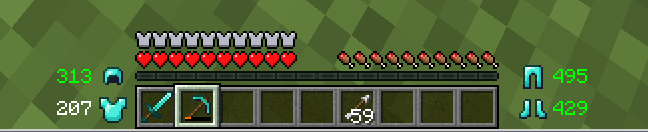
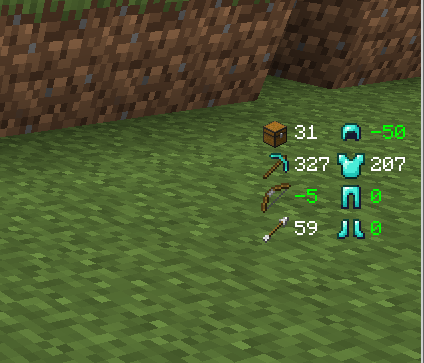
About this Mod
Mod description
This is another mod that shows your item durabilities as I couldn't find one that had everything I wanted.
Differences to other similar mods are:
Show item durability numbers in color (green/white/yellow/red) depending on items state
Items that are at almost 100% show damage, not durability. For example, your diamond pick that was used 5 times will show -5, not 1556. Great when you're using the mending enchantment to fix your stuff and don't know the exact number you want to reach
Also show number of empty inventory slots; know at a glance if you can continue mining or should return to your chest
Shows the amount of time for your buffs to run out so you don't have to press E to check whether that water breathing potion lasts for another minute (can be turned off in options)
Play a warning sound when your item is about to break; stop losing your Efficiency V pick to not looking at the GUI. The warning will play when your item is at less than 10% AND less than 100 - since 1.4, these values can be configured.
Set your window title to "
Durability Viewer was the first mod I ever made, and the fact that 61352151511 made the source code for his Durability Show (https://minecraft.curseforge.com/projects/durability-show) available on GitHub helped a lot. Thank you very much!
Some screenshots:
Configuration
All versions are configurable, but the way to configure them depends on the version and mod loader you're using.
Fabric with ModMenu: Use the cogwheel icon that ModMenu shows when you select the mod.
If you want to replace the sound, open the .jar file in a zip utility (7zip, winzip, winrar, ...). and replace the assets/durabilityviewer/sounds/tool_breaking.ogg file with your own. Or, remove that file from the jar to get rid of the sound forever (or at least until you redownload the jar file).
To make sure the mod doesn't slow down your minecraft, it has been optimized using jprofiler (https://www.ej-technologies.com/products/jprofiler/overview.html).
Available Versions
How to Install Durability Viewer Updated on Your Client
Install the Mod Loader Locally
Install fabric for your local Minecraft version.
Download the Matching File
Choose the Durability Viewer Updated file for fabric and Minecraft 26.3.
Install Mod
Place the .jar file in your local .minecraft/mods folder and restart Minecraft. No server-side installation is required.
Compatibility
Mod Loaders
Minecraft Versions
26.3, 26.2, 26.1.2 (+17 more)
Server-side
✗ UnsupportedRecommended RAM
4 GB(min. 3 GB)Frequently Asked Questions
Does Durability Viewer Updated need to be installed on the Minecraft server?
No. Modrinth marks Durability Viewer Updated as unsupported on the server side. Install it only in your local Minecraft mods folder. Your server can remain unchanged unless the mod page lists an additional dependency.
Which version and loader does Durability Viewer Updated require?
Use a file for fabric, forge, neoforge, quilt and your exact Minecraft version. Supported versions include 26.3, 26.2, 26.1.2. Files for different loaders are not interchangeable.
Durability Viewer Updated is not working – what should I check?
First check the Minecraft version, loader version and required dependencies. Put the .jar file in your local .minecraft/mods folder and remove older duplicates. Because this mod is client-side, adding server RAM will not fix it.
Similar Mods



![[TaCZ] Timeless and Classics Zero](https://cdn.modrinth.com/data/SzzJttH8/fd27766d2bb8390d284696b1dbd358f87e081439_96.webp)


Minecraft Server for Your Group
Durability Viewer Updated stays on your client. Host a compatible world for your group.