
Dynamic Crosshair
A mod that hides or changes the crosshair dependent on context
Screenshots
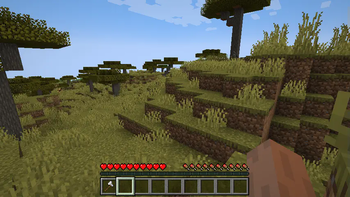
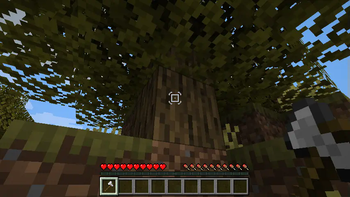
About this Mod
Dynamic Crosshair is a Minecraft mod for the Fabric & (Neo)Forge launchers.
It hides or changes the crosshair dependent on context.
NOTE: With version 8, the mod has been substantially rewritten. Configs should be migrated automatically, but please double-check whether any of your settings have been lost if updating from an older version!
Features
- Hide the crosshair when not looking at anything.
- Hide or show it depending on what is being looked at.
- Hide or show it depending on the currently equipped item.
- Change the crosshair style for various situations.
- Highly configurable.
Dependencies
This mod has been written for Minecraft >= 1.18.2.
Fabric version
- requires Fabric API
- from version 6 upwards, there is an optional dependency on YetAnotherConfigLib for an ingame configuration screen
- versions up to 5.5 require ClothConfig
- not required: Mod Menu for ingame configuration screen
(Neo)Forge version
- from version 6 upwards, there is an optional dependency on YetAnotherConfigLib for an ingame configuration screen
- versions up to 5.5 require ClothConfig
Mod Compatibility
This mod is very strongly coupled to vanilla Minecraft and has to hardcode a lot of interaction rules.
Thus, playing on a non-vanilla world will make the advanced features (context-dependent style) unreliable.
If you play with content mods, I recommend also installing Dynamic Crosshair Compat.
If you like dynamic UI elements, also check out my other mod Auto HUD that extends dynamic behaviour to most of the HUD.
DynamicCrosshair is currently not compatible with Exordium (set its enabledGui setting to false to use its other features) and can have issues with Immediately Fast.
Available Versions
How to Install Dynamic Crosshair on Your Client
Install the Mod Loader Locally
Install fabric for your local Minecraft version.
Download the Matching File
Choose the Dynamic Crosshair file for fabric and Minecraft 26.3.
Install Mod
Place the .jar file in your local .minecraft/mods folder and restart Minecraft. No server-side installation is required.
Compatibility
Mod Loaders
Minecraft Versions
26.3, 26.2, 26.1.2 (+29 more)
Server-side
✗ UnsupportedRecommended RAM
4 GB(min. 3 GB)Frequently Asked Questions
Does Dynamic Crosshair need to be installed on the Minecraft server?
No. Modrinth marks Dynamic Crosshair as unsupported on the server side. Install it only in your local Minecraft mods folder. Your server can remain unchanged unless the mod page lists an additional dependency.
Which version and loader does Dynamic Crosshair require?
Use a file for fabric, forge, neoforge and your exact Minecraft version. Supported versions include 26.3, 26.2, 26.1.2. Files for different loaders are not interchangeable.
Dynamic Crosshair is not working – what should I check?
First check the Minecraft version, loader version and required dependencies. Put the .jar file in your local .minecraft/mods folder and remove older duplicates. Because this mod is client-side, adding server RAM will not fix it.
Similar Mods




![[ETF] Entity Texture Features](https://cdn.modrinth.com/data/BVzZfTc1/af683d206d50b05258d865b0d6e4aa2f2cee12f2_96.webp)

Minecraft Server for Your Group
Dynamic Crosshair stays on your client. Host a compatible world for your group.