
Easy NPC
Create easily NPCs with dialogs for your world or for your mods.
Screenshots
About this Mod
🗣 Easy NPC (Bundle)










Easy NPC provides a simplified system for creating custom NPCs with dialogs, trading,
and interactions for map makers, RPGs, adventure servers, modpacks, and other mods.
This project is the Easy NPC Bundle, a launcher convenience package that installs the
required Easy NPC modules automatically.
This bundle does not contain the Easy NPC modules themselves.
📦 Installation Overview
Easy NPC is split into multiple modules.
The bundle exists to simplify installation via launchers that support automatic dependency
resolution.
Option A: Launcher install (recommended)
- Install Easy NPC Bundle
- Your launcher will automatically install the required modules:
- Easy NPC Core
- Easy NPC Config UI (configuration tools and required networking)
Option B: Manual install or copied modpacks
If you install mods manually or copy a modpack between instances, make sure the required modules are
present:
- Easy NPC Core
- Easy NPC Config UI
Tip: When sharing or copying a modpack, copy the full mods/ folder to ensure all required jars are
included.
Introduction & Overview Video (English)
✨ Features
- Easy NPCs with dialogs, trading, and interactions
- Simple setup for map makers, servers, and RPG environments
- Configurable actions with debug options
- Trading support with configurable offers and conditions
- Skin configuration with player name and URL support
- Designed for both server and client environments
- API support and integration for other mods
📦 Mod Integration
Armourer's Workshop
Basic integration for Armourer's Workshop to use skins from the library.
Epic Fight Mod
Built in support for Epic Fight is included since Easy NPC 6.4.x.
No additional integration mod is required.
[Immersive Melodies][immersive-melodies]
Basic integration for Immersive Melodies to use music instruments.
Usage
Spawn an NPC using the corresponding spawn egg or via the summon command.
Use the predefined /easy_npc commands or the NPC config wand to open a graphical user interface.
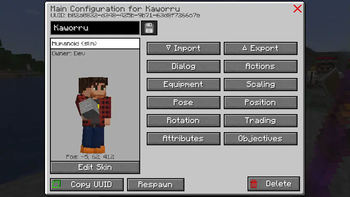
The GUI allows you to configure dialogs, trading options, skins, actions, and other NPC related
settings directly in game.
Most interactions and adjustments can be done directly in game without editing files or restarting
the server.
⬆️ Upgrading
Please make sure to check the upgrade guide before upgrading/updating to a new
version.
ℹ️ Why there is no jar-in-jar bundle anymore
Older versions used a jar-in-jar setup to bundle multiple Easy NPC modules into a single file.
This approach caused several technical issues:
- Duplicate mod IDs when modules were installed separately
- Class loading conflicts and ambiguous mod sources
- Incompatibilities when only the Easy NPC Core was required as a dependency
- Increased maintenance and support complexity
Modern launchers already provide dependency resolution.
Using this mechanism results in a cleaner, more predictable setup and allows Easy NPC modules to be
updated independently.
ℹ️ More Information
Please check the wiki for additional information.
🐛 Report Issues, Bugs, Crashes or Feature Requests
Please report issues and feature requests over the issues link. I'm happy to help you.
🫶 Support me
If you enjoy using my creations, consider supporting my development! ☕️
Donations via Ko-fi are immensely helpful,
but not required (my mods are free and open-source!).
Every bit helps me keep creating mods in my free time, covering software, services, hardware costs
and some extra slice of pizza or additional Spezi.
⚖️ License
The MIT LICENSE applies only to the code in this repository.
Images, models and other assets are explicitly excluded.
Available Versions
How to Install Easy NPC on Your Server
Order Server
Order a Minecraft Java server with at least 3 GB RAM (4 GB recommended).
Set fabric Loader
In the panel under "Egg", select the fabric loader and matching Minecraft version (26.3).
Install Mod
Open the mod browser in the dashboard and search for "Easy NPC". Click "Install" – done! Alternatively, upload the .jar via SFTP to the /mods folder.
Compatibility
Mod Loaders
Minecraft Versions
26.3, 26.2, 26.1.2 (+19 more)
Server-side
✓ RequiredRecommended RAM
4 GB(min. 3 GB)Frequently Asked Questions
Easy NPC server crashes on startup – what to do?
Most common cause: wrong fabric version or insufficient RAM. Check the server log (latest.log) for "OutOfMemoryError" or "Mixin" errors. With Mado Hosting: ensure at least 3 GB RAM is allocated and the loader matches the mod version (26.3). You can switch loaders with one click in the panel.
Is Easy NPC compatible with fabric and forge and neoforge and quilt?
Easy NPC officially supports fabric, forge, neoforge, quilt for Minecraft 26.3, 26.2, 26.1.2. Note: Forge and Fabric mods are NOT cross-compatible – pick one loader and stick with it. The Mado dashboard automatically detects incompatible loader combinations.
Server lagging with Easy NPC – how to optimize performance?
Recommended RAM: 4 GB (per 8 players). Use /spark profiler to check if Easy NPC consumes the most tick time. Common fixes: reduce server view-distance to 8-10, install "performant" or "starlight" as supplementary mods on Forge. With Mado Hosting, your server runs on NVMe SSDs with dedicated CPU cores for minimal latency.
Similar Mods




Rent Modded Server
Install Easy NPC with just one click on your server.