
Elytra Optimizations
Optimizes Elytra's janky math code
Screenshots
About this Mod
KNOWN ISSUE: DOESN'T WORK ON 1.21.2+
I'm currently trying to get a fix for that.
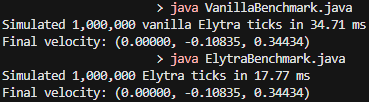
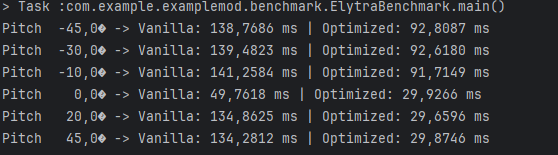
Optimizes Elytra's janky math code by pre-calculating some variables and other stuff. It gains roughly 25-35% faster compute timing per tick while still maintaining vanilla parity (should be even better on lower-end hardware!).
Performance:
Every ~millionth tick of nonstop flying with the Elytra (equivalent to almost 14 hours) Minecraft computes ±300 FPS more (not that impressive but still something!). Go to gallery for a more in-depth explanation.
Dependencies:
- Fabric loader installer (version 0.16.14+) - https://fabricmc.net/use/installer/
- Fabric API (any version that supports Minecraft version 1.21.1+) - https://modrinth.com/mod/fabric-api
Credits:
- sebastian - old icon and Neoforge port
- repository for Neoforge https://github.com/BaboboiPR/elytra-optimization-neoforged
Compatibility:
Should work with every other mod.
Feel free to report any bug via my discord! - @qkba
Available Versions
How to Install Elytra Optimizations on Your Client
Install the Mod Loader Locally
Install fabric for your local Minecraft version.
Download the Matching File
Choose the Elytra Optimizations file for fabric and Minecraft 1.21.8.
Install Mod
Place the .jar file in your local .minecraft/mods folder and restart Minecraft. No server-side installation is required.
Compatibility
Mod Loaders
Minecraft Versions
1.21.8, 1.21.7, 1.21.6 (+6 more)
Server-side
✗ UnsupportedRecommended RAM
4 GB(min. 3 GB)Frequently Asked Questions
Does Elytra Optimizations need to be installed on the Minecraft server?
No. Modrinth marks Elytra Optimizations as unsupported on the server side. Install it only in your local Minecraft mods folder. Your server can remain unchanged unless the mod page lists an additional dependency.
Which version and loader does Elytra Optimizations require?
Use a file for fabric, neoforge, quilt and your exact Minecraft version. Supported versions include 1.21.8, 1.21.7, 1.21.6. Files for different loaders are not interchangeable.
Elytra Optimizations is not working – what should I check?
First check the Minecraft version, loader version and required dependencies. Put the .jar file in your local .minecraft/mods folder and remove older duplicates. Because this mod is client-side, adding server RAM will not fix it.
Similar Mods






Minecraft Server for Your Group
Elytra Optimizations stays on your client. Host a compatible world for your group.