
Modrinth · Fabric, Forge
Enchanting System Overhaul on your Minecraft server
Enchanting System Overhaul runs on Minecraft servers with Fabric or Forge. Order your server, set the loader in the panel and install the mod with one click in the mod browser.
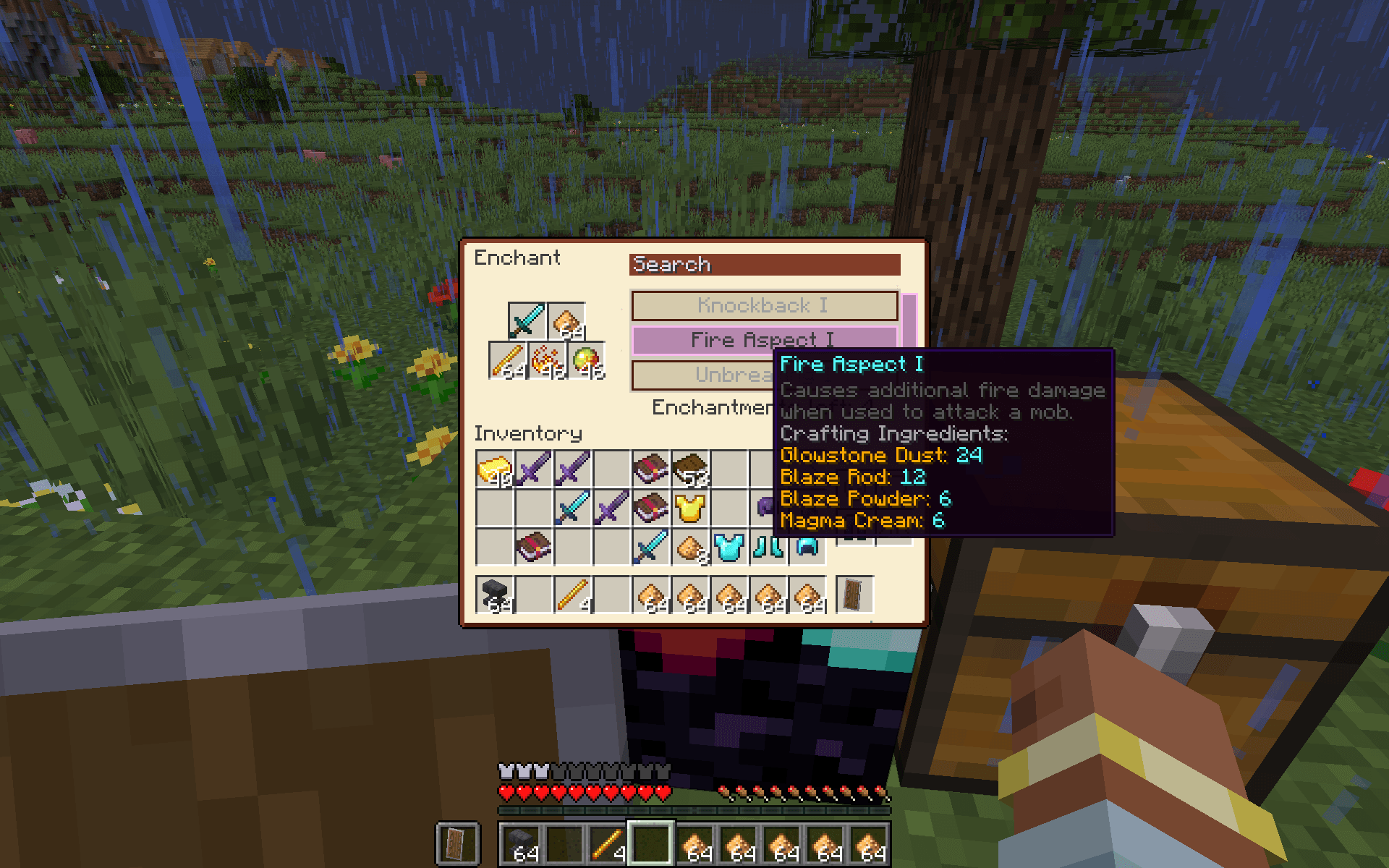
Changes the way items are enchanted to give players more control and reduce impact of RNG
- Downloads
- 67.1K
- Author
- CmdrJane
- Loader
- Fabric, Forge
- Minecraft
- 1.19.2 – 1.20.4
- Updated
- –
Screenshots
What Enchanting System Overhaul looks like


Images: Enchanting System Overhaul on Modrinth, published by the project team.
Setup
Install Enchanting System Overhaul on your server
The server and players need the same loader and Minecraft version. Back up the world before adding or updating mods.
- 01
Configure
4 GB of RAM is preselected. You choose the term and add-ons and pay by credit card or PayPal.
- 02
Set the loader
In the panel, set the server software to Fabric or Forge and choose the matching Minecraft version, for example 1.20.4.
- 03
Install the mod
Search the mod browser for “Enchanting System Overhaul” and install the release for your loader. Alternatively, upload the .jar to the mods folder via SFTP. Required dependencies are listed on the project page.
- 04
Connect
Every player installs the same Enchanting System Overhaul release locally and connects using the server address from the panel.
- On the server
- Required
- On the client
- Required
- Loader
- Fabric, Forge
- Minecraft
- 1.20.4, 1.20.1, 1.19.2
- License
- MIT License
The panel
Install mods, find errors.
Real screenshots from the Mado panel. Both come with every Minecraft server.
Mod browser
Modrinth and CurseForge, right in the panel.
The browser filters by your Minecraft version. Install mods with one click, without uploading .jar files.

AI crash analysis
When a mod crashes, the analyzer reads the log.
Mods often fail on a wrong loader version, Java version or missing dependency. The analyzer names a likely cause and suggests a fix.

Releases
Published releases
Pick the file that matches your server’s loader and Minecraft version. The server and players need the same release.
Enchanting System Overhaul · Modrinth- Enchanting System Overhaul 1.2.2June 23, 2024Minecraft 1.20.4 · Fabric
- Enchanting System Overhaul 1.2.2June 23, 2024Minecraft 1.20.1 · Fabric
- Enchanting System Overhaul 1.2.2June 23, 2024Minecraft 1.20.1 · Forge
- Enchanting System Overhaul 1.2.2June 23, 2024Minecraft 1.19.2 · Fabric
- Enchanting System Overhaul 1.2.2June 23, 2024Minecraft 1.19.2 · Forge
Original description by the project author
Enchanting System Overhaul(ESO)
Changes the way items are enchanted to give players more control and reduce impact of RNG
Required both on client and server. Fabric version depends on Fabric API
Forge version does NOT require any additional dependencies
Project wiki is here.
You can support me on ko-fi now

Features
- XP costs are eliminated by default(recipes can be configured to use xp in versions 1.1.1 and later), instead you will have to use wide array of items provided by vanilla game
- Enchanting system now is discovery based. You need to obtain enchanted books first and right click them to learn new enchantments(As of version 1.0.6 this can be disabled in config)
- Once enchantment learned you can enchant items and books with it
- Enchantments applied to items can be leveled up at enchanting table at any time
- Optionally enchantments leveling can be enabled which will require you to obtain books with higher enchantments levels to be able to upgrade to them
- You can apply as many enchantments to item as configuration allows at any time. That means you don't need to fully enchant your item in one go
- Optionally curse amplification feature can be enabled to allow for intentional curse application to items. Curses will increase enchantments limit per item
- Item enchanting and combining through anvil has been re-enabled as of version 1.2.0
- Enchantment recipes are data driven and can be customized through data-packs at any time
- Materials override feature allows to customize enchantability of materials or individual items
Enchanting System Overhaul server crashes on startup – what to do?
Common causes: the loader or Minecraft version does not match the mod file, a dependency is missing, or RAM is too low. Check the log (latest.log) for “OutOfMemoryError”, “Mixin” or missing mods. At Mado, the AI crash analysis reads the log and suggests a cause. You can change the loader and version in the panel.
Which loader does Enchanting System Overhaul run on?
According to Modrinth, Enchanting System Overhaul supports Fabric, Forge for Minecraft 1.20.4, 1.20.1, 1.19.2. Forge and Fabric files are not interchangeable: pick one loader for the server and clients.
How much RAM does a server with Enchanting System Overhaul need?
As guidance, 3–4 GB for a server with this mod. This is an estimate, not a measured minimum. More mods, many players and long view distances need more. The spark profiler shows whether a mod is costing tick time.
Similar mods
Popular mods in the same category
 Server-ready

Xaero's Minimap
by thexaero
Displays a map of the nearby world terrain, players, mobs, entities in the corner of your screen. Lets you create waypoints which help you find the locations you've marked.
 Server-ready

Xaero's World Map
by thexaero
Adds a full screen world map which shows you what you have explored in the world. Works great together with Xaero's Minimap.
 Client only

Not Enough Animations
by tr7zw
Bringing first-person animations to the third-person
 Client only

3D Skin Layers
by tr7zw
Render the player skin layer in 3d!
Ready for your server with Enchanting System Overhaul?
4 GB of RAM from €8.00 per month. 35% off your first month with MADO35.