
Entity Culling Unofficial
Backport of Entity Culling (1.8 version, under MIT) to 1.7.10.
Screenshots

About this Mod
What is this?
This is a port of the 1.8 version of the Entity Culling mod (licensed under MIT, as seen here or backup) to 1.7.10.
See the original mod (1.8+) here.
What does this do?
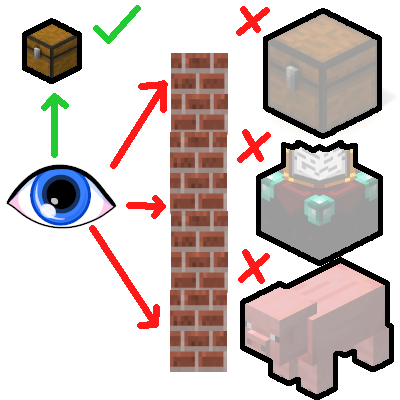
This mod improves performance by using asynchronous calculations to determine obstructed entities and tile entities, in order to prevent them from rendering. What this means in practice is that entities and tiles that you cannot see, will not waste precious FPS by being rendered regardless.
The performance improvements are largest and most noticeable if you're running a heavily modded pack and have a performance-heavy base with lots of machines, decorations, mobs, and so forth.
F. A. Q
- Will this break with (insert optimization mod here)?
No, it will not. I have tested it to work correctly with most widespread optimization mods out there. On the off-chance there is an issue, it should be reported.
- Will this break with (insert content mod here)?
No, it will not, unless the mod's tileentities set their bounding boxes improperly. In that case, all you have to do is blacklist that mod's tileentities from this mod's configuration file.
- Is there any downside to this?
No, except for an extremely small, barely noticeable RAM usage increase.
- Will you port this to (insert any other version)?
It would be more wise to ask the original mod's author this question.
Please also make sure to read the F.A.Q over at the original mod page.
Available Versions
How to Install Entity Culling Unofficial on Your Client
Install the Mod Loader Locally
Install forge for your local Minecraft version.
Download the Matching File
Choose the Entity Culling Unofficial file for forge and Minecraft 1.7.10.
Install Mod
Place the .jar file in your local .minecraft/mods folder and restart Minecraft. No server-side installation is required.
Compatibility
Mod Loaders
Minecraft Versions
1.7.10
Server-side
✗ UnsupportedRecommended RAM
4 GB(min. 3 GB)Frequently Asked Questions
Does Entity Culling Unofficial need to be installed on the Minecraft server?
No. Modrinth marks Entity Culling Unofficial as unsupported on the server side. Install it only in your local Minecraft mods folder. Your server can remain unchanged unless the mod page lists an additional dependency.
Which version and loader does Entity Culling Unofficial require?
Use a file for forge and your exact Minecraft version. Supported versions include 1.7.10. Files for different loaders are not interchangeable.
Entity Culling Unofficial is not working – what should I check?
First check the Minecraft version, loader version and required dependencies. Put the .jar file in your local .minecraft/mods folder and remove older duplicates. Because this mod is client-side, adding server RAM will not fix it.
Similar Mods






Minecraft Server for Your Group
Entity Culling Unofficial stays on your client. Host a compatible world for your group.