
Fcitx5 Enhancer
A simple mod that enhances Fcitx5 users' experience.
Screenshots

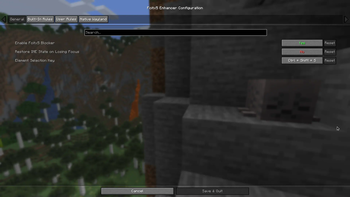
About this Mod
Fcitx5-Enhancer
This is a mod made for Minecraft, which provides compatibility with Fcitx5, and makes your life easier.
The Problem
When using IME in Minecraft, pressing a key that is also a game hotkey (e.g. Tab, Enter) causes the key event to be
handled by both the input method and the game.
And then you'll be interrupted. That's crazy. So I wrote this mod, in order to deal with this disrupting problem.
Extra Features
We provides a highly configurable IMBlocker, with a visual element selector.
Besides, we added IME support for native Wayland environment. (Only for 1.20.x and 1.21.x)
Requirements
Fabric Loader and a JVM shipped with Unsafe (for 1.20 and 1.20.1) are required to run this mod.
Cloth Config is required too. To access the config screen, you need
to install Mod Menu as well.
Notice
This mod relies on native libraries to implement its functionalities.
And the built-in libraries were compiled for Linux x86_64 (glibc 2.31, from Debian 11).
If you are using a different architecture (e.g. aarch64) or an incompatible system, you must compile them yourself.
Follow the instructions on GitHub to get started.
License
This project is licensed under MIT License.
Available Versions
How to Install Fcitx5 Enhancer on Your Client
Install the Mod Loader Locally
Install fabric for your local Minecraft version.
Download the Matching File
Choose the Fcitx5 Enhancer file for fabric and Minecraft 26.3.
Install Mod
Place the .jar file in your local .minecraft/mods folder and restart Minecraft. No server-side installation is required.
Compatibility
Mod Loaders
Minecraft Versions
26.3, 26.2, 26.1.2 (+23 more)
Server-side
✗ UnsupportedRecommended RAM
4 GB(min. 3 GB)Frequently Asked Questions
Does Fcitx5 Enhancer need to be installed on the Minecraft server?
No. Modrinth marks Fcitx5 Enhancer as unsupported on the server side. Install it only in your local Minecraft mods folder. Your server can remain unchanged unless the mod page lists an additional dependency.
Which version and loader does Fcitx5 Enhancer require?
Use a file for fabric and your exact Minecraft version. Supported versions include 26.3, 26.2, 26.1.2. Files for different loaders are not interchangeable.
Fcitx5 Enhancer is not working – what should I check?
First check the Minecraft version, loader version and required dependencies. Put the .jar file in your local .minecraft/mods folder and remove older duplicates. Because this mod is client-side, adding server RAM will not fix it.
Similar Mods






Minecraft Server for Your Group
Fcitx5 Enhancer stays on your client. Host a compatible world for your group.