
flaming(火焰熊熊)
Repurpose some wood products and similar items that cannot be used as fuel in the original version, and add new fuels and burning durations to the available item tags
Screenshots
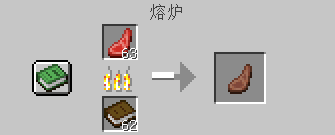
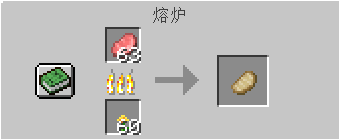
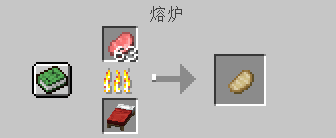
About this Mod
Preface:
In the original game, the fuel structure is too limited: wood/carpet/coal/lava
And those "little tricks" of Mojang:
For example, items like beds, which are synthesized using fuel,cannot even burn!
Therefore, it takes up a lot of space in survival, and it feels wasteful to discard it.
It's like chicken ribs - tasteless to eat, but a pity to throw away.
Now, this module can help you solve this problem without wasting anything!
Introduction:
A simple mod that re-enables some wood products and similar wood-based items that cannot be used as fuel in the vanilla game to become fuel again.
Note: (Must read before use!!!)
The Fabric side also requires the installation of the Fabric API (please place the Fabric API in the directory: game instance name/mods);
(This module adopts a semi-passive update approach.) I am a high school student, and with my busy schoolwork, I may decide to update at any time.
FAQ
Q: What should I do if there are BUGs, crashes, or no effects after adding a mod?
A: Please first confirm whether your operating mode (Forge or Fabric) is correct. If the issue persists after confirmation, please inquire in the comment section.
Available Versions
How to Install flaming(火焰熊熊) on Your Server
Order Server
Order a Minecraft Java server with at least 3 GB RAM (4 GB recommended).
Set fabric Loader
In the panel under "Egg", select the fabric loader and matching Minecraft version (1.20.4).
Install Mod
Open the mod browser in the dashboard and search for "flaming(火焰熊熊)". Click "Install" – done! Alternatively, upload the .jar via SFTP to the /mods folder.
Compatibility
Mod Loaders
Minecraft Versions
1.20.4, 1.20.3, 1.20.2 (+10 more)
Server-side
~ OptionalRecommended RAM
4 GB(min. 3 GB)Frequently Asked Questions
flaming(火焰熊熊) server crashes on startup – what to do?
Most common cause: wrong fabric version or insufficient RAM. Check the server log (latest.log) for "OutOfMemoryError" or "Mixin" errors. With Mado Hosting: ensure at least 3 GB RAM is allocated and the loader matches the mod version (1.20.4). You can switch loaders with one click in the panel.
Is flaming(火焰熊熊) compatible with fabric and forge and neoforge?
flaming(火焰熊熊) officially supports fabric, forge, neoforge for Minecraft 1.20.4, 1.20.3, 1.20.2. Note: Forge and Fabric mods are NOT cross-compatible – pick one loader and stick with it. The Mado dashboard automatically detects incompatible loader combinations.
Server lagging with flaming(火焰熊熊) – how to optimize performance?
Recommended RAM: 4 GB (per 8 players). Use /spark profiler to check if flaming(火焰熊熊) consumes the most tick time. Common fixes: reduce server view-distance to 8-10, install "performant" or "starlight" as supplementary mods on Forge. With Mado Hosting, your server runs on NVMe SSDs with dedicated CPU cores for minimal latency.
Similar Mods






Rent Modded Server
Install flaming(火焰熊熊) with just one click on your server.