
Freelook++
Enhanced freelook mod with improved camera controls and features for better gameplay experience.
Screenshots
About this Mod
Freelook++ - Enhanced Camera Controls
Enhanced freelook mod with improved camera controls and features for better gameplay experience.
Features
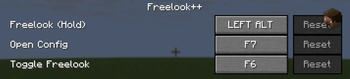
- Hold to Freelook: Hold Left Alt to temporarily enable freelook mode
- Toggle Freelook: Press F6 to toggle freelook mode on/off
- Perspective Toggle Control: Configure what happens when you try to change perspective (F5) while freelook is toggled
- Configurable Controls: Customize key bindings in Options > Controls > Freelook++ category
- Smooth Camera Movement: Enhanced camera controls with configurable sensitivity
- Client-Side Only: No server-side dependencies required - works on any server!
- Lightweight: Minimal performance impact on your game
Controls
| Key | Action |
|---|---|
| Left Alt (Hold) | Temporary freelook mode |
| F6 | Toggle freelook mode |
| F7 | Open configuration screen |
Keys can be customized in the Controls menu!
Configuration Options
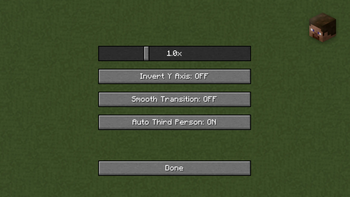
- Mouse Sensitivity: Adjust mouse sensitivity for freelook (0.1x to 3.0x)
- Invert Y Axis: Invert vertical mouse movement
- Smooth Transition: Enable smooth camera transitions
- Auto Third Person: Automatically switch to third person when freelook is enabled
- Perspective Toggle Behavior: Choose what happens when you press F5 while freelook is toggled:
- Do Nothing: Ignore perspective toggle (default)
- Deactivate Freelook: Turn off freelook when perspective is toggled
Access the configuration screen by pressing F7 or through the Controls menu!
Note: Perspective toggle behavior only affects toggled freelook (F6), not held freelook (Left Alt).
Perfect for:
- Building: Look around while placing blocks
- Exploring: Check your surroundings safely
- PvP: Maintain awareness while moving
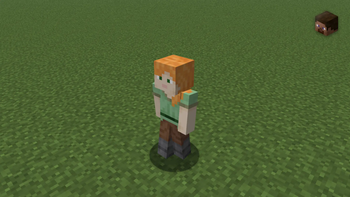
- Screenshots: Get the perfect angle
Installation
- Install Fabric Loader
- Download Fabric API
- Download Freelook++ from this page
- Place both mod files in your
.minecraft/modsfolder - Launch Minecraft with the Fabric profile
Requirements
- Minecraft: Latest supported versions (updated regularly)
- Fabric Loader: Latest compatible version
- Fabric API: Required
- Java: 21+
- Environment: Client-side only
- Server Compatibility: Works on all servers
Support
- Bug Reports: GitHub Issues
- Source Code: GitHub Repository
License
Open source under MIT License.
Enjoy enhanced camera controls with Freelook++!
Available Versions
How to Install Freelook++ on Your Client
Install the Mod Loader Locally
Install fabric for your local Minecraft version.
Download the Matching File
Choose the Freelook++ file for fabric and Minecraft 1.21.10.
Install Mod
Place the .jar file in your local .minecraft/mods folder and restart Minecraft. No server-side installation is required.
Compatibility
Mod Loaders
Minecraft Versions
1.21.10, 1.21.10-rc1, 1.21.9 (+2 more)
Server-side
✗ UnsupportedRecommended RAM
4 GB(min. 3 GB)Frequently Asked Questions
Does Freelook++ need to be installed on the Minecraft server?
No. Modrinth marks Freelook++ as unsupported on the server side. Install it only in your local Minecraft mods folder. Your server can remain unchanged unless the mod page lists an additional dependency.
Which version and loader does Freelook++ require?
Use a file for fabric and your exact Minecraft version. Supported versions include 1.21.10, 1.21.10-rc1, 1.21.9. Files for different loaders are not interchangeable.
Freelook++ is not working – what should I check?
First check the Minecraft version, loader version and required dependencies. Put the .jar file in your local .minecraft/mods folder and remove older duplicates. Because this mod is client-side, adding server RAM will not fix it.
Similar Mods






Minecraft Server for Your Group
Freelook++ stays on your client. Host a compatible world for your group.