GhostBlock
Gives you the ability to give yourself ghost block and other cool features CLIENT-SIDE
Screenshots

About this Mod
GhostBlock 2.0+
GhostBlock is a client-side ghost block and ghost item mod. It lets you create client-side only blocks, have ghost items and enter a fake creative mode that's let you build easily with ghost block without changing what the server actually gives you.
Features
Ghost Creative
Use:
/ghostblock creative
Ghost Creative lets you fly around from your camera and place/break client-side ghost blocks in fake creative mode while your real player stays where they actually are.
- Fake creative inventory and hotbar
- Creative-style reach
- Client-side block placing and breaking
- Pick block support
- Water/lava ghost placement
- Client-side ghost sign editing
- Your real player can still take normal damage/knockback
- Shows your real player at their actual server position
Ghost Items
Give yourself client-side ghost items:
/ghostblock give <item> <amount>
Example:
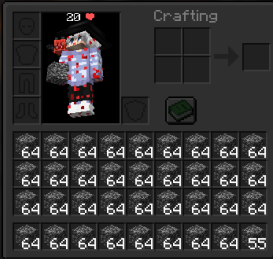
/ghostblock give bedrock 64
Clear only ghost inventory items while keeping your real items:
/ghostblock clearinv
Ghost Block Placing
Enable right-click ghost block placing:
/ghostblock place <block>
Example:
/ghostblock place dirt
Enable right-click ghost block replacing:
/ghostblock replace <block>
Example:
/ghostblock replace glass
Run the same command again to toggle it off.
Fake Survival
Use:
/ghostblock fakesurvival
This visually switches your client to survival mode, useful for placing blocks in adventure mode client-side.
Remove Ghost Blocks
Remove all ghost blocks and restore the original client-side blocks:
/ghostblock remove
or
/ghostblock clear
Settings
Commands:
/ghostblock setting ClickDisappear true/false
Controls whether right-clicking ghost blocks removes them.
/ghostblock setting PlaceOnYourself true/false
Controls whether ghost blocks can be placed inside your own player position.
Keybind
The ghost block keybind is still available.
Default key: P
Important Notice
GhostBlock is client-side. Ghost blocks and ghost items are local to your game and are not real server-side blocks/items.
Do not use this mod on servers where ghost blocks, ghost items, fake creative, or client-side building tools are not allowed. Some servers may consider this cheating or a disallowed modification. It is your responsibility to check the server rules before using it. You are responsible if you get banned.
This mod uses FastStats Analytics https://faststats.dev/info
Available Versions
How to Install GhostBlock on Your Client
Install the Mod Loader Locally
Install fabric for your local Minecraft version.
Download the Matching File
Choose the GhostBlock file for fabric and Minecraft 26.3.
Install Mod
Place the .jar file in your local .minecraft/mods folder and restart Minecraft. No server-side installation is required.
Compatibility
Mod Loaders
Minecraft Versions
26.3, 26.2, 26.1.2 (+26 more)
Server-side
✗ UnsupportedRecommended RAM
4 GB(min. 3 GB)Frequently Asked Questions
Does GhostBlock need to be installed on the Minecraft server?
No. Modrinth marks GhostBlock as unsupported on the server side. Install it only in your local Minecraft mods folder. Your server can remain unchanged unless the mod page lists an additional dependency.
Which version and loader does GhostBlock require?
Use a file for fabric and your exact Minecraft version. Supported versions include 26.3, 26.2, 26.1.2. Files for different loaders are not interchangeable.
GhostBlock is not working – what should I check?
First check the Minecraft version, loader version and required dependencies. Put the .jar file in your local .minecraft/mods folder and remove older duplicates. Because this mod is client-side, adding server RAM will not fix it.
Similar Mods






Minecraft Server for Your Group
GhostBlock stays on your client. Host a compatible world for your group.