
Helium Client
A Custom Client That Customizes Every Aspect Of The Game Whilst Improving Performance.
Screenshots


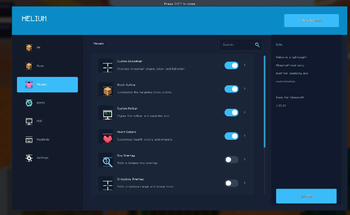

About this Mod
Welcome to Helium Client!
Helium client is a client based minecraft mod that allows you to customize the game in real time.
IMPORTANT NOTE:
ALL SETTINGS MUST BE TURNED ON VIA HELIUM CLIENT SETTINGS.

Summary:
Helium client optimizes the game with settings such as
- Adaptive Scaling
- Culling Behind Camera
- Throttle Particles
- Disable Map Rendering.
Helium client also lets players customize the game!
- Custom Block Outlines
- Complete Color Overhaul of UI / GUI
- Custom Inventory Hotbars.
And Much More!
You can see the Helium Settings by either
- Pressing Right Shift / The Selected Keybind
- Options -> Helium Settings

Tips
- Enable Optimizations!
- Visual Effects Increases FPS!
- Customize Your UI!
In helium client, You can use Profiles to share your Minecraft Settings OR By Using Others.
You can save a profile. Then go into the folder. Then send it to someone. They can import it by clicking "Import JSON" or "Import TXT" depending on what format it was exported on.

Texture Pack Editor / Resource Pack Editor

How it works.
- Create A Pack.
- Rename it to whatever you want.
- Search for any texture and edit it!
- You can import textures if you dont want to edit them with the ingame editor
- You can Change Keybinds for tools Via the Minecraft Keybinds menu.
- Save to pack, Then Apply Changes. Then click Done.
Thanks for Using Helium!
Available Versions
How to Install Helium Client on Your Client
Install the Mod Loader Locally
Install fabric for your local Minecraft version.
Download the Matching File
Choose the Helium Client file for fabric and Minecraft 26.1.2.
Install Mod
Place the .jar file in your local .minecraft/mods folder and restart Minecraft. No server-side installation is required.
Compatibility
Mod Loaders
Minecraft Versions
26.1.2, 1.21.11, 1.21.10
Server-side
✗ UnsupportedRecommended RAM
4 GB(min. 3 GB)Frequently Asked Questions
Does Helium Client need to be installed on the Minecraft server?
No. Modrinth marks Helium Client as unsupported on the server side. Install it only in your local Minecraft mods folder. Your server can remain unchanged unless the mod page lists an additional dependency.
Which version and loader does Helium Client require?
Use a file for fabric and your exact Minecraft version. Supported versions include 26.1.2, 1.21.11, 1.21.10. Files for different loaders are not interchangeable.
Helium Client is not working – what should I check?
First check the Minecraft version, loader version and required dependencies. Put the .jar file in your local .minecraft/mods folder and remove older duplicates. Because this mod is client-side, adding server RAM will not fix it.
Similar Mods






Minecraft Server for Your Group
Helium Client stays on your client. Host a compatible world for your group.