
Inv Tweaker
Inventory sorting and grouping mod, also has auto fill for the hotbar
Screenshots
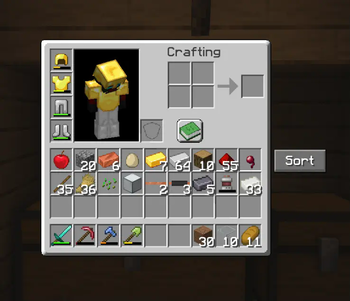
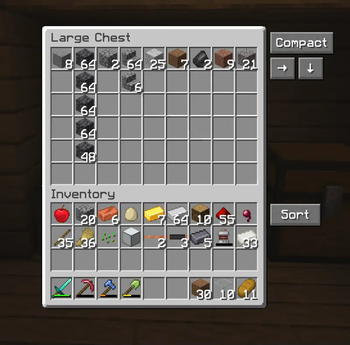



About this Mod
An inventory sorting mod trying to be a homage to the old original "Inventory Tweaks" mod.
The difference to some of the other sorting mods, this one does not only sort alphabetically, but also has the ability to sort in horizontal and vertical groups, making chests etc. look less cluttered and more tidy. This is what Inventory Tweaks did in the past and i haven't found a modern and updated sorting mod, that did exactly that, only alphabetical sorting.
Another feature is the automatic refilling of the hotbar. Inventory Tweaks had a feature, where when you finished a stack of food or a stack of blocks, it would take another stack from your inventory and put it in the last used slot slot in your hotbar, so that you can continue building, eating etc. without having to open your inventory or pressing middle mouse button. Really just quality of life things that bother me lol.
How to use:
Simply use the buttons next to the inventory, or use the key binds as explained below.
The arrows simply mean which way it's sorted, so the arrow pointing right means it's row grouped and the arrow pointing down means it's column grouped.
To sort the player inventory simply press R. To sort chests etc. press T. To cycle between compact sorting (alphabetical), Row Grouping and Column Grouping, simply press Z, or rebind the keys.
Hotbar auto refill can be enabled, or disabled, by pressing H.
The horizontal and vertical sorting works best when chests aren't too full with many different item types, otherwise it starts putting stuff where it doesn't seem logical. I'm trying to improve that. Compact sorting works quite well in all cases.
Works both in singleplayer and multiplayer. Also supports other mods, like Reinforced Chests.
Requires the Fabric API mod.
License & Use
May not be altered, changed or redistributed without permission.
Using and sharing it in mod packs is allowed.
Available Versions
How to Install Inv Tweaker on Your Client
Install the Mod Loader Locally
Install fabric for your local Minecraft version.
Download the Matching File
Choose the Inv Tweaker file for fabric and Minecraft 1.21.8.
Install Mod
Place the .jar file in your local .minecraft/mods folder and restart Minecraft. No server-side installation is required.
Compatibility
Mod Loaders
Minecraft Versions
1.21.8, 1.21.7, 1.21.6
Server-side
✗ UnsupportedRecommended RAM
4 GB(min. 3 GB)Frequently Asked Questions
Does Inv Tweaker need to be installed on the Minecraft server?
No. Modrinth marks Inv Tweaker as unsupported on the server side. Install it only in your local Minecraft mods folder. Your server can remain unchanged unless the mod page lists an additional dependency.
Which version and loader does Inv Tweaker require?
Use a file for fabric and your exact Minecraft version. Supported versions include 1.21.8, 1.21.7, 1.21.6. Files for different loaders are not interchangeable.
Inv Tweaker is not working – what should I check?
First check the Minecraft version, loader version and required dependencies. Put the .jar file in your local .minecraft/mods folder and remove older duplicates. Because this mod is client-side, adding server RAM will not fix it.
Similar Mods






Minecraft Server for Your Group
Inv Tweaker stays on your client. Host a compatible world for your group.