
lazyboost-render
A client-side optimization mod for Minecraft Fabric, offering weather, entity, sound, and HUD customization for better FPS and gameplay experience.
Screenshots
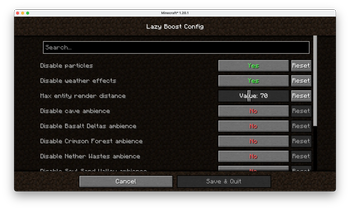

About this Mod
LazyBoost
LazyBoost is a Minecraft Fabric mod that boosts client rendering performance and provides many configurable visual and audio options for a smoother gameplay experience.
This mod requred modmenu, if not, you may not open the configure menu
Features
easier hand toggle
Use that toggle to easier toggle render hand.toggle gamma (brightness)
Easy to get more brightness, easy to take pictures.simple entity render
If the entity is out of config entity render distance and also in vanilla entity distance, the mod will use a red box to render it.Auto FPS Reduction
Automatically lowers FPS limit to 12 when Minecraft window is unfocused or minimized, saving system resources.ModMenu Integration
All options can be configured in-game via ModMenu or the config file.
Installation
- Download the latest release from Modrinth.
- Place the downloaded
.jarfile into your Minecraftmodsfolder. - Make sure you have installed Fabric Loader and Fabric API.
- (Optional) Install ModMenu for in-game configuration.
Configuration
- Press the LazyBoost key (configurable in Controls) to open the configuration GUI.
- You can also use ModMenu to access the config screen.
- All options are saved in the config file and take effect immediately.
License
Licensed under the Apache License 2.0. See LICENSE for details.
Available Versions
How to Install lazyboost-render on Your Client
Install the Mod Loader Locally
Install fabric for your local Minecraft version.
Download the Matching File
Choose the lazyboost-render file for fabric and Minecraft 1.21.11.
Install Mod
Place the .jar file in your local .minecraft/mods folder and restart Minecraft. No server-side installation is required.
Compatibility
Mod Loaders
Minecraft Versions
1.21.11, 1.21.10, 1.21.9 (+8 more)
Server-side
✗ UnsupportedRecommended RAM
4 GB(min. 3 GB)Frequently Asked Questions
Does lazyboost-render need to be installed on the Minecraft server?
No. Modrinth marks lazyboost-render as unsupported on the server side. Install it only in your local Minecraft mods folder. Your server can remain unchanged unless the mod page lists an additional dependency.
Which version and loader does lazyboost-render require?
Use a file for fabric, quilt and your exact Minecraft version. Supported versions include 1.21.11, 1.21.10, 1.21.9. Files for different loaders are not interchangeable.
lazyboost-render is not working – what should I check?
First check the Minecraft version, loader version and required dependencies. Put the .jar file in your local .minecraft/mods folder and remove older duplicates. Because this mod is client-side, adding server RAM will not fix it.
Similar Mods






Minecraft Server for Your Group
lazyboost-render stays on your client. Host a compatible world for your group.