Locator Heads
Show player heads on the locator bar and other usefull settings.
Screenshots





About this Mod



Locator Heads
is a client-side Minecraft mod that displays nearby players as heads on your XP bar, making it easy to track their location and direction at a glance. Customize colors, borders, filtering options, and add a compass overlay to enhance your multiplayer experience.



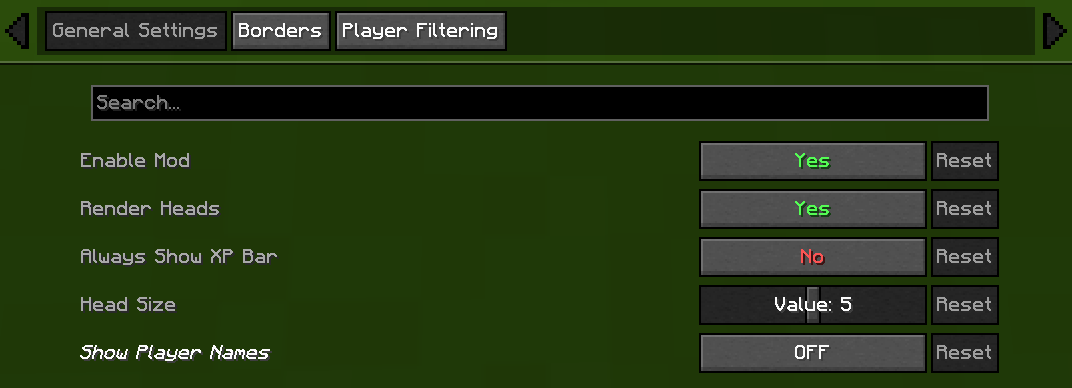
⚙️ General Settings
- Enable/Disable Mod
Chose weather or not mod is on or off. - Render Heads
Choose if you want heads to be rendered (can be used to only show names) - Always show XP bar
- Head Size
Change the size of the heads - Show Player Names
| Player Name Option | Description |
|---|---|
| Never | No names on the locator bar. (default) |
| Always | Names permanently visible above all player heads. |
| Looking At | Names appear only when you look within a 30° |
| Player List | Names show when the in-game player list is open. |

🧭 Compass
- Show Compass
Toggle the compass overlay on or off - Compass Colour
Customize the color of the compass direction letters using hex color picker - Compass Shadow
Toggle black outline around compass letters for better visibility

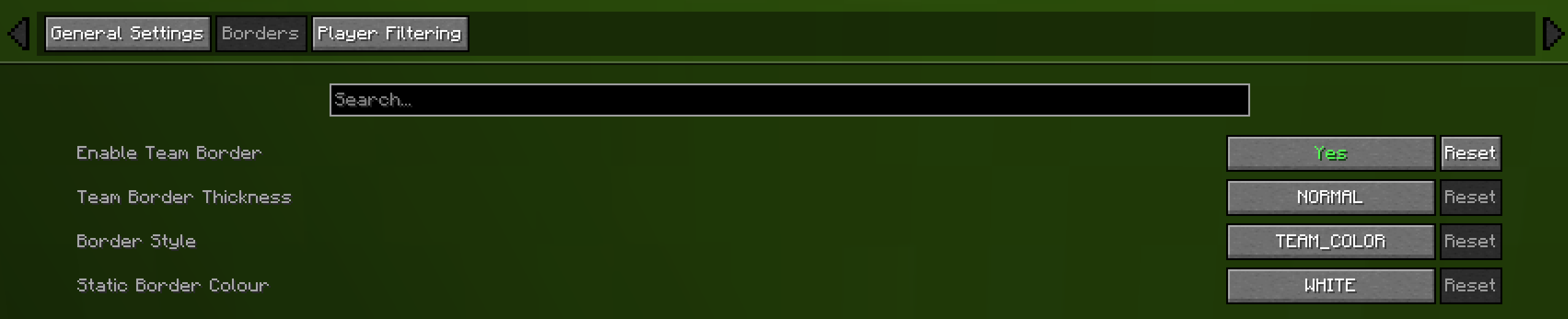
🎨 Borders
- Enable Border
If enabled the border is on - Border Thickness
How many pixels thick the border should be - Border Style
Can be eithere "TEAM_COLOUR" or "STATIC_COLOUR" - Static Border Colour
Choose what colour the static border will have

🎯 Advanced Player Filtering
choose who appear on your locator bar:
- All Players (default)
Shows everyone. - Include Only
Display only the players listed in your filter. - Exclude Only
Hide only the players listed, showing all others.
Filter Syntax
- Separate names by commas (
,), semicolons (;), colons (:), or periods (.).
Example:
Jeb_, Dinnerbone; LadyAgnes

🔗 Dependencies
Required
Optional (Recommended)

Compatibility
| Mod | Compatibility |
|---|---|
| Flashback | Automatically hides the locator bar and compass while viewing replays. |
| Gnetum | Integrates with Gnetum's Info Bar to prevent HUD overlap. |
👥 Credits
- Original Head Rendering Concept & Code — MCRcortex

🔧 Update Help


💡 Feature Requests
- Always show XP bar — TechPro424
- Static border — Starrider37
- Compass — xisumavoid
and Zedaph


Available Versions
How to Install Locator Heads on Your Client
Install the Mod Loader Locally
Install fabric for your local Minecraft version.
Download the Matching File
Choose the Locator Heads file for fabric and Minecraft 26.3.
Install Mod
Place the .jar file in your local .minecraft/mods folder and restart Minecraft. No server-side installation is required.
Compatibility
Mod Loaders
Minecraft Versions
26.3, 26.2, 26.1.2 (+7 more)
Server-side
✗ UnsupportedRecommended RAM
4 GB(min. 3 GB)Frequently Asked Questions
Does Locator Heads need to be installed on the Minecraft server?
No. Modrinth marks Locator Heads as unsupported on the server side. Install it only in your local Minecraft mods folder. Your server can remain unchanged unless the mod page lists an additional dependency.
Which version and loader does Locator Heads require?
Use a file for fabric and your exact Minecraft version. Supported versions include 26.3, 26.2, 26.1.2. Files for different loaders are not interchangeable.
Locator Heads is not working – what should I check?
First check the Minecraft version, loader version and required dependencies. Put the .jar file in your local .minecraft/mods folder and remove older duplicates. Because this mod is client-side, adding server RAM will not fix it.
Similar Mods






Minecraft Server for Your Group
Locator Heads stays on your client. Host a compatible world for your group.