
LOD Server Support
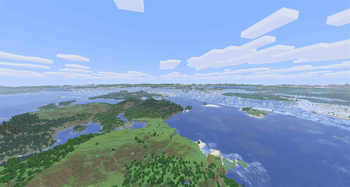
Voxy multiplayer support (unofficial). See fully rendered chunks and players thousands of blocks away in multiplayer.
Screenshots
About this Mod
LOD Server Support
Enables players with Voxy to see fully rendered terrain out to hundreds of chunks on multiplayer servers without needing to explore the world first. Also includes far player rendering so you can also see other players far beyond the vanilla render distance.
Try it live: join lod-server-support.modrinth.gg with Voxy and this mod installed. Supports Minecraft 26.2, 26.1, 1.21.11, and 1.21.1.
Compatibility
Clients use the Fabric mod on every version; on 26.2, 26.1, and 1.21.1 a NeoForge client works as well. Supported servers:
| Minecraft | Fabric | Paper / Purpur | Folia | NeoForge |
|---|---|---|---|---|
| 26.2 | ✅ | ✅ | ✅ | ✅ |
| 26.1 | ✅ | ✅ | ✅ | ✅ |
| 1.21.11 | ✅ | ✅ | ✅ | - |
| 1.21.10 | ✅ | ✅ | - | - |
| 1.21.1 | ✅ | ✅ | - | ✅ |
Folia support is experimental. NeoForge support is best-effort, with far player rendering available on 1.21.1 only.
Compatible with AntiXray, Moonrise, C2ME, ViaVersion/ViaBackwards, and most other mods including Create. Can be run alongside Distant Horizons on the same server to support DH clients and Voxy clients simultaneously.
Can populate Xaero's World/Mini Map based on the LOD data, enable this in client Sodium settings, click Apply, then reconnect.
LOD Server Support is backwards and forwards compatible from v0.4.0 through the current version. Server operators can freely update to take advantage of improvements without breaking clients on older versions, and clients can update without breaking compatibility with older servers.
On NeoForge (26.2 and 26.1) the tested client path is our Foxy fork (get it from the releases page, it carries the Windows natives fix that stock Foxy lacks), which loads the regular Fabric Voxy jar on NeoForge. Tested with Sodium 0.9.1 + Voxy 0.2.18-beta on 26.2 and Sodium 0.8.12 + Voxy 0.2.16-beta on 26.1.2, exact pairings in the Foxy README.
On NeoForge (1.21.1) use Roxy to load the Fabric Voxy jar. Tested working with Roxy 0.2.0, Voxy 0.2.16-beta (the 1.21.11 build), Sodium 0.8.12, and Forgified Fabric API 0.116.15. If distant Voxy chunks do not show up, turn off environmental fog in your video settings.
Voxy Server Side is the same mod. Voxy Server Side clients are compatible with LOD Server Support servers and vice versa.
Installation
Install LOD Server Support on both the server (LOD Server Support Fabric mod, Paper plugin, or NeoForge mod) and every client that wants these features. Without LOD Server Support on both the connecting client and on the server it will not function. Clients without LOD Server Support can still join normally.
Configuration
Config files are generated during first run at config/lss-server-config.yaml on Fabric and NeoForge or plugins/LodServerSupport/lss-server-config.yaml on Paper. Client settings are in config/lss-client-config.yaml. Settings are grouped by feature and documented inline, including units and restart/reconnect requirements.
Edit the YAML and run /lsslod reload on the server or /lss reload on the client.
Commands
Server (Fabric, NeoForge, and Paper)
/lsslod stats- Show per-player transfer statistics/lsslod diag- Show detailed diagnostics (config, bandwidth, queue depths)/lsslod reload- Reload server settings from YAML; settings that still need a restart are reported/lsslod store status- Show LOD store status (state, hit/miss counters, size)/lsslod store backfill start|stop|status- Control the background pre-warm walk (not on Paper)/lsslod help- List all commands
Client (Fabric and NeoForge)
/lss reload- Reload client settings from YAML; settings that still need a reconnect are reported/lss clearcache- Clear the local column cache, forcing all chunks to be re-requested from the server/lss reset- Wipe this worlds's LODs (local cache and Voxy's stored data) and re-stream them fresh/lss diag- Show client-side diagnostics (connection, throughput, scan progress, request budget)
Server Performance Tuning
Turn the LOD store on. Set enabled: true under storage.lod_store (requires a restart). It caches the preprocessed LOD data to disk for CPU savings, with the drawback of extra disk usage that can be comparable to the size of your world files.
On Fabric and NeoForge, when the LOD store is enabled a backfill task will populate it. Maximum CPU savings are only achieved after the store is populated. Check the progress of the task with /lsslod store backfill status. If your world is much larger than the area players commonly visit you can save on disk space by setting enabled: false under storage.lod_store.backfill. Paper populates the store as it serves terrain.
Use the bandwidth and generation limiters to limit CPU. LOD Server Support's CPU cost is essentially how many columns per second it serves plus how many chunks it generates, and these configs cap exactly that:
network.bandwidth.per_player_mib_per_second/network.bandwidth.global_mib_per_secondbound the chunk serve rate. They count uncompressed bytes on purpose so compression doesn't quietly raise the real ceiling. Actual network utilization depends on compression and the terrain.generation.concurrency.global/generation.concurrency.per_playerbound new chunk generation, by far the most expensive thing LOD Server Support can trigger. On a server exploring fresh terrain this dominates, and lowering it is the single biggest saving. Settingenabled: falseundergenerationstops new generation; existing jobs finish.storage.disk.max_concurrent_readsbounds how many LOD disk reads run at once, so LOD traffic can't monopolize disk I/O that vanilla chunk loading needs. The0auto default is right for most servers; lower it to1or2if gameplay chunk loading stutters while LODs stream, raise it if LOD loading feels slow on fast NVMe storage.
Disable LOD store resweep on Paper. Set resweep_interval_seconds: 0 under storage.lod_store. This reduces periodic checking, but on Paper it is possible to miss chunk updates so old LODs could be served.
Pre-generate the world. Obviously the best thing you can do for player experience is avoid chunk generation by pre-generating your map with a tool such as Chunky.
Redistribution
This mod is MIT-licensed, redistribution with attribution is welcome, and modpacks can reference the official Modrinth project directly. Per Modrinth's reupload policy: XANTHA via Voxy Server Side has the copyright holder's explicit permission to distribute this mod, and derivatives of it, on Modrinth.
Available Versions
How to Install LOD Server Support on Your Server
Order Server
Order a Minecraft Java server with at least 4 GB RAM (6 GB recommended).
Set fabric Loader
In the panel under "Egg", select the fabric loader and matching Minecraft version (26.2).
Install Mod
Open the mod browser in the dashboard and search for "LOD Server Support". Click "Install" – done! Alternatively, upload the .jar via SFTP to the /mods folder.
Compatibility
Mod Loaders
Minecraft Versions
26.2, 26.1.2, 26.1.1 (+6 more)
Server-side
~ OptionalRecommended RAM
6 GB(min. 4 GB)Frequently Asked Questions
LOD Server Support server crashes on startup – what to do?
Most common cause: wrong fabric version or insufficient RAM. Check the server log (latest.log) for "OutOfMemoryError" or "Mixin" errors. With Mado Hosting: ensure at least 4 GB RAM is allocated and the loader matches the mod version (26.2). You can switch loaders with one click in the panel.
Is LOD Server Support compatible with fabric and folia and neoforge and paper and purpur?
LOD Server Support officially supports fabric, folia, neoforge, paper, purpur for Minecraft 26.2, 26.1.2, 26.1.1. The Mado dashboard automatically detects incompatible loader combinations.
Server lagging with LOD Server Support – how to optimize performance?
Recommended RAM: 6 GB (per 5 players). Use /spark profiler to check if LOD Server Support consumes the most tick time. Common fixes: reduce server view-distance to 8-10, install "performant" or "starlight" as supplementary mods on Forge. With Mado Hosting, your server runs on NVMe SSDs with dedicated CPU cores for minimal latency.
Similar Mods




Rent Modded Server
Install LOD Server Support with just one click on your server.