
MCEF (Minecraft Chromium Embedded Framework)
MCEF (Minecraft Chromium Embedded Framework) is a mod and library for adding the Chromium web browser into Minecraft.
Screenshots
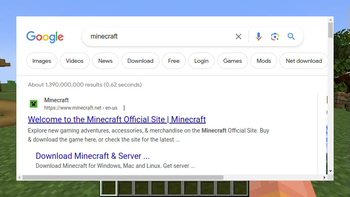
About this Mod
MCEF (Minecraft Chromium Embedded Framework)
MCEF is a mod and library for adding the Chromium web browser into Minecraft. This mod does not do anything useful by itself; it is a library for other mods to use the Chromium browser.
MCEF is based on java-cef (Java Chromium Embedded Framework), which is based on CEF (Chromium Embedded Framework), which is based on Chromium. It was originally created by montoyo. It was rewritten and currently maintained by the CinemaMod Group.
MCEF contains a downloader system for downloading the java-cef & CEF binaries required by the Chromium browser. This requires a connection to https://mcef-download.cinemamod.com.
Discussion: https://discord.gg/rNrh5kW8Ty
Current Chromium version: 116.0.5845.190
Supported Platforms
- Windows 10/11 (x86_64, arm64)*
- macOS 11 or greater (Intel, Apple Silicon)
- GNU Linux glibc 2.31 or greater (x86_64, arm64)**
*Some antivirus software may prevent MCEF from initializing. You may have to disable your antivirus or whitelist the mod files for MCEF to work properly.
**This mod will not work on Android.
For Players
Download the mod here for Fabric or Forge.
For Modders
MCEF is LGPL, as long as your project doesn't modify or include MCEF source code, you can choose a different license. Read the full license in the LICENSE file in this directory.
Using MCEF in Your Project
Visit the MCEF GitHub for information on how to include MCEF in your project.
Available Versions
How to Install MCEF (Minecraft Chromium Embedded Framework) on Your Client
Install the Mod Loader Locally
Install fabric for your local Minecraft version.
Download the Matching File
Choose the MCEF (Minecraft Chromium Embedded Framework) file for fabric and Minecraft 1.21.4.
Install Mod
Place the .jar file in your local .minecraft/mods folder and restart Minecraft. No server-side installation is required.
Compatibility
Mod Loaders
Minecraft Versions
1.21.4, 1.21.3, 1.21.2 (+7 more)
Server-side
✗ UnsupportedRecommended RAM
4 GB(min. 3 GB)Frequently Asked Questions
Does MCEF (Minecraft Chromium Embedded Framework) need to be installed on the Minecraft server?
No. Modrinth marks MCEF (Minecraft Chromium Embedded Framework) as unsupported on the server side. Install it only in your local Minecraft mods folder. Your server can remain unchanged unless the mod page lists an additional dependency.
Which version and loader does MCEF (Minecraft Chromium Embedded Framework) require?
Use a file for fabric, forge, neoforge and your exact Minecraft version. Supported versions include 1.21.4, 1.21.3, 1.21.2. Files for different loaders are not interchangeable.
MCEF (Minecraft Chromium Embedded Framework) is not working – what should I check?
First check the Minecraft version, loader version and required dependencies. Put the .jar file in your local .minecraft/mods folder and remove older duplicates. Because this mod is client-side, adding server RAM will not fix it.
Similar Mods



Minecraft Server for Your Group
MCEF (Minecraft Chromium Embedded Framework) stays on your client. Host a compatible world for your group.