
Mebahel's Zombie Horde
No zombie is alone — prepare for group hunts, AI ambushes, and break-ins through glass and fences. Survive smarter, stronger hordes that evolve with you.
Screenshots
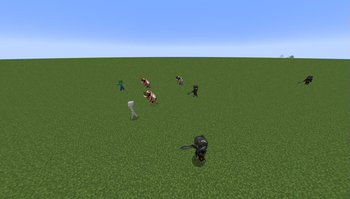
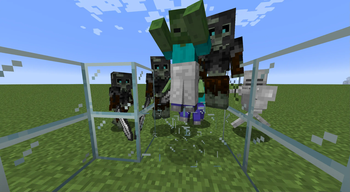
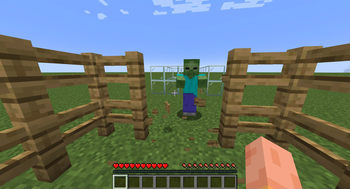
About this Mod
Mebahel's Zombie Horde
Turn ordinary nights into survival events with coordinated zombie hordes, shared aggression, destructive AI, biome-aware compositions, progressive difficulty, and extensive configuration.
Minecraft: Check the Files tab for currently supported versions
Loaders: Fabric, Quilt, Forge, and NeoForge (with Syntra Connector & Forgified Fabric API)



The dead no longer wander alone.
Mebahel's Zombie Horde adds recurring survival events where groups of undead spawn together, travel toward a shared destination, and react as a single threat. If one member discovers a player, the entire horde is alerted.
These are not ordinary Minecraft zombies appearing one by one around your base. Horde members can coordinate their aggression, break through selected defenses, appear with different equipment and compositions, and become more dangerous as your world progresses.
The system is highly configurable, making it suitable for anything from occasional roaming groups to a much harsher survival experience built around preparing for the next attack.
If you enjoy the mod, use the Follow button on CurseForge to be notified about future updates and improvements.
Why Play Zombie Horde?
- Coordinated hordes: Zombies spawn as groups and move toward a shared destination instead of behaving like unrelated random spawns.
- Shared awareness: One zombie spotting a player can alert the entire horde.
- Destructive AI: Horde members can break glass, fences, and gates when enabled.
- Biome-aware compositions: Different biomes can use different mobs and equipment pools.
- Modded mob support: Horde compositions can include entities from other mods.
- Progressive difficulty: Visiting the Nether can permanently make future hordes more dangerous.
- Rare elite hordes: Some groups can appear with weapons and armor while ordinary hordes remain more common.
- Safer world spawning: Surface hordes look for solid ground, enough space, and open sky before spawning.
- Extensive configuration: Control timing, size, health, equipment, spawn chance, dimensions, biomes, aggression, and more.
Coordinated Horde Events
Hordes appear at configurable intervals and move together toward a common destination.
Instead of forcing every encounter directly onto the player, a horde exists as a group in the world. That group can become a serious threat the moment one member notices you.
Shared Awareness
If one horde member detects a player, the entire horde is alerted and begins attacking.
This makes scouting and positioning more important. Pulling one zombie from a group can quickly turn into a much larger encounter.
Breakable Defenses
Depending on your configuration, horde members can destroy selected defensive blocks to reach their target.
Supported destructive behavior includes:
- Breaking glass.
- Breaking fences.
- Breaking fence gates.
This means simple vanilla barriers may no longer be enough to stop an incoming horde.
The behavior can be disabled individually if you prefer a less destructive survival experience.
Progressive Difficulty
Zombie Horde can make the world more dangerous as the player progresses.
When the difficulty system is enabled, visiting the Nether permanently increases future horde difficulty.
This allows early-game hordes to remain manageable while making later attacks more threatening once the player has reached stronger equipment and resources.
Biome-Aware Hordes
Hordes can adapt to the biome where they appear.
By default, Overworld hordes can use zombies across most biomes, while deserts and badlands can favor husks.
Biome-specific compositions take priority when available, and horde members remain associated with their leader's biome.
Custom compositions can define:
- Allowed dimensions.
- Allowed biomes.
- Weighted mob types.
- Armor probability.
- Weighted armor choices.
This system can also use entities from other mods, allowing modpacks to build completely custom horde ecosystems.
Rare Elite Hordes
Not every attack has the same strength.
Some hordes can appear with weapons and armor, while ordinary hordes remain more common.
Weighted equipment pools allow stronger or rarer gear to appear without making every group feel identical.
Safer Surface Spawning
Overworld hordes attempt to spawn in locations that make sense for a large group.
The system checks for:
- Solid ground.
- Enough room for the horde.
- Open sky.
If no suitable position can be found, the spawn attempt is skipped instead of forcing mobs into invalid or broken locations.
Highly Configurable
Zombie Horde is designed to work for both normal survival worlds and heavily customized modpacks.
The main configuration file is:
mebahel-zombie-horde_config.json
Important options include:
| Option | Purpose |
|---|---|
spawnInDayLight |
Controls whether hordes can spawn without burning in daylight. |
enableDifficultySystem |
Enables the permanent post-Nether difficulty increase. |
hordeSpawning |
Completely enables or disables horde spawning. |
hordeSpawnDelay |
Controls the delay between horde spawn attempts. |
hordeSpawnChance |
Controls the chance that a horde actually spawns during a cycle. |
randomNumberHordeReinforcements |
Adds a random number of extra mobs to a horde. |
hordeNumber |
Controls how many hordes may exist at the same time. |
hordeMemberBonusHealth |
Adds bonus health to every horde member. |
hordeMemberBreakGlass |
Allows horde members to break glass. |
hordeMemberBreakFence |
Allows horde members to break fences and gates. |
showHordeSpawningMessage |
Displays horde spawn coordinates in chat. |
Spawn Delay
In current versions using the newer delay format:
"hordeSpawnDelay": [15, "minute"]
Older versions used:
"hordeSpawnDelay": 15
The delay can be expressed in minutes or days depending on the version and configuration format.
Custom Horde Compositions
Horde composition is data-driven and can be adapted to different dimensions, biomes, mobs, and equipment.
Example:
{
  "hordeCompositions": [
    {
      "weight": 1,
      "dimensions": [
        "minecraft:overworld"
      ],
      "biomes": [
        "minecraft:desert",
        "minecraft:badlands"
      ],
      "mobTypes": [
        {
          "id": "minecraft:husk",
          "weight": 1,
          "spawnWithArmorProbability": 0.65,
          "armor": {
            "head": [
              { "itemId": "minecraft:iron_helmet", "weight": 3 },
              { "itemId": "minecraft:chainmail_helmet", "weight": 1 }
            ],
            "chest": [],
            "legs": [],
            "feet": []
          }
        }
      ]
    }
  ]
}
How It Works
- Higher
weightvalues make a composition or mob type more likely to be selected. biomesrestricts a composition to the listed biomes.- Omit
biomesto allow the composition in every biome of the configured dimensions. spawnWithArmorProbabilitycontrols the armor chance for each configured slot.- Armor entries use relative weights and do not need to add up to a fixed total.
- If
armoris omitted, the existing random iron armor behavior is used.
SCREENSHOT: TWO OR THREE DIFFERENT HORDE COMPOSITIONS IN DIFFERENT BIOMES
In-Game Commands
Available in v1.0.13 and newer:
/mebahelzombiehorde spawnhorde
Manually spawns a horde.
/mebahelzombiehorde reloadconfig
Reloads the configuration file.
/mebahelzombiehorde nextspawn
Displays the time until the next possible horde spawn.
Installation and Dependencies
Always use dependency versions compatible with the Minecraft version of the Zombie Horde file you download.
Fabric
Required:
Forge / NeoForge
Forge and NeoForge run the Fabric version through Sinytra Connector and require:
Check that the Connector version you install supports your chosen Minecraft and loader version.
Compatibility
Zombie Horde is designed to work well in modded survival setups.
Modded Entities
Custom horde compositions can reference entities from other mods, allowing pack creators to replace or mix vanilla zombies with their own hostile mobs.
Modded Equipment
Weighted equipment pools can be customized to fit the progression and balance of a larger modpack.
Dimensions and Biomes
Compositions can be restricted by dimension and biome, allowing different horde identities in different parts of the world.
SCREENSHOT: MODDED MOB INCLUDED IN A CUSTOM HORDE
Modpack Information
Yes, Zombie Horde can be included in modpacks.
The mod is especially suited to survival, horror, difficulty, progression, and apocalypse-themed packs.
Modpack authors can customize:
- Horde frequency.
- Spawn chance.
- Horde size and reinforcement count.
- Number of simultaneous hordes.
- Health scaling.
- Post-Nether difficulty.
- Destructive behavior.
- Dimensions and biomes.
- Mob selection.
- Modded entities.
- Armor probability.
- Weighted equipment choices.
This makes it possible to use Zombie Horde as a light survival event system or as one of the central threats of an entire modpack.
When publishing a pack, link back to the official Zombie Horde project page so players can easily find updates and documentation.
Continue the Adventure
Zombie Horde is part of the growing collection of Mebahel Minecraft mods.
Mebahel's RPG: Villager Quests & Companions
Turn villages into RPG hubs with branching stories, repeatable contracts, recruitable companions, rumors, a quest journal, and a full quest map.
View Villager Quests & Companions on CurseForge
Mebahel's Creatures: Draugr Invasion
Explore Nordic ruins, fight intelligent Draugr, solve dungeon challenges, defeat the Draugr Overlord, and trigger a repeatable invasion that hunts the player.
View Draugr Invasion on CurseForge
Mebahel's Creatures: Dwarven Automatons
Explore ancient Dwemer-inspired ruins, battle mechanical constructs, recover Dwarven technology, and summon mechanical companions.
View Dwarven Automatons on CurseForge
Join the Mebahel Community
Zombie Horde is actively developed.
Join the community to share survival stories, suggest new horde behaviors, report issues, discuss balancing, and follow future development.
Join the Mebahel Discord
Following the mod, leaving constructive feedback, sharing screenshots or videos, and recommending it to other players all help the project grow.
Support Development
Zombie Horde and the other Mebahel projects continue to receive new features, improvements, compatibility work, and balancing updates.
If you would like to directly support future development:
Support is completely optional. Playing the mod, following the project, reporting issues, leaving feedback, and sharing it with other players already helps a lot.
Zombie Horde is an unofficial Minecraft mod and is not affiliated with or endorsed by Mojang Studios.
Available Versions
How to Install Mebahel's Zombie Horde on Your Server
Order Server
Order a Minecraft Java server with at least 3 GB RAM (4 GB recommended).
Set fabric Loader
In the panel under "Egg", select the fabric loader and matching Minecraft version (1.21.3).
Install Mod
Open the mod browser in the dashboard and search for "Mebahel's Zombie Horde". Click "Install" – done! Alternatively, upload the .jar via SFTP to the /mods folder.
Compatibility
Mod Loaders
Minecraft Versions
1.21.3, 1.21.2, 1.21.1 (+4 more)
Server-side
✓ RequiredRecommended RAM
4 GB(min. 3 GB)Frequently Asked Questions
Mebahel's Zombie Horde server crashes on startup – what to do?
Most common cause: wrong fabric version or insufficient RAM. Check the server log (latest.log) for "OutOfMemoryError" or "Mixin" errors. With Mado Hosting: ensure at least 3 GB RAM is allocated and the loader matches the mod version (1.21.3). You can switch loaders with one click in the panel.
Is Mebahel's Zombie Horde compatible with fabric and forge and neoforge and quilt?
Mebahel's Zombie Horde officially supports fabric, forge, neoforge, quilt for Minecraft 1.21.3, 1.21.2, 1.21.1. Note: Forge and Fabric mods are NOT cross-compatible – pick one loader and stick with it. The Mado dashboard automatically detects incompatible loader combinations.
Server lagging with Mebahel's Zombie Horde – how to optimize performance?
Recommended RAM: 4 GB (per 8 players). Use /spark profiler to check if Mebahel's Zombie Horde consumes the most tick time. Common fixes: reduce server view-distance to 8-10, install "performant" or "starlight" as supplementary mods on Forge. With Mado Hosting, your server runs on NVMe SSDs with dedicated CPU cores for minimal latency.
Similar Mods




Rent Modded Server
Install Mebahel's Zombie Horde with just one click on your server.