
Modrinth · Fabric, Forge, NeoForge, Quilt · Client mod
New Visual Keybing
New Visual Keybing is a client-side mod. Install it on your computer; the server does not need it.
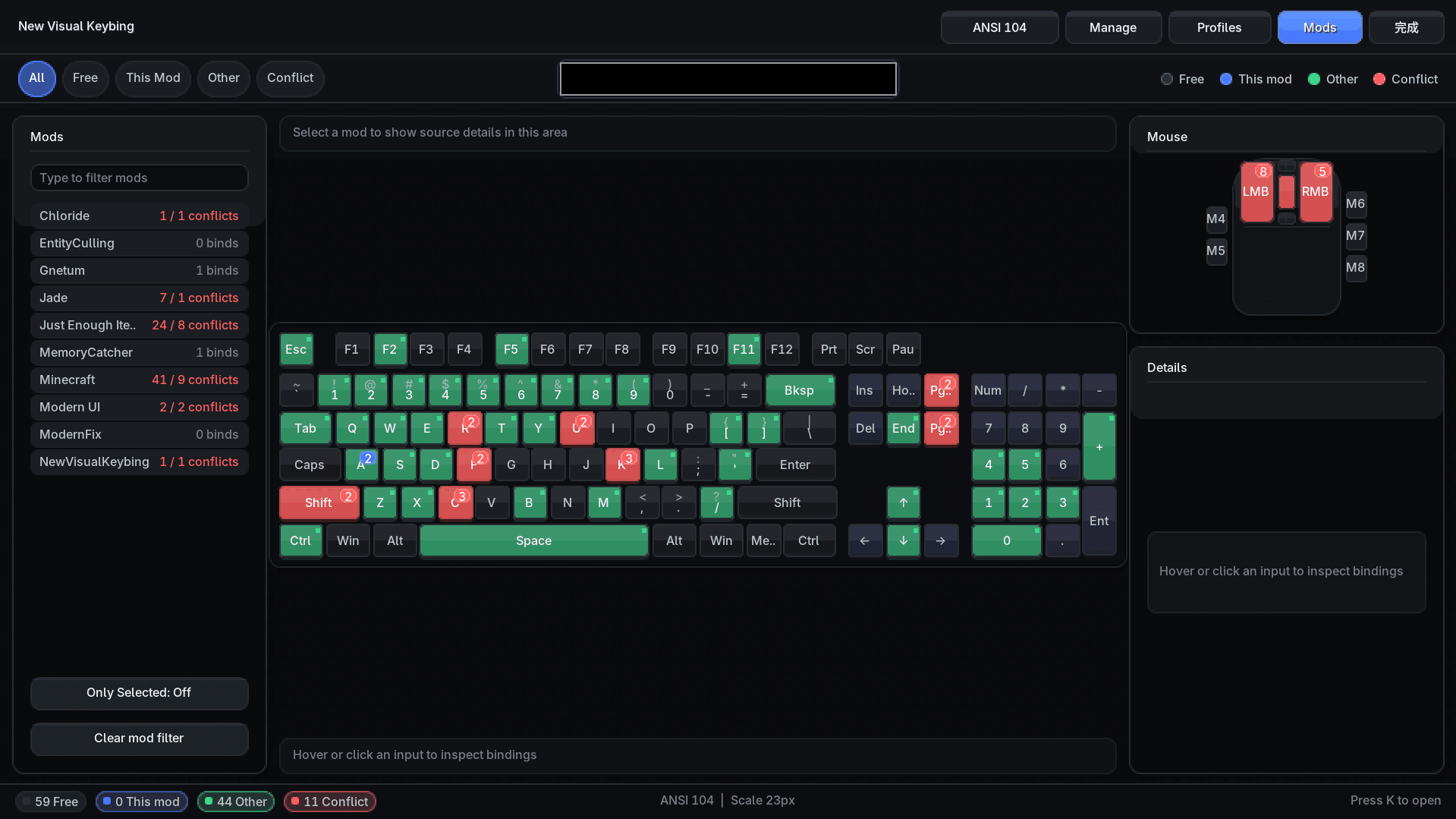
NewVisualKeybing is a visual key binding management mod for Minecraft. It presents keyboard and mouse layouts so players can inspect, filter, and adjust key usage across a modpack.
- Downloads
- 387.8K
- Author
- CancriRecoleta
- Loader
- Fabric, Forge, NeoForge, Quilt
- Minecraft
- 1.19 – 26.2
- Updated
- –
Screenshots
What New Visual Keybing looks like


Images: New Visual Keybing on Modrinth, published by the project team.
Setup
Install New Visual Keybing on your client
Client-side mods only run on your computer. More server RAM does not change their performance.
- 01
Install the loader locally
Install Fabric or Forge or NeoForge or Quilt for your Minecraft version in your launcher.
- 02
Download the file
Download the New Visual Keybing file for your loader and your exact Minecraft version, for example 26.2.
- 03
Add it to the mods folder
Put the .jar file in your local .minecraft/mods folder and remove older duplicates.
- 04
Launch
Launch Minecraft with the loader profile. Nothing needs to change on the server.
- On the server
- Not needed
- On the client
- Required
- Loader
- Fabric, Forge, NeoForge, Quilt
- Minecraft
- 26.2, 26.1.2, 26.1.1 +17 more
- License
- GNU Lesser General Public License v3.0 only
Releases
Published releases
Pick the file that matches your server’s loader and Minecraft version. The server and players need the same release.
New Visual Keybing · Modrinth- New Visual Keybing 0.9.4September 5, 2026Minecraft 1.21.1, 1.21.2, 1.21.3 · Fabric
- New Visual Keybing 0.9.4September 5, 2026Minecraft 1.21.1, 1.21.2, 1.21.3 · NeoForge
- New Visual Keybing 0.6.16June 18, 2026Minecraft 1.20.1 · Fabric, Quilt
- New Visual Keybing 0.6.16June 18, 2026Minecraft 1.20.1 · Forge, NeoForge
- New Visual Keybing 0.6.16June 17, 2026Minecraft 26.2 · Fabric
Original description by the project author
Description


NewVisualKeybing is a visual key binding management mod for Minecraft. It presents keyboard and mouse layouts so players can inspect, filter, and adjust key usage across a modpack.
Features
- Visual keyboard, mouse, and wheel input status
- Filter bindings by mod, status, and search text
- Show free, current-mod, other-mod, and conflicting bindings
- Quickly unbind, rebind, and edit priority from the details panel
- Save, rename, apply, import, and export key binding profiles
- Multiple keyboard layouts and optional hiding of non-selected mod keys
Opening
Press K by default to open the visual keybind viewer, or access it from the controls screen.
modpack use
When using in a modpack, you must link back to the original link. Distribution of this mod's binary files in any form is not allowed.
Does New Visual Keybing need to be installed on the Minecraft server?
No. Modrinth marks New Visual Keybing as unsupported on the server side. Install it only in your local mods folder. Your server can stay unchanged unless the project page lists an additional dependency.
Which version and loader does New Visual Keybing require?
Use a file for Fabric, Forge, NeoForge, Quilt and your exact Minecraft version. Supported versions include 26.2, 26.1.2, 26.1.1. Files for different loaders are not interchangeable.
New Visual Keybing is not working – what should I check?
First check the Minecraft version, loader version and required dependencies. Because the mod is client-side, more server RAM will not fix it.
Similar mods
Popular mods in the same category
 Server-ready

FerriteCore
by malte0811
Memory usage optimizations
 Client only

Mod Menu
by Prospector
Adds a mod menu to view the list of mods you have installed.
 Server-ready

YetAnotherConfigLib (YACL)
by isxander
A builder-based configuration library for Minecraft!
 Server-ready

Xaero's Minimap
by thexaero
Displays a map of the nearby world terrain, players, mobs, entities in the corner of your screen. Lets you create waypoints which help you find the locations you've marked.
Looking for mods for your own server?
The catalog lists mods that run on Minecraft servers.