
Open Parties and Claims - Essentials
Configurable commands, party chat and fine-grained claim permissions for Open Parties and Claims. Formerly OPAC - Better Commands.
About this Mod
OPAC - Essentials
The next generation of OPAC - Better Commands.




OPAC - Essentials is an addon for Open Parties and Claims, developed for the Brassworks SMP. It adds configurable short commands, party chat, fine-grained claim permissions and a Xaero's World Map Claim Search integration.
The UI on version 2.2 or higher requires KotlinForForge
Legacy Releases
Every release before 2.0 belongs to the legacy generation of the mod. Those releases use the old OPAC - Better Commands name and only provide fixed command features. They do not include configurable command names or the current permission system.
Features
- Configurable names for every command added by OPAC - Essentials
- Short aliases for commonly used OPAC commands
- Argument-free
/claimand/unclaimcommands - Party chat with direct messages, toggle and status commands
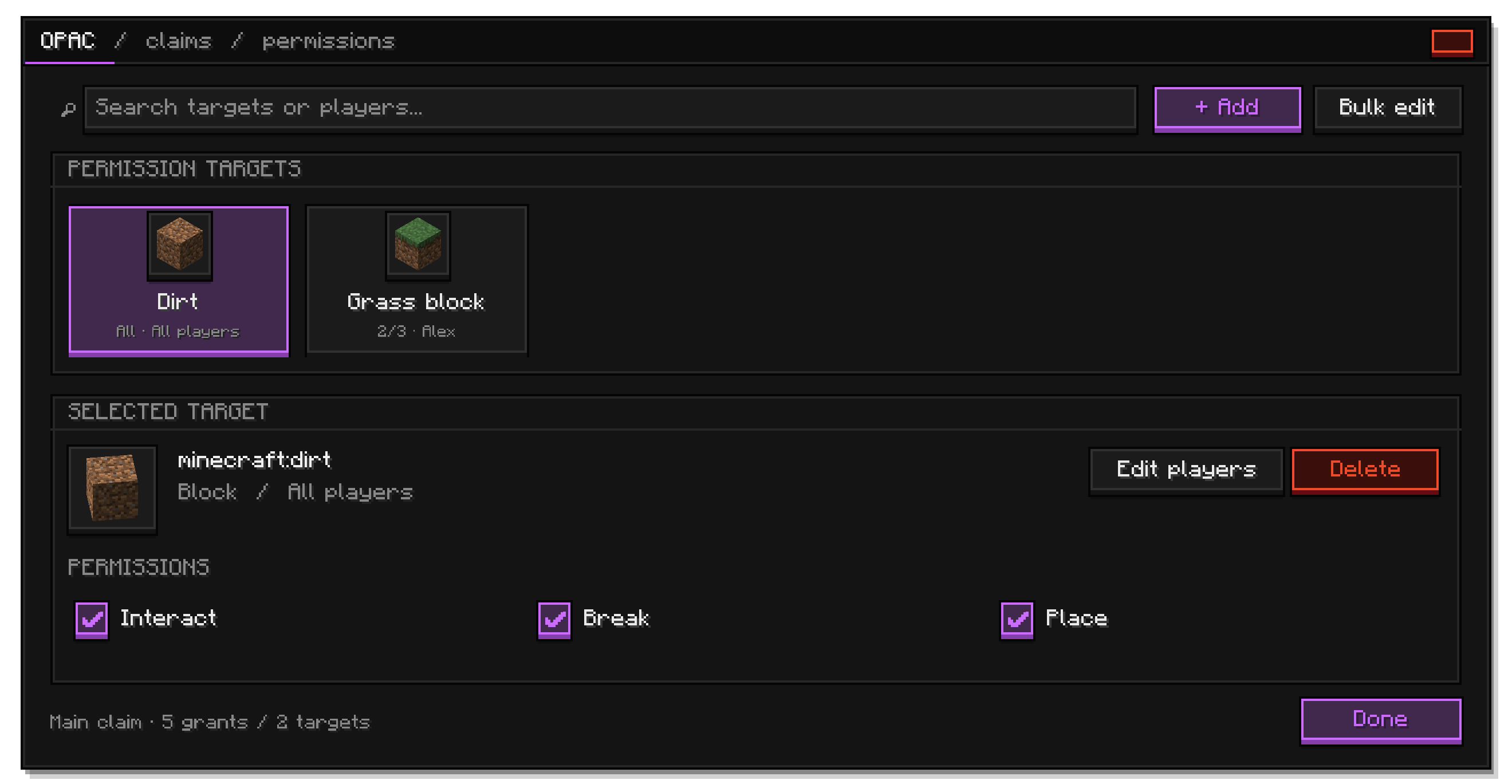
- Claim permission interface through
/claims permissions - Claim owner search directly in Xaero's World Map
Command Configuration
Command names can be changed in:
config/opac_essentials-commands.toml
Default configuration:
[commands]
claims = "claims"
party = "party"
claim = "claim"
unclaim = "unclaim"
party_chat = "pchat"
Command names may contain 1-32 lowercase letters, numbers, underscores or hyphens. Each configured command must use a unique name and must not conflict with a command registered by another mod. A full server restart is required after changing the configuration.
Claim Permissions
Claim owners can grant exceptions for individual registry entries instead of opening an entire claim.
| Target | Available actions |
|---|---|
| Blocks | Interact, break and place |
| Block entities | Interact and break |
| Entities | Interact and attack |
| Throwable items and projectiles | Throw, use and projectile impact |
Rules can apply to all players or to one or more selected players. To manage them, stand inside a claim or subclaim you own and run:
/claims permissions
The interface supports search, registry suggestions, multiple actions and players, per-target player assignments and bulk access changes. Edits remain staged until Save & Done is pressed. Server administrators with permission level 2 can also manage the claim or subclaim in which they are standing.
Permissions can also be listed, added and removed through the command tree. Older grouped permission data is migrated automatically when loaded.
Party Chat
Using the default command names:
/pchat <message>
/pchat toggle
/pchat status
Party messages use OPAC's native handling and formatting. Errors returned by OPAC are passed through to the player.
Xaero's World Map Claim Search
When Xaero's World Map is installed, a search button is added to the map interface. Enter a player's name to center the map on their first claim cluster. Previous and next controls cycle through disconnected clusters, while a high-visibility outline marks the current selection.
Claim snapshots and cluster calculations are processed incrementally and asynchronously to reduce client-side lag with large claim counts.
Requirements and Compatibility
- Minecraft 1.21.1
- NeoForge 21.1.216 or newer within the 21.1 release line
- Open Parties and Claims 0.25.8 or newer
- Xaero's World Map for the optional claim search interface
- If on Client, KotlinForForge is required
OPAC - Essentials contains a compatibility layer for both OPAC API v1 and API v2. This keeps older supported OPAC releases using API v1 compatible while allowing newer API v2 releases to work without a separate build.
Both the client and server need the mod when using the permission UI and its network features. The client also needs KotlinForForge. The Xaero claim search itself is a client-side World Map integration.
Planned Features
The following features are planned and may change during development:
- Complete overhaul of the OPAC claim and party interfaces
- A unified UI for claims, subclaims, parties and permissions
- More permission targets and actions
- Party-, rank- and group-based permission rules
- Permission import, export and advanced migration tools
- More admin commands to manage Claim/Party related stuff
Roadmap entries are goals, not guarantees. Their scope and release order may change based on testing, OPAC API changes and community feedback.
License
Licensed under the Apache License 2.0. You may use, modify and redistribute this software under the terms of that license.
Credits
- Development and design by DerErneuerer
- Created for the Brassworks
- Built as an addon for Open Parties and Claims
Links



Available Versions
How to Install Open Parties and Claims - Essentials on Your Server
Order Server
Order a Minecraft Java server with at least 3 GB RAM (4 GB recommended).
Set neoforge Loader
In the panel under "Egg", select the neoforge loader and matching Minecraft version (1.21.1).
Install Mod
Open the mod browser in the dashboard and search for "Open Parties and Claims - Essentials". Click "Install" – done! Alternatively, upload the .jar via SFTP to the /mods folder.
Compatibility
Mod Loaders
Minecraft Versions
1.21.1
Server-side
✓ RequiredRecommended RAM
4 GB(min. 3 GB)Frequently Asked Questions
Open Parties and Claims - Essentials server crashes on startup – what to do?
Most common cause: wrong neoforge version or insufficient RAM. Check the server log (latest.log) for "OutOfMemoryError" or "Mixin" errors. With Mado Hosting: ensure at least 3 GB RAM is allocated and the loader matches the mod version (1.21.1). You can switch loaders with one click in the panel.
Is Open Parties and Claims - Essentials compatible with neoforge?
Open Parties and Claims - Essentials officially supports neoforge for Minecraft 1.21.1. The Mado dashboard automatically detects incompatible loader combinations.
Server lagging with Open Parties and Claims - Essentials – how to optimize performance?
Recommended RAM: 4 GB (per 8 players). Use /spark profiler to check if Open Parties and Claims - Essentials consumes the most tick time. Common fixes: reduce server view-distance to 8-10, install "performant" or "starlight" as supplementary mods on Forge. With Mado Hosting, your server runs on NVMe SSDs with dedicated CPU cores for minimal latency.
Similar Mods






Rent Modded Server
Install Open Parties and Claims - Essentials with just one click on your server.