Polymorph
No more recipe conflicts! Adds an option to choose the crafting result if more than one is available.
Screenshots
About this Mod
Polymorph is a mod that solves recipe conflicts by letting players choose between all potential
outputs shared by the same ingredients.
With a sufficiently large amount of mods, recipe conflicts are a common occurrence and the
responsibility for resolving these usually falls on the user or modpack developer, using datapacks
or other tools to ensure that each recipe is unique.
Polymorph offers an alternative solution, allowing all possible crafting and smelting recipes to
co-exist regardless of conflicts.
Features
Crafting

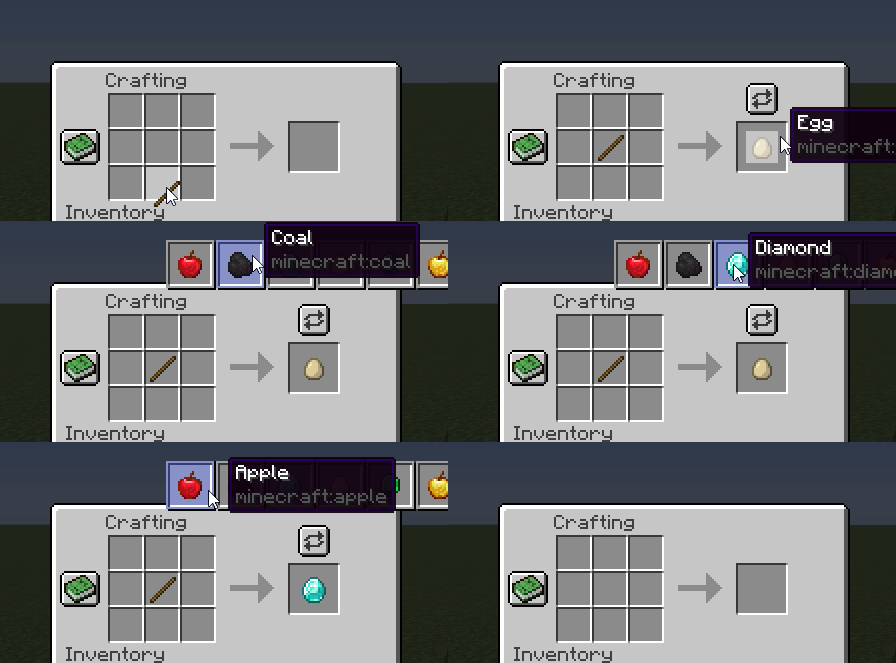
When a group of ingredients matches more than one recipe, a button will appear above the output
slot. Pushing this button will show a list of all possible results and selecting one will change the
crafting output to match. Polymorph will also remember the last selection as long as the ingredients
don't change, so repeated crafting actions are possible on the same selection.
Smelting

When a valid input matches more than one output, a button will appear above the output slot. Pushing
this button will show a list of all possible results with the currently selected result highlighted
in green. Selecting one of the listed results will change the smelting output to match. This
selection will be saved to the block itself and persist across world loading and unloading.
Smithing

Exactly like the crafting screen, a button will appear above the output slot when a valid input matches more than one
output. Upon selection, the output will change to match.
Commands
To assist identifying potential conflicts, there's a command /polymorph conflicts that will try to identify recipes
that conflict with each other and outputs a list of them to your logs folder. Currently, the command will scan crafting,
smelting, blasting, smoking, and smithing recipes.
Affiliates
Available Versions
How to Install Polymorph on Your Server
Order Server
Order a Minecraft Java server with at least 3 GB RAM (4 GB recommended).
Set fabric Loader
In the panel under "Egg", select the fabric loader and matching Minecraft version (1.21.1).
Install Mod
Open the mod browser in the dashboard and search for "Polymorph". Click "Install" – done! Alternatively, upload the .jar via SFTP to the /mods folder.
Compatibility
Mod Loaders
Minecraft Versions
1.21.1, 1.21, 1.20.6 (+13 more)
Server-side
✓ RequiredRecommended RAM
4 GB(min. 3 GB)Frequently Asked Questions
Polymorph server crashes on startup – what to do?
Most common cause: wrong fabric version or insufficient RAM. Check the server log (latest.log) for "OutOfMemoryError" or "Mixin" errors. With Mado Hosting: ensure at least 3 GB RAM is allocated and the loader matches the mod version (1.21.1). You can switch loaders with one click in the panel.
Is Polymorph compatible with fabric and forge and neoforge and quilt?
Polymorph officially supports fabric, forge, neoforge, quilt for Minecraft 1.21.1, 1.21, 1.20.6. Note: Forge and Fabric mods are NOT cross-compatible – pick one loader and stick with it. The Mado dashboard automatically detects incompatible loader combinations.
Server lagging with Polymorph – how to optimize performance?
Recommended RAM: 4 GB (per 8 players). Use /spark profiler to check if Polymorph consumes the most tick time. Common fixes: reduce server view-distance to 8-10, install "performant" or "starlight" as supplementary mods on Forge. With Mado Hosting, your server runs on NVMe SSDs with dedicated CPU cores for minimal latency.
Similar Mods




![[ETF] Entity Texture Features](https://cdn.modrinth.com/data/BVzZfTc1/af683d206d50b05258d865b0d6e4aa2f2cee12f2_96.webp)

Rent Modded Server
Install Polymorph with just one click on your server.