
PvP BOT
A mod for Minecraft Fabric that adds smart PvP bots
Screenshots
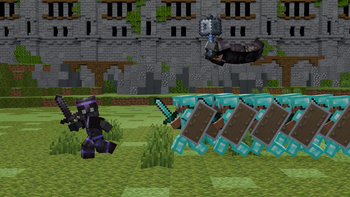
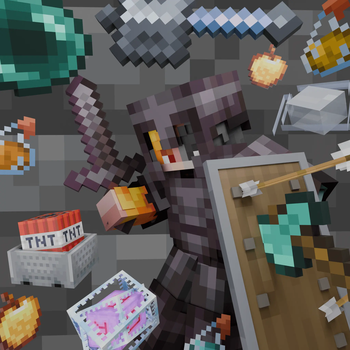


About this Mod
An advanced mod for Minecraft Fabric that adds AI bots for PvP
This mod adds bots to the server with advanced combat AI, a faction system, automatic equipment, and navigation. Bots can fight players, mobs, and each other, using a variety of weapons and tactics.




Need a paper version? Then check the PPvPBot
🎮 Main Features
🤖 Bot Management
- Bot spawn with unique names (random name generation)
- Mass spawn of up to 50 bots simultaneously
- Automatic restoration of bots after a server restart
- Synchronization of the bot list with the server
⚔️ Combat System
- Advanced combat AI with various tactics
- Critical hits when jumping
- Many weapon types:
- Melee: swords, axes
- Ranged: bows, crossbows
- Mace with jumping attacks (wind charges)
- Crystal PVP (obsidian + crystals)
- Anchor PVP (respawn anchor + glowstone)
- Auto-potions healing, strength, speed, fire resistance
- Shield mechanics - blocking, shield breaking, mace defense prediction
🛡️ Utilities and Survival
- Auto-equip armor and weapons
- Auto-totem offhand
- Auto-shield on low HP
- Auto-food
- Auto-repair armor with Mending XP bottles
- Cobweb use to slow enemies
🚶 Navigation and Movement
- Bunny hop for faster travel
- Adjustable speed
- Wander mode when no target
- Retreat on low HP
- Smart navigation to targets
- Combat strafing
- Path following system
👥 Faction System
- Faction creation for bots
- Hostile relations - set factions as enemies for automatic combat
- Member Management - add/remove bots and players
- Faction-wide commands - attack, give items, follow paths
- Friendly Fire toggle
🎒 Kit System
- Creating kits from your inventory
- Giving kits to bots and factions
- Saving kits across restarts
🛤️ Path System
- Create paths for bots to follow
- Add waypoints to paths
- Loop mode - back-and-forth or circular movement
- Walk types - bhop, sprint, or walk
- Visual indicators - particles showing path points and lines
- Distribute bots evenly along a path
🎯 Realism
- Miss Chance
- Mistake Chance - attack wrong direction
- Shield Break Chance
📊 Live Stats Dashboard
- Real-time bot statistics — total spawns, kills, damage, active bots
- Live graphs — server activity history with downsampling (500 points max)
- Top names — most frequently spawned bot names
- All-time records — max online servers and max active bots
- Server-Sent Events — instant dashboard updates
- History stored in DuckDB — efficient time-series storage, 30-day retention
- Backend — standalone Velocity plugin with embedded HTTP server
- Dashboard URL: http://pvpbotstats.survivalworld.win/
📋 Commands
Basic Commands
/pvpbot spawn [name]          - Spawn a bot (random name if not specified)
/pvpbot remove <name>         - Remove a bot
/pvpbot removeall             - Remove all bots
/pvpbot reload                - Reload all configurations
Bot Management
/pvpbot bot-management list              - List all active bots
/pvpbot bot-management inventory <name>  - Show bot's inventory
/pvpbot bot-management mass-spawn <count> - Spawn multiple bots (1-50)
/pvpbot bot-management attack <bot> <target> - Order bot to attack
/pvpbot bot-management stop-attack <bot>     - Stop bot from attacking
Settings
/pvpbot settings                          - Show all settings
/pvpbot settings auto-armor [true/false]  - Auto-equip armor
/pvpbot settings auto-weapon [true/false] - Auto-equip weapons
/pvpbot settings drop-armor [true/false]  - Drop worse armor
/pvpbot settings drop-weapon [true/false] - Drop worse weapons
/pvpbot settings drop-distance <1-10>     - Item pickup distance
/pvpbot settings interval <1-100>         - Check interval (ticks)
/pvpbot settings combat [true/false]      - Enable combat
/pvpbot settings revenge [true/false]     - Revenge mode
/pvpbot settings auto-target [true/false] - Auto target search
/pvpbot settings target-players [true/false] - Attack players
/pvpbot settings target-mobs [true/false]    - Attack mobs
/pvpbot settings target-bots [true/false]    - Attack other bots
/pvpbot settings criticals [true/false]      - Critical hits
/pvpbot settings ranged [true/false]         - Use bow/crossbow
/pvpbot settings mace [true/false]           - Use mace
/pvpbot settings attack-cooldown <1-40>      - Attack cooldown (ticks)
/pvpbot settings melee-range <2-6>           - Melee range
/pvpbot settings move-speed <0.1-2.0>        - Movement speed
/pvpbot settings view-distance <5-128>       - Target search range
/pvpbot settings retreat [true/false]        - Retreat when low HP
/pvpbot settings auto-totem [true/false]     - Auto-equip totem
/pvpbot settings totem-priority [true/false] - Totem over shield
/pvpbot settings auto-shield [true/false]    - Auto-use shield
/pvpbot settings shield-break [true/false]   - Break shields with axe
/pvpbot settings shield-break-chance <0-100> - Shield break chance (%)
/pvpbot settings shield-hold-ticks <10-200>  - Max shield hold ticks
/pvpbot settings shield-raise-ticks <2-40>   - Shield raise ticks
/pvpbot settings shield-mace [true/false]    - Raise shield vs mace
/pvpbot settings prefer-sword [true/false]   - Prefer sword over axe
/pvpbot settings auto-eat [true/false]       - Auto-eat food
/pvpbot settings auto-potion [true/false]    - Auto-use potions
/pvpbot settings auto-mend [true/false]      - Auto-repair armor
/pvpbot settings bhop [true/false]           - Bunny hop
/pvpbot settings idle [true/false]           - Wander without target
/pvpbot settings idle-radius <3-50>          - Wander radius
/pvpbot settings friendly-fire [true/false]  - Damage allies
/pvpbot settings miss-chance <0-100>         - Miss chance (%)
/pvpbot settings mistake-chance <0-100>      - Mistake chance (%)
/pvpbot settings aim-speed <3-45>            - Rotation speed
/pvpbot settings special-names [true/false]      - Use special names
/pvpbot settings bot-leave-on-death [true/false] - Remove on death
/pvpbot settings attack-invincible [true/false]  - Attack creative/spectator
/pvpbot settings safe-spawn [true/false]         - Random offset on spawn
/pvpbot settings clear-on-remove [true/false]    - Clear inventory on kill
/pvpbot settings shield-mace [true/false]        - Raise shield vs mace
/pvpbot settings view-distance <5-128>           - Target search range
/pvpbot settings max-mass-spawn <50-10000>       - Max bots per mass-spawn
/pvpbot settings profile-lagg-fix [true/false]   - Prevent lag on bot spawn
Ranged Combat Settings
/pvpbot settings ranged-min-range <3.0-20.0>     - Min bow distance
/pvpbot settings ranged-optimal-range <10.0-50.0> - Ideal bow distance
/pvpbot settings ranged-max-range <15.0-100.0>   - Max bow engagement range
/pvpbot settings bow-draw-ticks <5-100>           - Bow full draw time
/pvpbot settings arrow-prediction [true/false]    - Predictive bow aiming
/pvpbot settings ranged-strafe [true/false]       - Strafe while shooting bow
/pvpbot settings ranged-retreat [true/false]      - Retreat with bow when close
Critical & Misc Settings
/pvpbot settings crit-fall-ticks <1-10>          - Falling ticks for crit
/pvpbot settings shield-hold-ticks <10-200>      - Max shield hold ticks
/pvpbot settings shield-raise-ticks <2-40>       - Shield raise anticipation
/pvpbot settings aim-speed <3.0-90.0>            - Rotation speed
Faction Commands
/pvpbot faction list                          - List all factions
/pvpbot faction create <name>                 - Create a faction
/pvpbot faction delete <name>                 - Delete a faction
/pvpbot faction info <faction>                - Faction information
/pvpbot faction add <faction> <player>        - Add player/bot
/pvpbot faction remove <faction> <player>     - Remove player/bot
/pvpbot faction add-near <faction> <radius>   - Add nearby bots
/pvpbot faction add-all <faction>             - Add all bots
/pvpbot faction hostile <f1> <f2> [true/false] - Set hostile
/pvpbot faction attack <faction> <target>     - All bots attack
/pvpbot faction give <faction> <item>         - Give item to all
/pvpbot faction path start <faction> <path>   - Start path
/pvpbot faction path stop <faction>           - Stop path
/pvpbot faction tp <faction> <x y z|player>   - Teleport entire faction gradually
Faction Kit Commands
/pvpbot faction kit give-kit <faction> <kit>      - Give kit to all members
/pvpbot faction kit give-kit-random <faction> <kit1> <w1>% [<kit2> <w2>% ...] - Give random weighted kit
Kit Commands
/pvpbot kit create-kit <name>                         - Create a kit from your inventory
/pvpbot kit delete-kit <name>                         - Delete a kit
/pvpbot kit kits                                      - List all kits
/pvpbot kit give-kit <player> <kit>                   - Give kit to a player/bot
/pvpbot kit give-kit-near <kit> [radius]              - Give kit to nearby bots
/pvpbot kit give-kit-near-random <radius> <kit1> <w1>% [<kit2> <w2>% ...] - Give random weighted kit to bots within radius
Path Commands
/pvpbot path create <name>                    - Create a new path
/pvpbot path delete <name>                    - Delete a path
/pvpbot path add-point <name>                 - Add waypoint (current pos)
/pvpbot path remove-point <name> [index]      - Remove waypoint
/pvpbot path clear <name>                     - Remove all waypoints
/pvpbot path list                             - List all paths
/pvpbot path info <name>                      - Show path information
/pvpbot path loop <name> <true/false>         - Toggle loop mode
/pvpbot path walk-type <name> <type>          - Set walk type (bhop/sprint/walk)
/pvpbot path show <name> <true/false>         - Toggle visualization
/pvpbot path start <bot> <path>               - Make bot follow path
/pvpbot path stop <bot>                       - Stop bot from following
/pvpbot path distribute <path>                - Distribute bots evenly
/pvpbot path start-near <path> <radius>       - Start path for nearby bots
/pvpbot path stop-all <path>                  - Stop all bots on path
🖼️ Screenshots
- Bots in battle

Faction system


Crystal PVP in action


Mass bot spawn

Path system in action


🔗 Links
- Modrinth: https://modrinth.com/mod/pvp-bot-fabric
- GitHub: https://github.com/Stepan1411/pvp-bot-fabric
- Issues: https://github.com/Stepan1411/pvp-bot-fabric/issues
- Wiki: https://stepan1411.github.io/pvpbot-docs.html
- Live Stats Dashboard: http://pvpbotstats.survivalworld.win/
Have a nice pvp! 🎮
Available Versions
How to Install PvP BOT on Your Server
Order Server
Order a Minecraft Java server with at least 3 GB RAM (4 GB recommended).
Set fabric Loader
In the panel under "Egg", select the fabric loader and matching Minecraft version (1.21.11).
Install Mod
Open the mod browser in the dashboard and search for "PvP BOT". Click "Install" – done! Alternatively, upload the .jar via SFTP to the /mods folder.
Compatibility
Mod Loaders
Minecraft Versions
1.21.11, 1.21.10
Server-side
✓ RequiredRecommended RAM
4 GB(min. 3 GB)Frequently Asked Questions
PvP BOT server crashes on startup – what to do?
Most common cause: wrong fabric version or insufficient RAM. Check the server log (latest.log) for "OutOfMemoryError" or "Mixin" errors. With Mado Hosting: ensure at least 3 GB RAM is allocated and the loader matches the mod version (1.21.11). You can switch loaders with one click in the panel.
Is PvP BOT compatible with fabric?
PvP BOT officially supports fabric for Minecraft 1.21.11, 1.21.10. The Mado dashboard automatically detects incompatible loader combinations.
Server lagging with PvP BOT – how to optimize performance?
Recommended RAM: 4 GB (per 8 players). Use /spark profiler to check if PvP BOT consumes the most tick time. Common fixes: reduce server view-distance to 8-10, install "performant" or "starlight" as supplementary mods on Forge. With Mado Hosting, your server runs on NVMe SSDs with dedicated CPU cores for minimal latency.
Similar Mods






Rent Modded Server
Install PvP BOT with just one click on your server.