
Redaction
The cleanest Minecraft experience (no hacks included).
Screenshots

About this Mod
REDACTION

Overhaul your gameplay experience with many features seemingly exclusive to cheat-clients.
Features
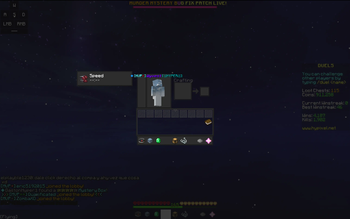
- Full-length hotbar
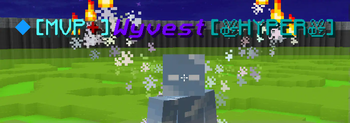
- Snow particle effects in inventory
Quality of Life
- Disable Hand Item Lighting - Removes the lighting on held items
- Custom Hand Item FOV - Allows to set a different FOV for the first person hand.
- Server Preview in Direct Connect - Shows a preview of the server info in the direct connect GUI.
- Last Server Joined Button - Shows the last server the user joined in the main menu.
Blackbar
Replaces the vanilla inventory with a "blackbar".

(text not included. use EvergreenHUD for that.)
Includes following customization:
- Whether to show slot numbers
- Update speed
- Blackbar color
- Blackbar item highlight color
Inventory
Adds snow in your inventory, with a configurable density and color.

Links and support
- Did you run into a bug? Open a bug report
- Service interruptions? Checkout Polyfrost Status
- Feeling social? Join our discord community
Available Versions
How to Install Redaction on Your Client
Install the Mod Loader Locally
Install fabric for your local Minecraft version.
Download the Matching File
Choose the Redaction file for fabric and Minecraft 26.3.
Install Mod
Place the .jar file in your local .minecraft/mods folder and restart Minecraft. No server-side installation is required.
Compatibility
Mod Loaders
Minecraft Versions
26.3, 26.2, 26.1.2 (+9 more)
Server-side
✗ UnsupportedRecommended RAM
4 GB(min. 3 GB)Frequently Asked Questions
Does Redaction need to be installed on the Minecraft server?
No. Modrinth marks Redaction as unsupported on the server side. Install it only in your local Minecraft mods folder. Your server can remain unchanged unless the mod page lists an additional dependency.
Which version and loader does Redaction require?
Use a file for fabric, forge, ornithe and your exact Minecraft version. Supported versions include 26.3, 26.2, 26.1.2. Files for different loaders are not interchangeable.
Redaction is not working – what should I check?
First check the Minecraft version, loader version and required dependencies. Put the .jar file in your local .minecraft/mods folder and remove older duplicates. Because this mod is client-side, adding server RAM will not fix it.
Similar Mods




![[ETF] Entity Texture Features](https://cdn.modrinth.com/data/BVzZfTc1/af683d206d50b05258d865b0d6e4aa2f2cee12f2_96.webp)

Minecraft Server for Your Group
Redaction stays on your client. Host a compatible world for your group.
Details
- License
- LicenseRef-GPL-3.0-with-Minecraft-Linking-Exception
- Server-side
- Unsupported