
Scoreboard Overhaul
An improved, cuter, and non-invasive scoreboard sidebar UI redesign!
Screenshots
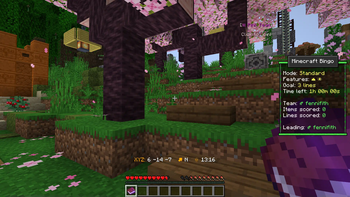
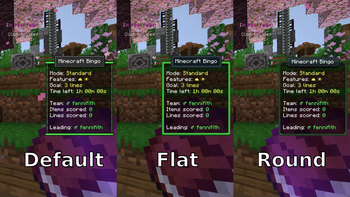
About this Mod
Scoreboard Overhaul



This mod redesigns the Minecraft scoreboard/sidebar to make it easier to use and somewhat better looking!
Make sure to also download the Fabric API! You'll also want to install Mod Menu and YetAnotherConfigLib to change any of the settings (but these are not required for it to run).

Features
Auto-hides the scoreboard when it isn't being used
By default, the scoreboard is shown for a brief period when either a score is changed or the Tab key is pressed.
This can be configured in the settings!Highlights score entries when updated
When a score is updated, it has a background "highlight" for a brief period.
There is an additional option to make scores flash when updated to make them more noticeable (turned off by default).Shows the player's current team color
If the player is on a team, the scoreboard border shows their team's color!
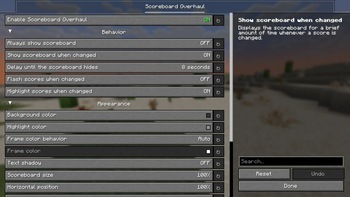
Config Options
Note: Options can only be configured if both Mod Menu and YetAnotherConfigLib are installed!

- Enable Scoreboard Overhaul: Controls whether the mod is active (if turned off, uses the vanilla scoreboard).
- Always show scoreboard: Overrides the dynamic hiding behavior, and makes the scoreboard always visible (like the vanilla scoreboard).
- Show scoreboard when changed: Displays the scoreboard for a brief amount of time whenever a score is changed.
- Delay until the scoreboard hides: How long the scoreboard should remain visible for after being shown.
- Background color: Background color of the scoreboard content
- Scoreboard size: The size of the scoreboard, in percent (relative to the current GUI scale)
- Horizontal position: The horizontal alignment of the scoreboard, in percent (0 is left, 100 is right)
- Vertical position: The vertical alignment of the scoreboard, in percent (0 is top, 100 is bottom)
- Flash scores when changed: Whether scores should flicker to indicate which entries have changed.
- Highlight scores when changed: Whether scores should be highlighted to indicate which entries have changed.
- Highlight color: The color to highlight changed scoreboard items with.
Available Versions
How to Install Scoreboard Overhaul on Your Client
Install the Mod Loader Locally
Install fabric for your local Minecraft version.
Download the Matching File
Choose the Scoreboard Overhaul file for fabric and Minecraft 26.3.
Install Mod
Place the .jar file in your local .minecraft/mods folder and restart Minecraft. No server-side installation is required.
Compatibility
Mod Loaders
Minecraft Versions
26.3, 26.2, 26.1.2 (+19 more)
Server-side
✗ UnsupportedRecommended RAM
4 GB(min. 3 GB)Frequently Asked Questions
Does Scoreboard Overhaul need to be installed on the Minecraft server?
No. Modrinth marks Scoreboard Overhaul as unsupported on the server side. Install it only in your local Minecraft mods folder. Your server can remain unchanged unless the mod page lists an additional dependency.
Which version and loader does Scoreboard Overhaul require?
Use a file for fabric, quilt and your exact Minecraft version. Supported versions include 26.3, 26.2, 26.1.2. Files for different loaders are not interchangeable.
Scoreboard Overhaul is not working – what should I check?
First check the Minecraft version, loader version and required dependencies. Put the .jar file in your local .minecraft/mods folder and remove older duplicates. Because this mod is client-side, adding server RAM will not fix it.
Similar Mods






Minecraft Server for Your Group
Scoreboard Overhaul stays on your client. Host a compatible world for your group.