
Simple Death Coordinates
Never lose your items again. Logs your death coordinates and distance in chat, click to copy for quick navigation.
About this Mod
Never lose your items again.
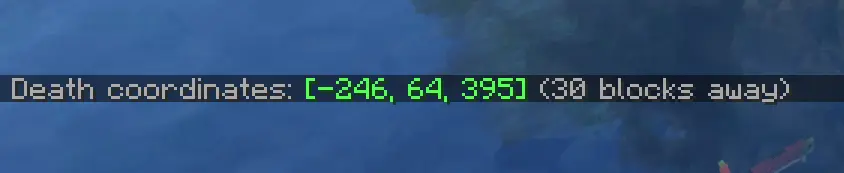
This lightweight mod automatically logs your death coordinates and distance in chat upon respawn, featuring a click-to-copy function for quick and easy navigation.
✨ Features
Vanilla Style Integration: The notifications are designed to mimic the look and feel of native /locate or game system messages. Keeping your HUD clean and authentic.
Instant Coordinates: Automatically displays your exact XYZ location the moment you respawn.
Distance Tracker: Shows exactly how far you are from your death point so you can plan your recovery.
Click-to-Copy: Simply click the chat message to copy your coordinates to the clipboard for easy use with waypoints or teleports.
Lightweight: No extra menus, no clutter—just the information you need, exactly when you need it.
🧩 How to use
Die in the game while exploring or building.
Upon respawning, check your chat for the automatically generated death message, styled just like a standard system notification.
Click on the coordinates in the chat to copy them to your clipboard.
Paste the coordinates into your favorite waypoint mod, map tool, or use them to teleport back if you have the necessary permissions!
⚙️ Compatibility & Technical Details
Vanilla-Friendly: The UI does not use custom inventory screens or complex pop-ups. It utilizes the standard Minecraft chat component system, ensuring full compatibility with other mods and custom chat interfaces.
Performance: Optimized for minimal resource usage, ensuring zero impact on your FPS or game logic.
Version Support: Works on any server (even if it's not installed on the server-side), making it the perfect tool for survival multiplayer and single-player worlds alike.
Available Versions
How to Install Simple Death Coordinates on Your Client
Install the Mod Loader Locally
Install fabric for your local Minecraft version.
Download the Matching File
Choose the Simple Death Coordinates file for fabric and Minecraft 26.2.
Install Mod
Place the .jar file in your local .minecraft/mods folder and restart Minecraft. No server-side installation is required.
Compatibility
Mod Loaders
Minecraft Versions
26.2, 26.1.2
Server-side
✗ UnsupportedRecommended RAM
4 GB(min. 3 GB)Frequently Asked Questions
Does Simple Death Coordinates need to be installed on the Minecraft server?
No. Modrinth marks Simple Death Coordinates as unsupported on the server side. Install it only in your local Minecraft mods folder. Your server can remain unchanged unless the mod page lists an additional dependency.
Which version and loader does Simple Death Coordinates require?
Use a file for fabric, neoforge, quilt and your exact Minecraft version. Supported versions include 26.2, 26.1.2. Files for different loaders are not interchangeable.
Simple Death Coordinates is not working – what should I check?
First check the Minecraft version, loader version and required dependencies. Put the .jar file in your local .minecraft/mods folder and remove older duplicates. Because this mod is client-side, adding server RAM will not fix it.
Similar Mods






Minecraft Server for Your Group
Simple Death Coordinates stays on your client. Host a compatible world for your group.