
Simple Shulker Preview
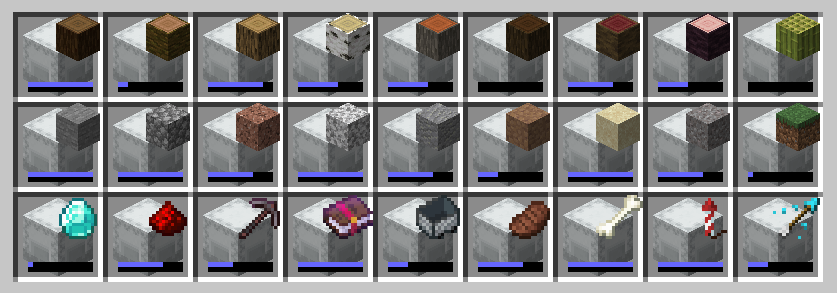
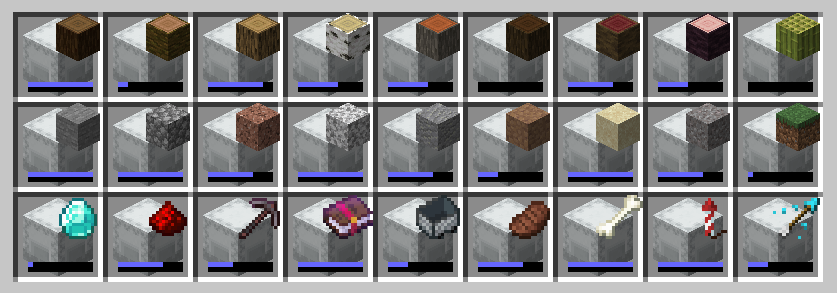
A minecraft fabric mod that displays a configurable icon indicating the contents of a shulker box, as well as a capacity bar.
Screenshots
About this Mod
Simple Shulker Preview



Simple Shulker Preview is a small fabric mod that displays an icon indicating the contents of a shulker. This icon appears on top of the shulker icon in inventory slots.
For other download pages, please see CurseForge or Modrinth.
Dependencies
This mod requires ModMenu to adjust the configs. The Cloth Config API mod is embedded - you don't need to download it yourself.
Configs
I won't go through all the configs, since they've increased over time. A brief overview is as follows:
| Option | Description |
|---|---|
Display Item |
Decides which item in the shulker should be displayed based on position or quantity. |
Custom Name |
Provides options to display an icon based on custom named shulkers |
Icon Positions |
Modify the x and y offsets of the icon, as well as scale. |
Capacity Bar |
Display a capacity bar, indicating how full the shulker box is |
Bar Position |
Set the position, size, and direction the capacity bar is drawn. |
Stack Limits |
Set minimum limits for the number of items required to display an icon |
Enable ... |
Option to enable additional features, such as bundles or recursive shulker support |
Disable Mod |
Disables the mod so that overlay icons are not displayed. |
When using custom named shulkers, you need to name it using the same conventions required for spawning in items. For example, naming a shulker minecraft:grass_block will display a grass block. If an invalid name has been given, it will continue to follow the 'Display Item' configuration (unless 'Custom Name' has been set to 'ALWAYS', of course).
Contributing
Contributions and suggestions are always welcome! Please limit all issues to only one feature at a time - feel free to open multiple at once if you have many ideas. Similarly, please limit pull requests to a single feature at a time and try to follow the existing code style.
To further discuss or get notifications of new updates, check out my Discord. If you like what I do, consider supporting me on Ko-Fi! 
Available Versions
How to Install Simple Shulker Preview on Your Client
Install the Mod Loader Locally
Install fabric for your local Minecraft version.
Download the Matching File
Choose the Simple Shulker Preview file for fabric and Minecraft 26.2.
Install Mod
Place the .jar file in your local .minecraft/mods folder and restart Minecraft. No server-side installation is required.
Compatibility
Mod Loaders
Minecraft Versions
26.2, 26.1.2, 26.1.1 (+36 more)
Server-side
✗ UnsupportedRecommended RAM
4 GB(min. 3 GB)Frequently Asked Questions
Does Simple Shulker Preview need to be installed on the Minecraft server?
No. Modrinth marks Simple Shulker Preview as unsupported on the server side. Install it only in your local Minecraft mods folder. Your server can remain unchanged unless the mod page lists an additional dependency.
Which version and loader does Simple Shulker Preview require?
Use a file for fabric and your exact Minecraft version. Supported versions include 26.2, 26.1.2, 26.1.1. Files for different loaders are not interchangeable.
Simple Shulker Preview is not working – what should I check?
First check the Minecraft version, loader version and required dependencies. Put the .jar file in your local .minecraft/mods folder and remove older duplicates. Because this mod is client-side, adding server RAM will not fix it.
Similar Mods



![[TaCZ] Timeless and Classics Zero](https://cdn.modrinth.com/data/SzzJttH8/fd27766d2bb8390d284696b1dbd358f87e081439_96.webp)


Minecraft Server for Your Group
Simple Shulker Preview stays on your client. Host a compatible world for your group.