Sit Anywhere!
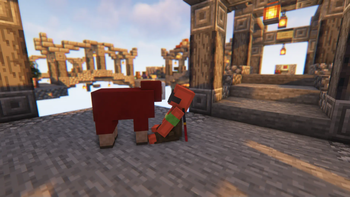
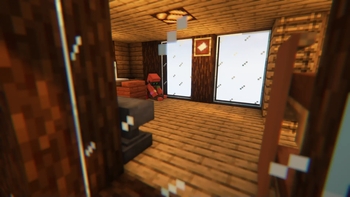
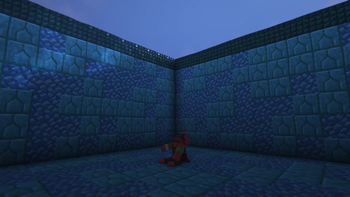
Sit anywhere you want! Look down, double tap sneak and right click and you sit. As easy as that. Or you can just sit on stair/slab or via "/trigger sit". Work on vanilla servers, or any other setup.
Screenshots



About this Mod
🪑 Sit Anywhere!
Sit on stairs, slabs, or literally any surface in Minecraft!
✨ Key Features
- Server-Side Only: Install it on your server or LAN. Players don't need to install anything to join and use it.
- Datapack & Mod Available: Use the datapack for specific worlds, or the mod for global activation across all worlds.
- Accident-Proof: Smart triggers prevent you from sitting down unintentionally.
- Future-Proof: Designed as a lightweight datapack logic, making it less likely to break with Minecraft updates. (But I'll make sure to fix it if it ever happens!
📖 How to Use
- On Stairs & Slabs: Stand on top of the block and right-click it.
- Anywhere Else: Look straight down, double-tap sneak (Shift), and right-click.
- Via Command: Type /trigger sit.
⤵️ Installation
📦 Datapack
- Download the
.zipfile. - Place it into your world's
datapacks/folder.
🌐 Translations: Also place the same
.zipfile into yourresourcepacks/folder (and enable it) to get translated texts.
⚙️ Mod
- Download the
.jarfile. - Place it into your Minecraft
mods/folder.
🌐 Translations: Built-in automatically, no extra steps needed!
Available languages (9): English (US), Français (France), Español (España), Deutsch (Deutschland), Português (Portugal), Italiano (Italia), 日本語 (日本), 한국어 (대한민국), 简体中文 (中国大陆).
The translation may be inaccurate as I only speak English and French. If you notice any errors, please let me know! If you would like to translate this project into your own language, feel free to create the translation file and send it to me!
💬 Feedback & Support
Have questions, suggestions, or found a bug? Join the community on Discord in the #mods-and-datapacks channel:
👉 Join Discord Server
Available Versions
How to Install Sit Anywhere! on Your Server
Order Server
Order a Minecraft Java server with at least 3 GB RAM (4 GB recommended).
Set datapack Loader
In the panel under "Egg", select the datapack loader and matching Minecraft version (26.3).
Install Mod
Open the mod browser in the dashboard and search for "Sit Anywhere!". Click "Install" – done! Alternatively, upload the .jar via SFTP to the /mods folder.
Compatibility
Mod Loaders
Minecraft Versions
26.3, 26.3-snapshot-9, 26.3-snapshot-7 (+34 more)
Server-side
✓ RequiredRecommended RAM
4 GB(min. 3 GB)Frequently Asked Questions
Sit Anywhere! server crashes on startup – what to do?
Most common cause: wrong datapack version or insufficient RAM. Check the server log (latest.log) for "OutOfMemoryError" or "Mixin" errors. With Mado Hosting: ensure at least 3 GB RAM is allocated and the loader matches the mod version (26.3). You can switch loaders with one click in the panel.
Is Sit Anywhere! compatible with datapack and fabric and forge and neoforge and quilt?
Sit Anywhere! officially supports datapack, fabric, forge, neoforge, quilt for Minecraft 26.3, 26.3-snapshot-9, 26.3-snapshot-7. Note: Forge and Fabric mods are NOT cross-compatible – pick one loader and stick with it. The Mado dashboard automatically detects incompatible loader combinations.
Server lagging with Sit Anywhere! – how to optimize performance?
Recommended RAM: 4 GB (per 8 players). Use /spark profiler to check if Sit Anywhere! consumes the most tick time. Common fixes: reduce server view-distance to 8-10, install "performant" or "starlight" as supplementary mods on Forge. With Mado Hosting, your server runs on NVMe SSDs with dedicated CPU cores for minimal latency.
Similar Mods






Rent Modded Server
Install Sit Anywhere! with just one click on your server.