
Skyblock Overhaul (SBO)
[SBO] SkyblockOverhaul is a Mod for the Mythological Ritual event in hypixel skyblock and custom partyfinder
Screenshots
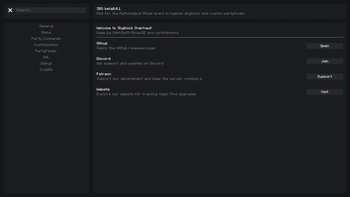

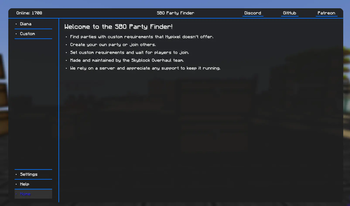
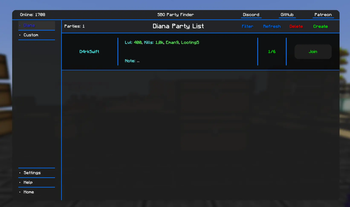
About this Mod
[SBO] SkyblockOverhaul: Mod for Hypixel SkyBlock

What it does
[SBO] SkyblockOverhaul is a feature‐rich Hypixel SkyBlock mod for Minecraft Fabric supporting most current Hypixel SkyBlock versions, designed primarily for the Diana event.
Table of Contents
Installation
Prerequisites
Before you begin, you need to have a few things installed:
- Fabric API: This is a dependency for most Fabric mods. Download from Modrinth
- Fabric Language Kotlin: This mod is written in Kotlin. Download from Modrinth
- Mod Menu: Shows SBO settings in the mod menu. Download from Modrinth
Step-by-Step Installation
Install Dependencies
- Download Fabric API and Fabric Language Kotlin for your Minecraft version
- Place the
.jarfiles in yourmodsfolder
Install SkyblockOverhaul
Launch the Game
- The mod should now be installed and ready to use!
Features
Diana Burrows
| Feature | Description |
|---|---|
| Spade Guess | Guess burrow location when using spade ability. Requires Dripping Lava Particles and /particlequality set to Extreme for best accuracy |
| Arrow Guess | Guess burrows from arrow direction after digging. Replaces the old Multi-guess system. Requires Dust Particles enabled |
| Close Burrow Detection | Auto-detect and update burrow types (Treasure/Mob/Start) when holding a spade near particles |
| Show Beacon Beam | Display beacon beams for waypoints extending to the sky |
| Show Title When Failure | Show a title when the arrow guess fails |
| Show Title When Chain End | Show a title when the burrow chain is complete |
Diana Warp
| Feature | Description |
|---|---|
| Add Warps | Choose warp locations: Wizard, DA (Dark Auction), Castle, or Stonks |
| Don't Warp If Burrow Close | Prevent warping if within 60 blocks of a burrow (configurable) |
| Warp Block Difference | Additional block buffer for warp distance calculations |
| Ignore Y Level | Ignore Y-level for Castle & Wizard warp distance calculations |
| Bad Warp Distance | Prefer accessible warps over close but inconvenient ones |
| Show Title When Warp Available | Display a title when warp becomes available |
Diana Trackers
| Feature | Description |
|---|---|
| Mob Tracker | Tracks Diana mob kills. Move with /sboguis |
| Loot Tracker | Tracks Diana loot drops. Move with /sboguis |
| Stats Tracker | Tracks stats (Mobs since Inq, Inqs since Chim, etc.) |
| Magic Find Tracker | Tracks highest Magic Find for sticks/chimeras |
| Past Events | View saved trackers from previous Diana events |
| AFK Timeout | Pause trackers after inactivity (15-900 seconds) |
| Assume All LS | Assume loot share on all Kings/Inquisitors/Manticores |
Loot Announcers
| Feature | Description |
|---|---|
| Chat Announcer | Announce rare drops (relics, shelmet, plushie, remedies) in chat |
| Screen Announcer | Display large on-screen message for Chimera, Stick, Relic |
| Show Price Title | Show item price as subtitle |
| Party Announcer | Share rare drops in party chat |
| Custom Messages | Customize drop messages with placeholders: {mf}, {amount}, {percentage} |
Customizable Drop Messages:
- Chimera (
!chim) - Manti-Core (
!core) - Fateful Stinger (
!stinger) - Brain Food (
!bf) - Shimmering Wool (
!wool)
Rare Mob Features
| Feature | Description |
|---|---|
| Share Rare-Mob | Send coordinates of rare mobs to party |
| Receive Rare-Mob | Create waypoints when party members share rare mobs |
| Highlight Rare Mobs | Glowing effect on King, Manti, Sphinx, Inquisitor |
| No Shuriken Overlay | Show overlay when rare mob has no shuriken |
| HP Alert | Title alert when rare mob HP drops below threshold |
| Sphinx Solver | Auto-solve Sphinx riddles |
Spawn Notifications (configurable per mob):
- Inquisitor, Manticore, Sphinx, King spawn messages
- Cocoon notifications
Customization
Waypoint Colors
- Closest Guess / Other Guess / Start / Mob / Treasure / Rare Mob / Other Waypoint
- Adjustable opacity (dynamic or fixed)
- Text scale, shadow, and distance cutoff settings
Custom Sounds (.ogg files)
Place in config/sbo/sounds/ and restart Minecraft:
| Sound Event | Default |
|---|---|
| Rare Spawn | (none) |
| Inquisitor Spawn | (none) |
| Sphinx Spawn | (none) |
| King Minos Spawn | (none) |
| Manticore Spawn | (none) |
| Cocoon | (none) |
| Burrow Found | (none) |
| Chimera Drop | (none) |
| Brain Food Drop | (none) |
| Manti-Core Drop | (none) |
| Fateful Stinger Drop | (none) |
| Shimmering Wool Drop | (none) |
| Relic Drop | (none) |
| Daedalus Stick Drop | (none) |
| Misc Drop (Crown, Souvenir, etc.) | (none) |
General QOL Features
| Feature | Description |
|---|---|
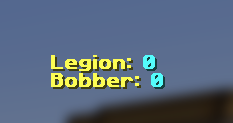
| Bobber Overlay | Track nearby bobbers |
| Legion Overlay | Track nearby players for Legion buff |
| Pickup Log Overlay | Log of picked up items (like SBA/SH) |
| Waypoints From Chat | Auto-create waypoints from coordinates in chat |
| Hide Own Waypoints | Hide waypoints you created |
| Phoenix Announcer | On-screen alert when dropping Phoenix pet |
| Message Hiders | Hide Diana, AutoPet, Implosion, or Sack messages |
Party Commands
| Command | Description |
|---|---|
!w / !warp |
Warp party |
!allinv / !allinvite |
Invite all |
!transfer |
Transfer party (to self or specified player) |
!promote / !demote |
Promote/demote party member |
!carrot |
Ask for carrot |
!time |
Send time in party |
!tps |
Send server TPS |
!chim |
Share chimera stats |
!inq |
Share inq stats |
!relic |
Share relic stats |
!stick |
Share stick stats |
!since |
Share "since" stats |
!burrow |
Share burrow count |
!mob |
Share mob count |
Party Finder
| Feature | Description |
|---|---|
| Auto Invite | Auto-invite players meeting your requirements |
| Auto Requeue | Auto-requeue after a member leaves |
| Customizable UI | Scale text and icons |
Commands
SBO Commands
| Command | Aliases | Description |
|---|---|---|
/sboguis |
/sbomoveguis, /sbomove |
Move overlay GUIs |
/sbopf |
- | Open Party Finder |
/sboachievements |
- | View achievements |
/sbopastevents |
/sbopevents, /sbopde |
View past Diana events |
/sboclearburrows |
/sbocb |
Clear saved burrows |
/sboresetsession |
- | Reset Diana session |
/sboresetmayortracker |
- | Reset mayor tracker |
/sboresetstatstracker |
- | Reset stats tracker |
/sborequeue |
- | Requeue party finder |
/sbodequeue |
- | Dequeue party finder |
/sbocheckparty |
/sbocheckp, /sbocp |
Check party members |
/sbocheck [player] |
/sboc |
Check player's Diana stats |
/sboreloadstats |
- | Reload stats from data file |
/sbo |
- | Open main SBO menu |
/sbohelp |
- | Show help menu |
/sbots |
/sbotsound, sbotestsound |
Test a sound |
/sbodc |
/sbodropchances |
Show drop chances |
/sboKey [key] |
- | Set party finder key |
/sboClearKey |
- | Clear party finder key |
__sbo_run_clickable_action |
- | Internal click action |
Party Commands
Use in party chat (must be party leader or have permissions):
| Command | Description |
|---|---|
!chim |
Your chimera stats this event |
!inq |
Your inq stats |
!relic |
Your relic stats |
!stick |
Your stick stats |
!since |
Your "since" stats |
!burrow |
Your burrow count |
!mob |
Your mob count |
Keybinds
Configure in Minecraft Options → Controls → Key Binds → SBO:
| Keybind | Default | Description |
|---|---|---|
| Guess Warp | Not bound | Warp to current guess |
| Inquisitor Warp | Not bound | Warp to nearest inquisitor |
| General Warp | Not bound | Warp to both (whichever is closest) |
| Send Coords | Not bound | Send your coordinates to chat |
Note: Keybinds are set to
Unknownby default. Bind them in Minecraft's keybind settings.
Configuration
- Config Location:
config/sbo/ - Sounds Folder:
config/sbo/sounds/(add.oggfiles here) - GUI Editing: Use
/sboguisor the "Move GUI's" button in settings
All settings are accessible via:
- In-game: Mod Menu → SBO → Configure
- Command:
/sbo
Support
For help, bug reports, or feature requests, please join our Discord.
This mod is actively maintained—your feedback and contributions are welcome!
Available Versions
How to Install Skyblock Overhaul (SBO) on Your Client
Install the Mod Loader Locally
Install fabric for your local Minecraft version.
Download the Matching File
Choose the Skyblock Overhaul (SBO) file for fabric and Minecraft 26.2.
Install Mod
Place the .jar file in your local .minecraft/mods folder and restart Minecraft. No server-side installation is required.
Compatibility
Mod Loaders
Minecraft Versions
26.2, 26.1.2, 26.1.1 (+6 more)
Server-side
✗ UnsupportedRecommended RAM
4 GB(min. 3 GB)Frequently Asked Questions
Does Skyblock Overhaul (SBO) need to be installed on the Minecraft server?
No. Modrinth marks Skyblock Overhaul (SBO) as unsupported on the server side. Install it only in your local Minecraft mods folder. Your server can remain unchanged unless the mod page lists an additional dependency.
Which version and loader does Skyblock Overhaul (SBO) require?
Use a file for fabric and your exact Minecraft version. Supported versions include 26.2, 26.1.2, 26.1.1. Files for different loaders are not interchangeable.
Skyblock Overhaul (SBO) is not working – what should I check?
First check the Minecraft version, loader version and required dependencies. Put the .jar file in your local .minecraft/mods folder and remove older duplicates. Because this mod is client-side, adding server RAM will not fix it.
Minecraft Server for Your Group
Skyblock Overhaul (SBO) stays on your client. Host a compatible world for your group.