SkyBlock Profile Viewer
Modern Hypixel SkyBlock Profile Viewer
Screenshots
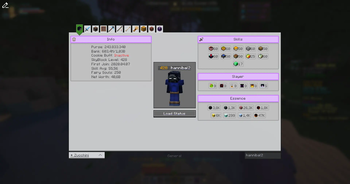
About this Mod
SkyBlock Profile Viewer


A Profile Viewer for Hypixel SkyBlock, developed with love and passion.
The Profile Viewer can be opened with /pv for your own Profile, or /pv <username> for someone else.
You can switch between the tabs using the buttons on the top of the UI.
If a tab has multiple categories, you can switch between them using the buttons on the left side of the UI..
Features
- Profile Spying: Adds a button into the Hypixel Profile Viewer to open this Profile Viewer.
- PronounDB: Integrates with PronounDB to display pronouns of the player.
- Party Finder: Sends a message to open the Profile Viewer for the player that just joined a party finder party.
- Replace Social Options: Replaces Hypixel's "Click to open social options" with "Click to open Profile Viewer" on chat messages.
- Scaling (Experimental): Automatically scales up some elements based on the player's screen size, to make it more readable on larger screens.
- and themes...
Themes
Comes built-in with two themes: Default (Light), Dark and NEU (transparent).
Quickly switch between them using the button in the top left corner of the UI.
Theme Showcase
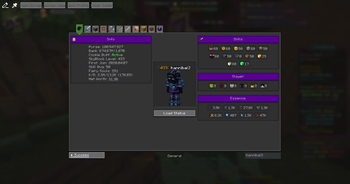
Dark Theme
 A dark mode theme for the profile viewer.
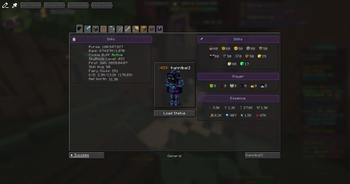
NEU Theme
 A transparent theme for the profile viewer, inspired by NEU's Profile Viewer.
You can also create your own theme, here's a guide:
Creating your own Theme
This needs to be done in a Texturepack.
In the Folder assets/skyblock-pv/themes/ create a new file called <theme_name>.json.
The json should have this layout:
{
    "name": "<theme_name>",
    "textures": {
        ...
    },
    "colors": {
        ...
    }
}
To "replace" a texture, you specify the path to the texture you want to replace as the key, and the path to your new texture as the value.
E.g., this replaces the normal button texture with a custom one:
{
    "name": "MyTheme",
    "textures": {
        "skyblock-pv:buttons/normal": "skyblock-pv:<theme>/buttons/normal"
    },
    "colors": {
        ...
    }
}
Some colors might look weird, as they look too similar to the background.
By default, it uses the minecraft colors.
The colors can either be in hex format or in decimal format.
{
    ...
    "colors": {
        "dark_gray": "#B5B5B5"
    }
}
Pages
🏠 Home Tab
 Designed to be simple and to show off the main aspects of the player's profile.
Designed with a purpose to be screenshot-able and shareable.
📦 Inventory Tab
 Switch between EnderChest, Backpack, ... pages using the custom build Carousel or the buttons up top.
📚 Collections Tab

🎣 Fishing Tab
 All fishing related information, so Essence Upgrades, Trophy Fish, Gear, Stats, ... in one tab.
🔍 And many more tabs...
...we just didn't put them in the ReadMe. Look at them when pv'ing yourself or someone else!
All Tabs
as of 2025-04-16
- Home
- Combat
- Dungeons
- Bestiary
- Crimson Isle
- Mob Kills
- Inventory
- Main Inventory
- Ender Chest
- Backpacks
- Wardrobe
- Accessory
- Sacks
- Personal Vault, Potion Bag, Fishing Bag, Quiver, Candy Bag, etc.
- Collections
- With Minions
- Mining
- Main Mining
- Mining Gear
- HotM
- Glacite
- Fishing
- Pets
- Farming
- Main Farming
- Visitors
- Crops
- Composter
- Museum
- Weapons
- Armor
- Chocolate Factory
- Rift
- Main Rift
- Inventory
- Ender Chest
Mod Compatibility
SkyBlocker
- Issue: SkyBlocker includes its own Profile Viewer.
- Resolution: We override their
/pvcommand with ours. If you prefer SkyBlocker's version, use/skyblocker pvinstead. - Note: We do not provide an option to disable this override, as using our mod implies a preference for our Profile Viewer.
Repository Access Issues
WARNING
If you are from Russia or another country where parts of the Internet are blocked, the mod may fail to initialize its external repositories.
Required Domains
Make sure the following domains are accessible through your VPN, Zapret, or any other bypass solution you are using:
https://skyblock-repo.pages.dev/https://skyblock-api-repo.thatgravyboat.tech/*.owdding.me/https://skyblock-pv.thatgravyboat.tech/
Configuring Zapret
If you are using Zapret, follow these steps:
- Open your Zapret installation directory.
- Navigate to the
listsfolder. - Open
list-general.txt. - Add the domains listed above.
- When adding them, remove everything before
//(including//) and remove the trailing/from each URL.
For example:
https://skyblock-repo.pages.dev/
should become
skyblock-repo.pages.dev
Available Versions
How to Install SkyBlock Profile Viewer on Your Client
Install the Mod Loader Locally
Install fabric for your local Minecraft version.
Download the Matching File
Choose the SkyBlock Profile Viewer file for fabric and Minecraft 26.3.
Install Mod
Place the .jar file in your local .minecraft/mods folder and restart Minecraft. No server-side installation is required.
Compatibility
Mod Loaders
Minecraft Versions
26.3, 26.2, 26.1.2 (+9 more)
Server-side
✗ UnsupportedRecommended RAM
4 GB(min. 3 GB)Frequently Asked Questions
Does SkyBlock Profile Viewer need to be installed on the Minecraft server?
No. Modrinth marks SkyBlock Profile Viewer as unsupported on the server side. Install it only in your local Minecraft mods folder. Your server can remain unchanged unless the mod page lists an additional dependency.
Which version and loader does SkyBlock Profile Viewer require?
Use a file for fabric and your exact Minecraft version. Supported versions include 26.3, 26.2, 26.1.2. Files for different loaders are not interchangeable.
SkyBlock Profile Viewer is not working – what should I check?
First check the Minecraft version, loader version and required dependencies. Put the .jar file in your local .minecraft/mods folder and remove older duplicates. Because this mod is client-side, adding server RAM will not fix it.
Similar Mods




![[ETF] Entity Texture Features](https://cdn.modrinth.com/data/BVzZfTc1/af683d206d50b05258d865b0d6e4aa2f2cee12f2_96.webp)

Minecraft Server for Your Group
SkyBlock Profile Viewer stays on your client. Host a compatible world for your group.