
Sleep Rework
Sleep Rework is a mod designed to fix some issues with Vanilla sleep mechanics
Screenshots

About this Mod
Sleep Rework
What
Sleep Rework is a mod designed do solve some issues I had with the Minecraft sleep system:
- Sleep is always available to the player, allowing them to avoid night, thus avoiding all potential challenge
- Sleep is almost required due to Phantoms
I know some people may disagree, so this mod may not be for you, but it is fairly configurable so you may be able to tweak it to your liking.
Requirements
Fabric Requires: Fabric API, Architectury API
Forge Requires: Architectury API
Community
Come join our Discord Server, if you have any questions, comment or suggestions. We love to see what people are doing with our mods.
Bug Reporting
Please report any bugs or issues in our Discord or on our Github Repository.
TL:DR
Here's the quick rundown:
- The player can not sleep until they reach 100% tiredness.
- Tiredness increases over time
- Potions can be brewed to speed up or slow down tiredness accumulation
- Phantoms will start to spawn when the player reaches 300% (by default) tiredness
Mechanics
Tiredness
Tiredness is a value attached to every player.
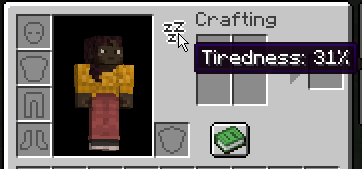
Your current Tiredness level can be seen within your inventory by hovering over the "Zzz" icon.
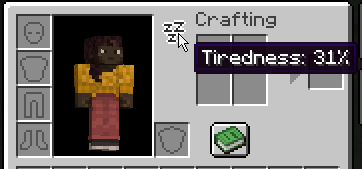
When your Tiredness level reaches 100%, you will be able to sleep. At 0 - 99%, you will recieved a "You may not rest now; You are not tired enough" message when attempting to use a bed.

After successfully sleeping, your tiredness will be reset to 0%.
The maximum level of Tiredness is 500%.
Phantoms
When your tiredness level reaches 300% (by default), Phantoms have a chance to spawn on you.
As your tiredness level increases, more Phantoms will spawn at once.
Potions
Sleep Rework adds two new types of potion:
Liveliness
Liveliness will decrease your Tiredness gain by 0.5x (by default) per potion level.
Liveliness Potions can be brewed with an Awkward Potion and a Honeycomb.
Drowsiness
Drowsiness will increase your Tiredness gain by 2x (by default) per potion level.
Drowsiness Potions can be brewed by corrupting a Liveliness Potion with a Fermented Spider Eye
See More on our Mechanics wiki page
Configuration
Available Versions
How to Install Sleep Rework on Your Server
Order Server
Order a Minecraft Java server with at least 3 GB RAM (4 GB recommended).
Set fabric Loader
In the panel under "Egg", select the fabric loader and matching Minecraft version (1.20.1).
Install Mod
Open the mod browser in the dashboard and search for "Sleep Rework". Click "Install" – done! Alternatively, upload the .jar via SFTP to the /mods folder.
Compatibility
Mod Loaders
Minecraft Versions
1.20.1, 1.20
Server-side
✓ RequiredRecommended RAM
4 GB(min. 3 GB)Frequently Asked Questions
Sleep Rework server crashes on startup – what to do?
Most common cause: wrong fabric version or insufficient RAM. Check the server log (latest.log) for "OutOfMemoryError" or "Mixin" errors. With Mado Hosting: ensure at least 3 GB RAM is allocated and the loader matches the mod version (1.20.1). You can switch loaders with one click in the panel.
Is Sleep Rework compatible with fabric and forge and neoforge?
Sleep Rework officially supports fabric, forge, neoforge for Minecraft 1.20.1, 1.20. Note: Forge and Fabric mods are NOT cross-compatible – pick one loader and stick with it. The Mado dashboard automatically detects incompatible loader combinations.
Server lagging with Sleep Rework – how to optimize performance?
Recommended RAM: 4 GB (per 8 players). Use /spark profiler to check if Sleep Rework consumes the most tick time. Common fixes: reduce server view-distance to 8-10, install "performant" or "starlight" as supplementary mods on Forge. With Mado Hosting, your server runs on NVMe SSDs with dedicated CPU cores for minimal latency.
Similar Mods






Rent Modded Server
Install Sleep Rework with just one click on your server.