
Sort It Out!
A capable inventory sorting mod that works either client-side or server-side
About this Mod
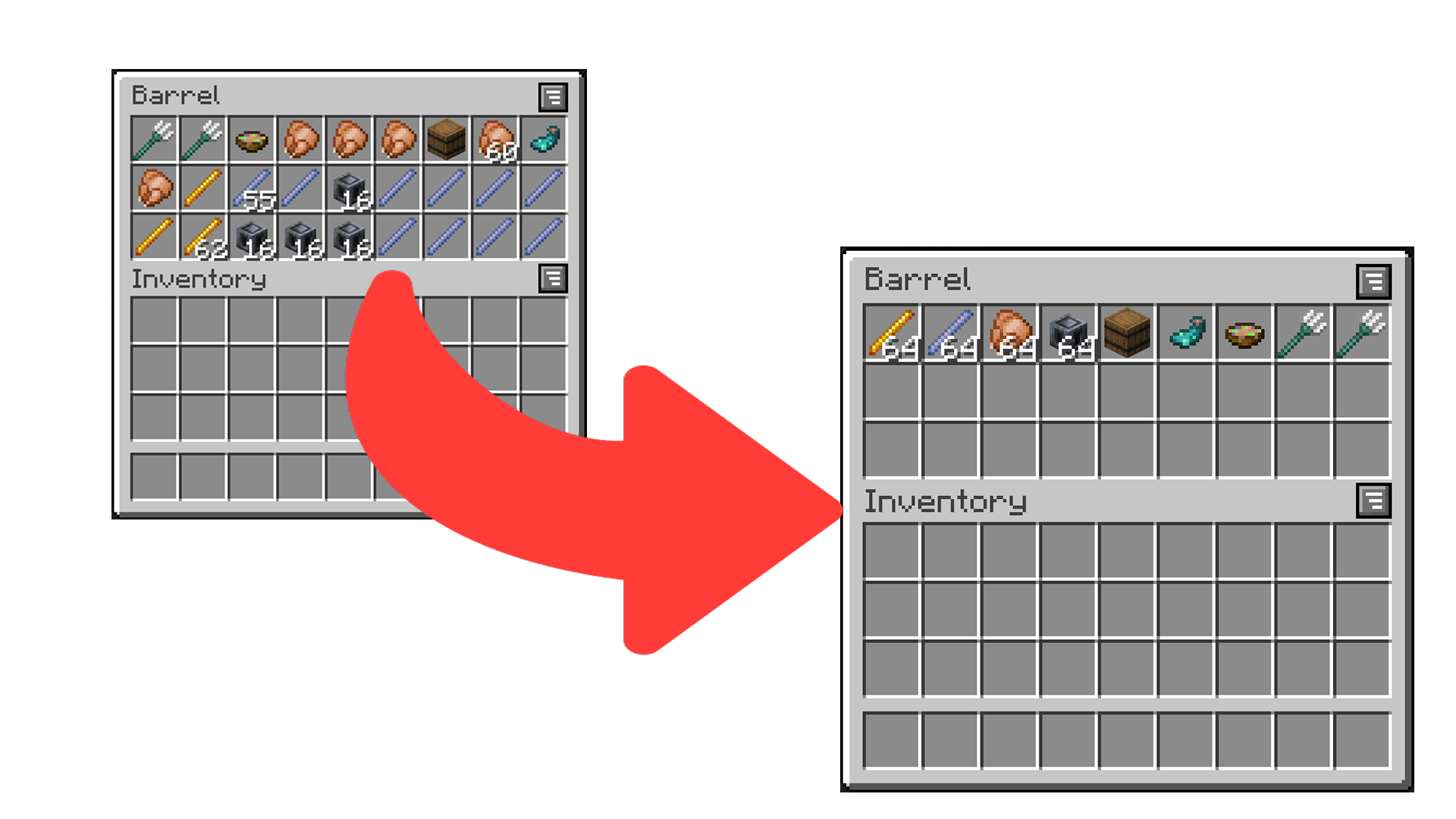
Sort It Out! is an inventory sorting mod that:
- has configurable sorting;
- works when installed only on the server (even with vanilla clients!);
- works when installed only on the client;
- and allows data-driven custom sort button locations.
How to Use
There are multiple ways to trigger sorting:
- Double-click an empty slot (configurable) (client or server).
- Click the sort button (client only).
- Press the sort keybind (default is
I) (client only).
How to Configure
Sort It Out! can be configured via an in-game configuration screen which can be accessed in Mod Menu (Fabric/Quilt) or the mods screen (Forge/NeoForge). In the case that the mod is not installed on the clientside, players can use the /sortitout preferences command to view and update their preferences (which will persist across rejoins and server restarts).
Packet Send Interval: defines the interval, in ticks, at which packets are sent when sorting on the client side (this will not take effect if the mod is installed on the serverside). Too low of an interval may cause a server to kick you.Invert Sorting: whether to invert the sorting order.Comparators: a list of comparators to use when comparing item stacks. If the first comparator states that the stacks are equal, the second will be used to break the tie (and so on).Slot Sorting Trigger: the action to use to trigger a sort by clicking on a slot. Defaults to double clicking an empty slot, but can be set to clicking the offhand key when hovering a slot.
FAQ
Does this need to be installed on the server/client?
Sort It Out! works in any configuration - as long as the mod is installed on one of the server or the client.
- Server only: any player without the mod (even vanilla clients) will be able to double-click to sort (by default) and use
/sortitoutto change their preferences. - Client only: players can join any server regardless of whether the server has the mod and will be able to double-click or use the sort buttons to sort. The config screen can be used to change preferences.
- Server and Client (recommended): players can sort using double-click or the sort buttons. The command or config screen can be used to change preferences.
How do I configure the location of sort buttons in screens?
See the docs page here.
I think I found a bug!
Report any issues you find on the GitHub issue tracker.
Available Versions
How to Install Sort It Out! on Your Server
Order Server
Order a Minecraft Java server with at least 3 GB RAM (4 GB recommended).
Set fabric Loader
In the panel under "Egg", select the fabric loader and matching Minecraft version (26.3).
Install Mod
Open the mod browser in the dashboard and search for "Sort It Out!". Click "Install" – done! Alternatively, upload the .jar via SFTP to the /mods folder.
Compatibility
Mod Loaders
Minecraft Versions
26.3, 26.2, 26.1.2 (+15 more)
Server-side
~ OptionalRecommended RAM
4 GB(min. 3 GB)Frequently Asked Questions
Sort It Out! server crashes on startup – what to do?
Most common cause: wrong fabric version or insufficient RAM. Check the server log (latest.log) for "OutOfMemoryError" or "Mixin" errors. With Mado Hosting: ensure at least 3 GB RAM is allocated and the loader matches the mod version (26.3). You can switch loaders with one click in the panel.
Is Sort It Out! compatible with fabric and forge and neoforge?
Sort It Out! officially supports fabric, forge, neoforge for Minecraft 26.3, 26.2, 26.1.2. Note: Forge and Fabric mods are NOT cross-compatible – pick one loader and stick with it. The Mado dashboard automatically detects incompatible loader combinations.
Server lagging with Sort It Out! – how to optimize performance?
Recommended RAM: 4 GB (per 8 players). Use /spark profiler to check if Sort It Out! consumes the most tick time. Common fixes: reduce server view-distance to 8-10, install "performant" or "starlight" as supplementary mods on Forge. With Mado Hosting, your server runs on NVMe SSDs with dedicated CPU cores for minimal latency.
Similar Mods






Rent Modded Server
Install Sort It Out! with just one click on your server.