
Stendhal
Stendhal is a client-side Fabric mod offering new and enhanced visual utilities for books, signs, anvil and the in-game chat.
Screenshots


About this Mod
⚠️ Some newer features might be unavailable if you use older Minecraft versions (1.16, 1.17).
⚠️ This mod is exclusive to Fabric. There is/will be no Forge version. Take a look at the FAQ below for an alternative.
❤ Description ❤
Stendhal is a client-side Fabric mod offering new and enhanced visual utilities for books, signs, anvil and the in-game chat.
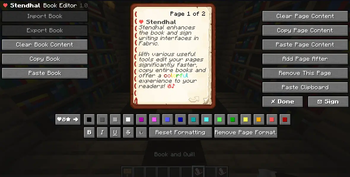
All the vanilla GUIs (screens) for Book & Quills, Books, Anvils and Signs have been reworked, with quick access to various tools (import & export books and signs to/from disk, copy entire page content, entire books or signs, clear a page or a book entirely in one click, ...), legacy colors and one-click away unicode characters!
On top of that, it also offers a quick access bar for unicode characters when opening the chat! You can also customize your nametags with these beautiful vanilla unicodes in any Anvil!
Impress your friends by using these unicode characters while talking to them, or give directions on signs in a beautiful way!
❤ Features ❤
Configuration options
- Available in many languages thanks to the community! Contribute to your language on my Discord Community!
- Access the detailed configuration file under .minecraft/.config/stendhal/stendhal.properties to change any option related to the mod
Book Editor
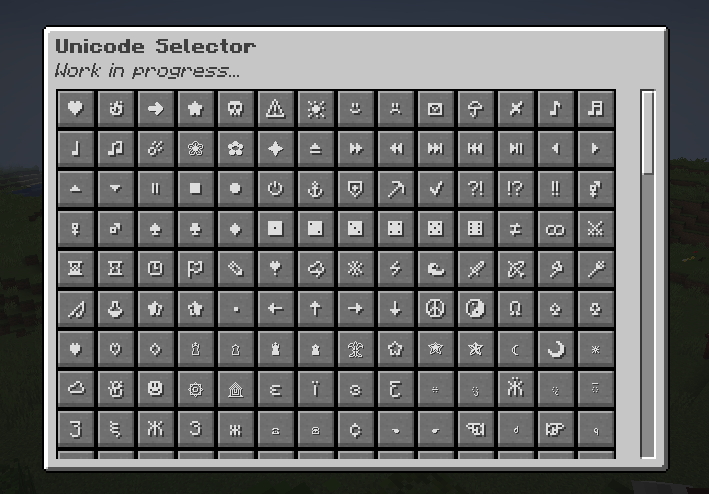
- (1.18) A Unicode (emote) picker to select any unicode supported by the in-game font!
- (1.18) Reading a signed book is now easier with page index navigation and search features. You can also export them to use their content in a Book & Quill again!
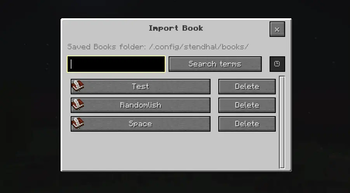
- (1.17) Import and Export books to the Minecraft folder to load your books on other worlds or servers!
- Copy, paste and clear page content in writable books
- Add and remove pages in one click
- Copy, paste and clear an entire book
- Choose among all the formatting and legacy colors options to customize your book
- Keep track of how many characters you typed on the bottom of each page to not go over the vanilla 256 characters limitation
- Add 70+ unicode characters to enhance your readers experience!
- Unsatisfied? Remove the page formatting in one click and start again!
Sign Editor
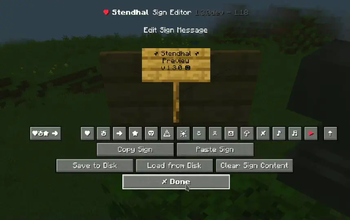
- (1.18) Import and Export signs to the Minecraft folder to load your books on other worlds or servers!
- (1.17) Quickly copy and paste entire signs on the same world/server is now a two-click process!
- Use 70+ unicode characters to customize your signs
- Unsatisfied with what you wrote? Clear the sign in one click and start writing again!
Chat & Anvil Utilities
- Use 70+ unicode characters to talk to your friends in a more lively way, or with customized item names!
❤ FAQ ❤
Q: Does this mod allow anyone that did not install Stendhal to see the books and signs modified with it?
A: Yes! This mod is entirely client-side, meaning anyone with or without the mod will see the modifications done by it. It only takes advantages of hidden vanilla features and exposes them to the users without doing any breaking changes.
Q: Can I use your mod in/for my modpack/datapack?
A: Please do! A credit would be appreciated in your modlist.
Simply do not appropriate yourself this mod.
Q: Will this mod ever come to Forge?
A: No! This mod is intended to push a little forward the Fabric community, and this is my choice to explicitly not make it available to another mod loader for the time being.
However, Ghostwriter is a solid alternative for Forge and the book editing part.
Q: Where can I find the source code of the project?
A: As of now, nowhere. This project has been a precious opportunity to make myself comfortable again with Java and a good learning process for modding, as much as I would love some help and see how people could contribute in amazing ways, I still want to practice and learn more for future mods.
I don't exclude opening the source code later down the line!
Q: Why is your mod named "Stendhal"?
A: Glad you are wondering! Marie-Henri Stendhal was a renowned French writer born in the 19th century in my hometown in France.
❤ Upcoming Updates ❤
Stendhal is being actively developed and ported to newer Minecraft versions over time.
If you would like to give suggestion and follow the development more actively, please join my Discord Community
❤ Community ❤
You can join me on my Discord Community to discuss about Stendhal alongside my various projects, whether they are linked to Minecraft modding or not!
If you would like, feel free to support me on Ko-Fi, it would make me really happy and motivated!

Available Versions
How to Install Stendhal on Your Client
Install the Mod Loader Locally
Install fabric for your local Minecraft version.
Download the Matching File
Choose the Stendhal file for fabric and Minecraft 26.3.
Install Mod
Place the .jar file in your local .minecraft/mods folder and restart Minecraft. No server-side installation is required.
Compatibility
Mod Loaders
Minecraft Versions
26.3, 26.2, 26.1.2 (+28 more)
Server-side
✗ UnsupportedRecommended RAM
4 GB(min. 3 GB)Frequently Asked Questions
Does Stendhal need to be installed on the Minecraft server?
No. Modrinth marks Stendhal as unsupported on the server side. Install it only in your local Minecraft mods folder. Your server can remain unchanged unless the mod page lists an additional dependency.
Which version and loader does Stendhal require?
Use a file for fabric and your exact Minecraft version. Supported versions include 26.3, 26.2, 26.1.2. Files for different loaders are not interchangeable.
Stendhal is not working – what should I check?
First check the Minecraft version, loader version and required dependencies. Put the .jar file in your local .minecraft/mods folder and remove older duplicates. Because this mod is client-side, adding server RAM will not fix it.
Similar Mods




![[ETF] Entity Texture Features](https://cdn.modrinth.com/data/BVzZfTc1/af683d206d50b05258d865b0d6e4aa2f2cee12f2_96.webp)

Minecraft Server for Your Group
Stendhal stays on your client. Host a compatible world for your group.
Details
- License
- Creative Commons Attribution Non Commercial No Derivatives 4.0 International
- Server-side
- Unsupported