
Terracart – Terrain Cart
Vanilla-friendly drivable cart, smooth movement, colors, fuel & repairs, HUD, sounds & particles.
Screenshots
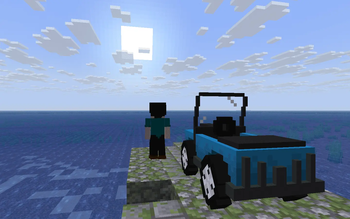
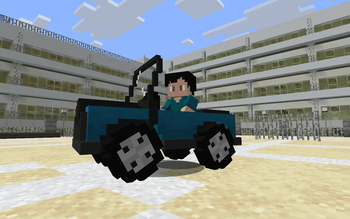
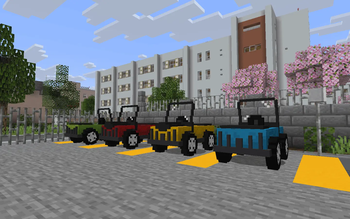
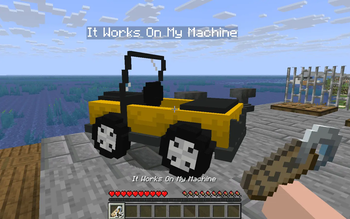
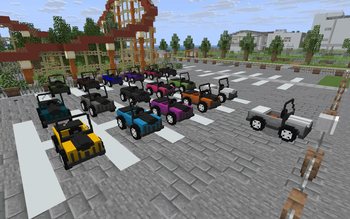
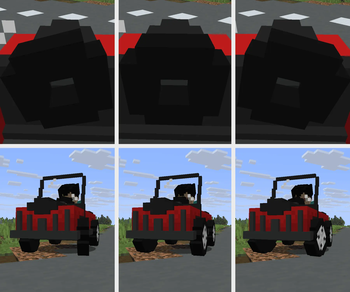
About this Mod


Terracart – Terrain Cart (v2.0)
Vanilla-friendly drivable cart — hop in, refuel with coal, repair with iron, choose one of 16 colors, name it with a nametag, and travel around your world.
✨ Features
- Drive: Rideable cart with smooth movement.
- Name Tag Support: Customize your vehicle by giving it a name.
- Model & Animations: High-quality vehicle model featuring full moving, steering, and turning animations.
- Fuel: Consumes fuel only while moving; refuel using coal.
- Repair: Vehicles take damage from hits and crashes; repair them using iron.
- Colorful: Personalize your ride with one of 16 colors.
- Survival Balance: Designed from the ground up to feel like a natural vanilla survival feature.
- HUD: On-ride HUD-BOX clearly displays your *speed / fuel / health*.
- Sound & Particles: Immersive custom sounds and impact particles for clear gameplay feedback.
- Damage: Run down enemies by dealing impact damage to mobs.
- Vanilla-Friendly: Built to fit perfectly alongside classic Minecraft mechanics.
🎮 How to use
- Craft the Terracart and choose a color (optional) before placing it.
- Smelt a colored cart in a furnace to return it to the default cart item.
- Note: carts do not drop themselves. To change color you must craft a new cart (or smelt before placing).
- Right-click to mount.
- Use normal movement keys to drive.
- Use a name tag to name the vehicle.
- Refuel with coal.
- Repair with iron.
- If the cart is destroyed, collect dropped materials and rebuild.
- Travel around your world and have fun.
🖼️ Gallery
Screenshots taken on the Umihara City map by Shiomate — huge thanks!
Map: Umihara City 海原 — Creator: Shiomate
📌 Notes
- Flashback: Carts will appear stuttering during recorded replay playback.
- Debugify: Enabling the fix for MC-259512 causes the cart to stutter while turning (Debugify right now mistakenly shows the tooltip "Increased input delay when riding an entity", while it should be "Horizontal camera rotation lags when riding").
- A Friendly Reminder: Please drive safe and build a smooth path or track for a better journey!
Available Versions
How to Install Terracart – Terrain Cart on Your Server
Order Server
Order a Minecraft Java server with at least 3 GB RAM (4 GB recommended).
Set fabric Loader
In the panel under "Egg", select the fabric loader and matching Minecraft version (26.3).
Install Mod
Open the mod browser in the dashboard and search for "Terracart – Terrain Cart". Click "Install" – done! Alternatively, upload the .jar via SFTP to the /mods folder.
Compatibility
Mod Loaders
Minecraft Versions
26.3, 26.2, 26.1.2 (+3 more)
Server-side
✓ RequiredRecommended RAM
4 GB(min. 3 GB)Frequently Asked Questions
Terracart – Terrain Cart server crashes on startup – what to do?
Most common cause: wrong fabric version or insufficient RAM. Check the server log (latest.log) for "OutOfMemoryError" or "Mixin" errors. With Mado Hosting: ensure at least 3 GB RAM is allocated and the loader matches the mod version (26.3). You can switch loaders with one click in the panel.
Is Terracart – Terrain Cart compatible with fabric?
Terracart – Terrain Cart officially supports fabric for Minecraft 26.3, 26.2, 26.1.2. The Mado dashboard automatically detects incompatible loader combinations.
Server lagging with Terracart – Terrain Cart – how to optimize performance?
Recommended RAM: 4 GB (per 8 players). Use /spark profiler to check if Terracart – Terrain Cart consumes the most tick time. Common fixes: reduce server view-distance to 8-10, install "performant" or "starlight" as supplementary mods on Forge. With Mado Hosting, your server runs on NVMe SSDs with dedicated CPU cores for minimal latency.
Similar Mods






Rent Modded Server
Install Terracart – Terrain Cart with just one click on your server.