
The One Probe
TOP, a WAILA alternative that shows information about what you're looking at
Screenshots
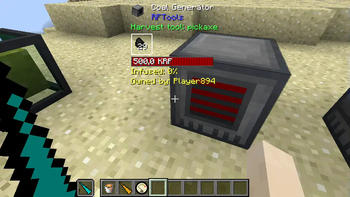
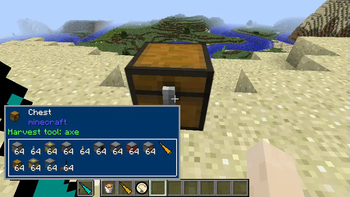
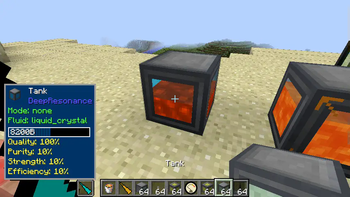
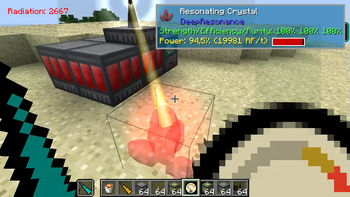
About this Mod
The One Probe
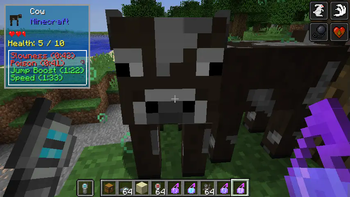
The One Probe (or TOP in short) is a more immersive version of WAILA. You don't get to see the information tooltip all the time but only when you have the probe in your hand (note that this mod can be configured to show the information all the time just like WAILA).
Note! The One Probe is NOT a client-only mod! It must be present on the server too!
Note! This mod works on 1.10.2 and 1.11.2 with the same JAR and requires CompatLayer
The 1.12 version is separate and does not require CompatLayer.
The purpose of this mod is to show on-screen information about the block you are looking at whenever you hold the probe in your hand (or off-hand). The mod itself will show basic information like the name of the block, the mod for the block and also the tool to use for harvesting the block. In addition this mod will also show the amount of RF energy that is stored in the block (if the block supports RF) and if you are sneaking it will also give a list of all items that are in the block if it is an inventory (like a chest).
This mod is very configurable so you can disable all the features mentioned above if they do not fit your playing style or modpack.
API
This mod also has a flexible API that other mods can use to add more information. Deep Resonance will use this mod to show information about the crystals and liquids. RFTools will also have support for this mod. The API can be found here.
See the wiki for more information.
Modpacks
You are free to use this mod in any modpack
Available Versions
How to Install The One Probe on Your Server
Order Server
Order a Minecraft Java server with at least 3 GB RAM (4 GB recommended).
Set fabric Loader
In the panel under "Egg", select the fabric loader and matching Minecraft version (26.2).
Install Mod
Open the mod browser in the dashboard and search for "The One Probe". Click "Install" – done! Alternatively, upload the .jar via SFTP to the /mods folder.
Compatibility
Mod Loaders
Minecraft Versions
26.2, 26.1.2, 1.21.11 (+36 more)
Server-side
✓ RequiredRecommended RAM
4 GB(min. 3 GB)Frequently Asked Questions
The One Probe server crashes on startup – what to do?
Most common cause: wrong fabric version or insufficient RAM. Check the server log (latest.log) for "OutOfMemoryError" or "Mixin" errors. With Mado Hosting: ensure at least 3 GB RAM is allocated and the loader matches the mod version (26.2). You can switch loaders with one click in the panel.
Is The One Probe compatible with fabric and forge and neoforge?
The One Probe officially supports fabric, forge, neoforge for Minecraft 26.2, 26.1.2, 1.21.11. Note: Forge and Fabric mods are NOT cross-compatible – pick one loader and stick with it. The Mado dashboard automatically detects incompatible loader combinations.
Server lagging with The One Probe – how to optimize performance?
Recommended RAM: 4 GB (per 8 players). Use /spark profiler to check if The One Probe consumes the most tick time. Common fixes: reduce server view-distance to 8-10, install "performant" or "starlight" as supplementary mods on Forge. With Mado Hosting, your server runs on NVMe SSDs with dedicated CPU cores for minimal latency.
Similar Mods




![[ETF] Entity Texture Features](https://cdn.modrinth.com/data/BVzZfTc1/af683d206d50b05258d865b0d6e4aa2f2cee12f2_96.webp)

Rent Modded Server
Install The One Probe with just one click on your server.