
Ultris: Boss Expansion
Explore 8 new and exciting bosses to take on across your world, with new structures, items, and stories for you to unravel.
Screenshots
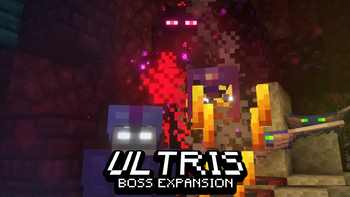
About this Mod
note: older and currently unmaintained project!
If using the Datapack version, I recommend installing the >> Optional Resourcepack <<
Ultris has a Discord Server for getting help and discussing my mods! Click here to join.
About:
Ultris is a Minecraft Boss Expansion datapack that expands Minecraft with 8 new exciting bosses to take on, each with their own quests and rewards. Explore multiple new boss structures, special items, and new foes for you to take on.
Unique boss patterns, boss music, stages, sounds and visuals all come together to create these awesome bosses, from bosses that can spawn early game, to bosses for the end game player.
To summon the bosses with cheats, use /function 1_splatus:ultris/admin_menu and select the option "Summon Bosses"
Wiki:
Click here to visit the Ultris Wiki!
To view more info on bosses, you can check out the Ultris wiki by clicking the link above.
The Wiki is not complete, but it can be completed faster with your help! If you'd like to contribute to the wiki, join my Discord Server, ping @limesplatus#4730 and I'll allow you access to editing.
Commands:
/function 1_splatus:ultris/admin_menu
License
For view of the entire license, click here. In summary, just dont republish this project or send modified copies to other people. You may modify it in singleplayer or in your own server. You are free to add this to modpacks as well.
Only one file is permitted to be edited in a public modpack, that being the mod's default settings file. This is helpful for modpack devs if they want certain features disabled from one of my mods. Join my discord if you need help locating this mod's default settings file.

Join the Discord Server to chat, discuss, and get help with my mods!

Help support the making of my datapacks with memberships or donations on Ko-fi!
https://ko-fi.com/limesplatus/tiers
Credits:
Creator/Programmer: • LimeSplatus#4730
Blaze King Music + Unused Shulker Stone Music: • humanoid#9099
Optimization Help: • Holmes (iRedSC)#0281
Multiple Blaze King Tower Rooms By:
• the game master#0666 ,
• Just Fan Account#2495
• Frektip#4587
• Churner#6711
How to Install Ultris: Boss Expansion on Your Server
Order Server
Order a Minecraft Java server with at least 3 GB RAM (4 GB recommended).
Set datapack Loader
In the panel under "Egg", select the datapack loader and matching Minecraft version (1.20.1).
Install Mod
Open the mod browser in the dashboard and search for "Ultris: Boss Expansion". Click "Install" – done! Alternatively, upload the .jar via SFTP to the /mods folder.
Compatibility
Mod Loaders
Minecraft Versions
1.20.1, 1.20, 1.19.4 (+4 more)
Server-side
✓ RequiredRecommended RAM
4 GB(min. 3 GB)Frequently Asked Questions
Ultris: Boss Expansion server crashes on startup – what to do?
Most common cause: wrong datapack version or insufficient RAM. Check the server log (latest.log) for "OutOfMemoryError" or "Mixin" errors. With Mado Hosting: ensure at least 3 GB RAM is allocated and the loader matches the mod version (1.20.1). You can switch loaders with one click in the panel.
Is Ultris: Boss Expansion compatible with datapack and fabric and forge and quilt?
Ultris: Boss Expansion officially supports datapack, fabric, forge, quilt for Minecraft 1.20.1, 1.20, 1.19.4. Note: Forge and Fabric mods are NOT cross-compatible – pick one loader and stick with it. The Mado dashboard automatically detects incompatible loader combinations.
Server lagging with Ultris: Boss Expansion – how to optimize performance?
Recommended RAM: 4 GB (per 8 players). Use /spark profiler to check if Ultris: Boss Expansion consumes the most tick time. Common fixes: reduce server view-distance to 8-10, install "performant" or "starlight" as supplementary mods on Forge. With Mado Hosting, your server runs on NVMe SSDs with dedicated CPU cores for minimal latency.
Similar Mods




Rent Modded Server
Install Ultris: Boss Expansion with just one click on your server.