
VexBot
Super smart Minecraft bots For PvP In any gamemode.
Screenshots

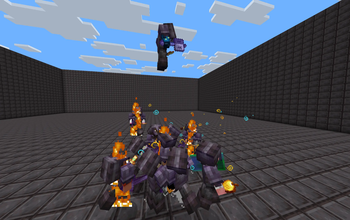
About this Mod


PvP Styles
- Sword
- Axe
- Shield
- Crossbow & Bow
- Cobweb (Toggleable)
- Potions
- TnT Minecart PvP (Toggleable)
- Crystal PvP
- Anchor PvP
- Wind Charge Macing
- Elytra mace
- Spear Mace
- Orbital Strike Cannon
- Trident Mace
Techniques
- Crit Chaining
- Combing
- Sweeping Hit
- W Tapping
- Cooldown Trick
- Stun Slam
- Jump Resets
- Peak Crit
- Mirror Punsish
- Pearl Chasing
- Hit Select
- Cooldown Trick
- 2 Tick Stun Slamming
- D Tapping
- Hit Selecting
- Hit Web
- Pearl Catch
- Windcharge Pearl Catch
- Punish Crits
- Strafing
- Smart Healing
- Mace-landing totem (holds totem in the main hand when someone is about to mace them)
- Restocking and regearing from shulkers and ender chests, loot packing, elytra regear
Pathfinding & Ai
- Avoids Obstacles
- Allways Takes the best route
- Revenge Mode
- Follow Mode
- Priority Targeting
- Auto Targeting (Configurable)
- Formation Follow
- Auto Avoids Webs
- Swimming
- Boat Crossing Over Water
- Tunneling
- Building To Targets
- Placing Blocks While Moving
- Ledge safety (won't walk off cliffs)
Other Features
- Record The Bots Pov
- FFA Mode
- Runs on Fabric and Paper servers (when using the paper version)
- Live stats page at mods.icondice.org/vexbot/stats
- Extensions: VexSim (Bounty Sim V3), VexTrial (wave survival), VexShop (shopkeeper bots) and VexPull, installed with /vexbot extensions pull
- Kits & kit IDs
- Random gear
- Nicknames and Custom Skins
- Custom Name Pools
- Null Portal Spawn
- Patrol Spesific Routes
Made By Vortexal2, Gooob21 and Epic_ATK
RIP JADEN_MAN
(wemmbu if u see this revive him or else)
Available Versions
How to Install VexBot on Your Server
Order Server
Order a Minecraft Java server with at least 3 GB RAM (4 GB recommended).
Set fabric Loader
In the panel under "Egg", select the fabric loader and matching Minecraft version (26.2).
Install Mod
Open the mod browser in the dashboard and search for "VexBot". Click "Install" – done! Alternatively, upload the .jar via SFTP to the /mods folder.
Compatibility
Mod Loaders
Minecraft Versions
26.2, 26.1.2, 1.21.11 (+11 more)
Server-side
✓ RequiredRecommended RAM
4 GB(min. 3 GB)Frequently Asked Questions
VexBot server crashes on startup – what to do?
Most common cause: wrong fabric version or insufficient RAM. Check the server log (latest.log) for "OutOfMemoryError" or "Mixin" errors. With Mado Hosting: ensure at least 3 GB RAM is allocated and the loader matches the mod version (26.2). You can switch loaders with one click in the panel.
Is VexBot compatible with fabric and paper?
VexBot officially supports fabric, paper for Minecraft 26.2, 26.1.2, 1.21.11. The Mado dashboard automatically detects incompatible loader combinations.
Server lagging with VexBot – how to optimize performance?
Recommended RAM: 4 GB (per 8 players). Use /spark profiler to check if VexBot consumes the most tick time. Common fixes: reduce server view-distance to 8-10, install "performant" or "starlight" as supplementary mods on Forge. With Mado Hosting, your server runs on NVMe SSDs with dedicated CPU cores for minimal latency.
Similar Mods



![[TaCZ] Timeless and Classics Zero](https://cdn.modrinth.com/data/SzzJttH8/fd27766d2bb8390d284696b1dbd358f87e081439_96.webp)


Rent Modded Server
Install VexBot with just one click on your server.