Voice Messages
Voice messages in minecraft chat
About this Mod
Voice messages
Mod and plugin that adds voice messages to the Minecraft.
Requires Simple Voice Chat installed.
Good to know
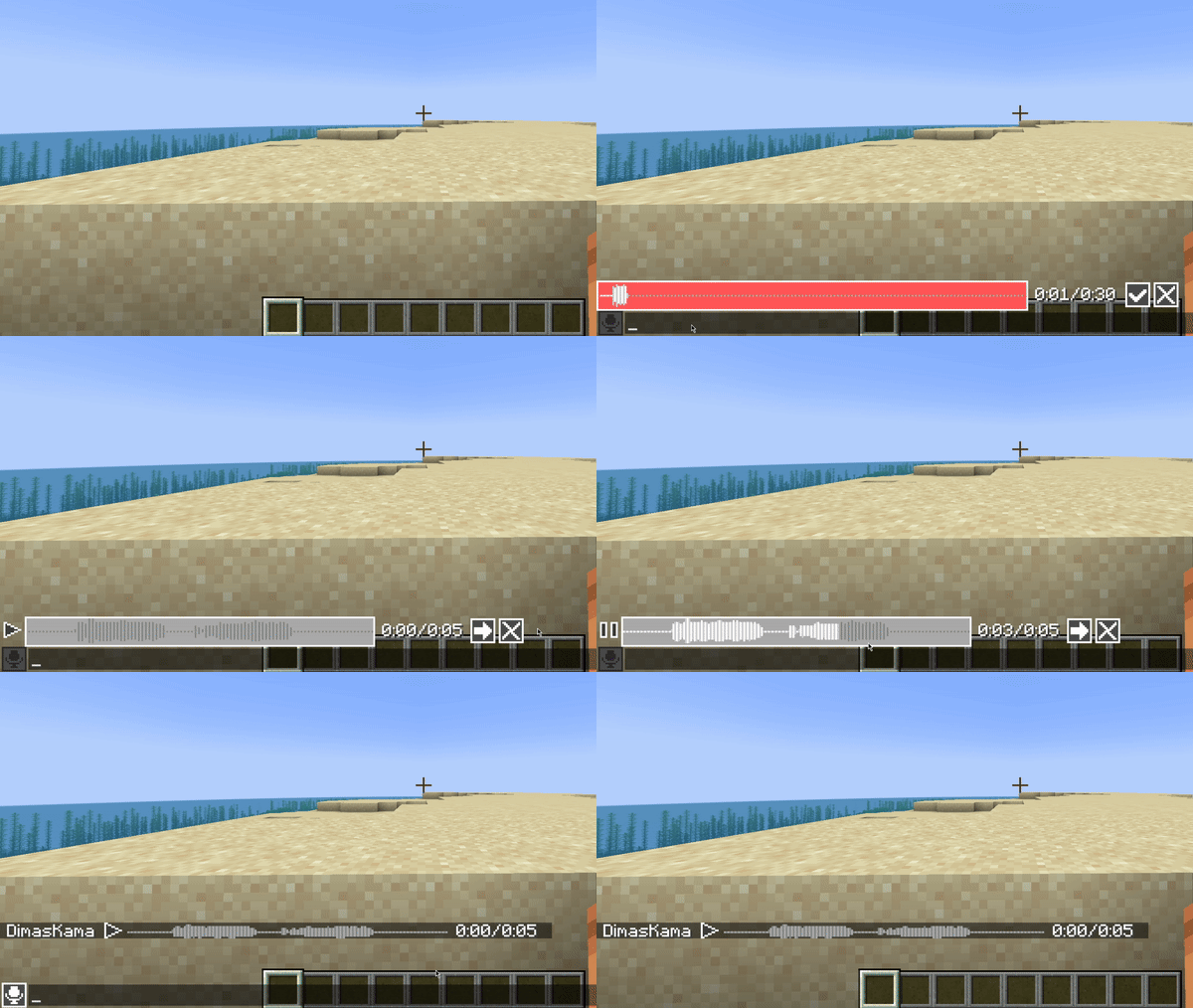
This mod must be installed both on server and client to work. If a player does not have this mod installed, he will not see voice messages.
This mod uses the microphone configured in Simple Voice Chat with all its settings. So make sure that Voice Amplification in Simple Voice Chat settings is not set to -100%.
Also, if voicechat sounds are disabled, you will not hear voice messages.
Private voice messages
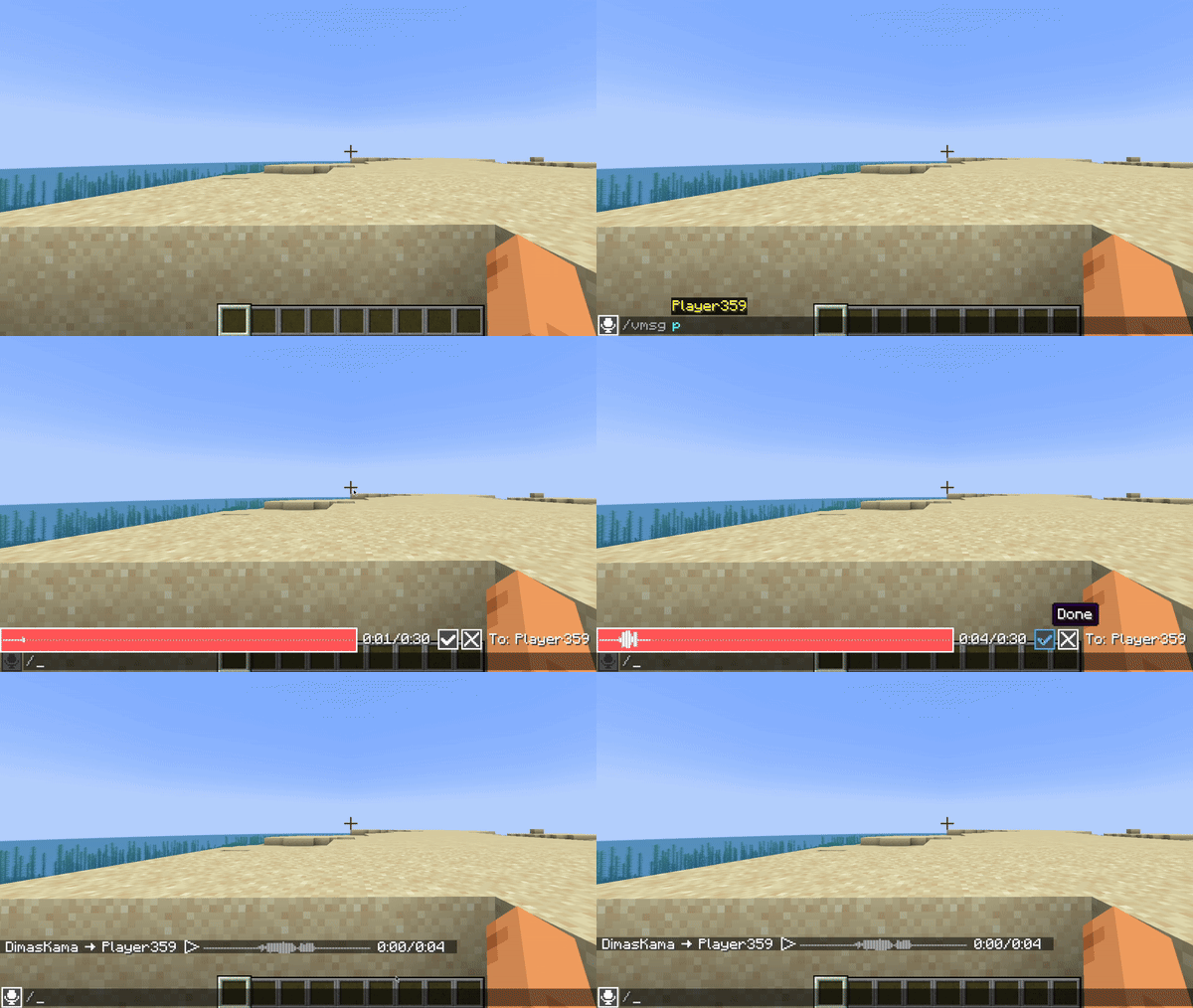
You can send private voice messages to players or to your team with /voicemsg <target> or /vmsg <target> commands.
Note that server can restrict you from sending them by permissions
Setup on server
Config
Server config is located in config/voicemessages_server.json
Here are the default values with their descriptions:
{
  "max_voice_message_duration_ms": 90000,  // The maximum voice message length in milliseconds in range [3_000;300_000]
  "voice_message_spam_punishment": "none", // The punishment for sending a voice message longer than the time elapsed since the sending previous one. Possible values: "none", "prevent", "kick"
  "voice_message_invalid_punishment": "prevent", // The punishment for sending an invalid voice message (longer than maximum configured) or sending a voice message without permission for it. Possible values: "none", "prevent", "kick"
  "mod_required": false,                         // If true, joining players will be kicked if they don't have this mod installed
  "mod_not_installed_text": "VoiceMessages is not installed or is of an old version" // The kick message for players that don't have this mod installed
}
Permissions
voicemessages.send- permission to send voice messages. Default:truevoicemessages.send.all- permission to send voice messages to global chat. Default:truevoicemessages.send.team- permission to send private voice messages to player's team. Default:truevoicemessages.send.players- permission to send private voice messages to players. Default:true
API
This mod has its own API.
Setup in build.gradle:
repositories {
    // Other repositories

    maven {
        name "dimaskama"
        url "https://maven.dimaskama.net/releases"
    }
}

dependencies {
    // Other dependencies

    // Voice Messages API
    compileOnly "ru.dimaskama.voicemessages:voicemessages-api:${voicemessages_api_version}"
}
Available Versions
How to Install Voice Messages on Your Server
Order Server
Order a Minecraft Java server with at least 3 GB RAM (4 GB recommended).
Set bukkit Loader
In the panel under "Egg", select the bukkit loader and matching Minecraft version (26.3).
Install Mod
Open the mod browser in the dashboard and search for "Voice Messages". Click "Install" – done! Alternatively, upload the .jar via SFTP to the /mods folder.
Compatibility
Mod Loaders
Minecraft Versions
26.3, 26.2, 26.1.2 (+12 more)
Server-side
✓ RequiredRecommended RAM
4 GB(min. 3 GB)Frequently Asked Questions
Voice Messages server crashes on startup – what to do?
Most common cause: wrong bukkit version or insufficient RAM. Check the server log (latest.log) for "OutOfMemoryError" or "Mixin" errors. With Mado Hosting: ensure at least 3 GB RAM is allocated and the loader matches the mod version (26.3). You can switch loaders with one click in the panel.
Is Voice Messages compatible with bukkit and fabric and folia and neoforge and paper and purpur and quilt and spigot?
Voice Messages officially supports bukkit, fabric, folia, neoforge, paper, purpur, quilt, spigot for Minecraft 26.3, 26.2, 26.1.2. The Mado dashboard automatically detects incompatible loader combinations.
Server lagging with Voice Messages – how to optimize performance?
Recommended RAM: 4 GB (per 8 players). Use /spark profiler to check if Voice Messages consumes the most tick time. Common fixes: reduce server view-distance to 8-10, install "performant" or "starlight" as supplementary mods on Forge. With Mado Hosting, your server runs on NVMe SSDs with dedicated CPU cores for minimal latency.
Similar Mods




Rent Modded Server
Install Voice Messages with just one click on your server.