
Wabi-Sabi Structures
A collection of unique, quality structures based on the Wabi-Sabi philosophy
Screenshots
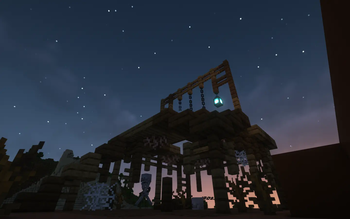
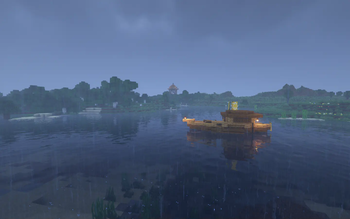
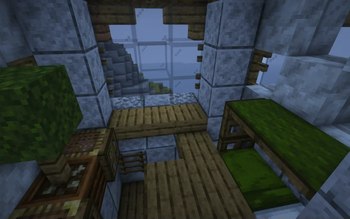
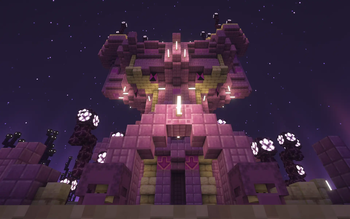
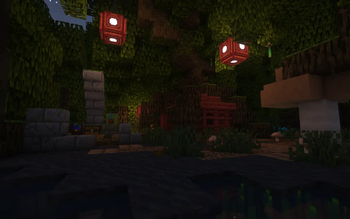
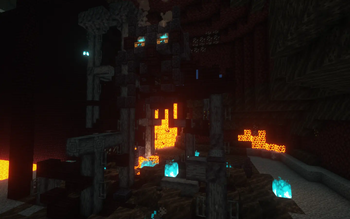
About this Mod

Wabi-Sabi Structures adds a plethora of new structures that generate throughout your Minecraft world, all designed with the Japanese philosophy of "Wabi-Sabi" in mind - embracing imperfection while still being aesthetically interesting.
Our structures uniquely complement Minecraft's generation with little extra spices. Expect anything from patches of natural crops, to various cozy cabins, degraded stables, dangerous towers, ominous monoliths, underground eggs of mysterious creatures, and more. Our aim is to provide newfound excitement in exploring new terrain, in a way that allows each world, biome, and dimension to have enhanced variety.
Features
Currently, Wabi-Sabi Structures contains over 70 new structures, including several in the Nether and End. Variants, loot, and block randomization are present for many structures to increase variability in generation.
In addition, many of our structures utilize mechanics present in vanilla Minecraft in order to showcase these features to players or alleviate issues in the base game - a tower in the Forest that teaches lighting and extinguishing Campfires, factory ruins in the Nether with a Basalt generator, an orchard in the End featuring different Note Block instruments, to name just a few. The loot found in certain structures might also include items that cannot be obtained otherwise in survival Minecraft, but in a way that is not game-breaking.
Compatibility
As of the 1.1.1 update, Wabi-Sabi Structures supports the following biome mods:
The mod will work alongside other mods that add new biomes, but currently our new structures will not spawn in the modded biomes. We plan to add full support for more popular biome mods in the future.
Installation
Fabric

- Download the Fabric installer.
- Install a version of Fabric Loader compatible with the version of the mod you are using.
- Locate your .minecraft directory. If there is a "mods" folder inside open it, otherwise create one and open it.
- Download Fabric API and Wabi-Sabi Structures and place their .jar files inside the mods folder.
- Launch Minecraft with the newly created Fabric installation.
Forge

- Download and install a version of Forge compatible with the version of the mod you are using.
- Locate your .minecraft directory. If there is a "mods" folder inside open it, otherwise create one and open it.
- Download Wabi-Sabi Structures and place the .jar file inside the mods folder.
Launch Minecraft with the newly created Forge installation.
Frequently Asked Questions
Q&A
Q: When is the next update coming out???
A: We work at our own pace, so updates will come when we are ready! We don't give exact release dates until we are certain that the update will be released on a specific day.
Q: Will you port to version X.Y.Z??
A: We will attempt to port to newly released Minecraft versions that are compatible with the mod loaders we support. However, our schedules may not align exactly with the mod loader's releases, so be patient. We will not be backporting to older versions.
Q: Is the mod required on the client to join a server with it?
A: No! The mod can be installed on the server side and players can join the server without needing to install the mod themselves. You can even join other servers with the mod installed, without problems.
Q: Where can I report a bug?
A: You can report bugs on the Issues tracker on our GitHub. Alternatively, you can join our Discord and report bugs in the #support channel.
Q: I have a super awesome structure idea! Where can I put my suggestion?
A: We love suggestions, and we have a #suggestions channel on our Discord where you can put them! Note that we do not accept all suggestions and that we may take creative liberties to modify your idea if we do, but it is a huge help for inspiration!
Q: Can I put this in my modpack?
A: Yes, just make sure that the modpack is hosted on Modrinth or Curseforge and linked to this page.
Q: Can I make a video with this mod?
A: Absolutely, whether it's a mod showcase, let's play, etc. you are allowed. We would appreciate if you put a link to this page in the description. Let us know when you've uploaded your video and we may put it on the page!
Q: Can I upload this on another website?
A: If you do you give all bodily control of your Optic Nerves to Tonkis! (In case you are confused, the answer is no.)
Credits
- Wpgradford: Project lead, Main builder, Pack scripter, Discord / X setup
- Wight of Shadows: Main builder, Pack scripter / Mod compiler, Title card artist, GitHub / Modrinth setup
- Wilva: Builder, Logo artist
- Nate Pinkston: Composed music and helped with recording / editing for the trailers
Special thanks to mathgeniuszach for help with the Fabric mod
Check out our other projects!
 Pale Formations
 Revamped Shipwrecks
 Unwrecked Ships
Available Versions
How to Install Wabi-Sabi Structures on Your Server
Order Server
Order a Minecraft Java server with at least 4 GB RAM (6 GB recommended).
Set datapack Loader
In the panel under "Egg", select the datapack loader and matching Minecraft version (1.21.11).
Install Mod
Open the mod browser in the dashboard and search for "Wabi-Sabi Structures". Click "Install" – done! Alternatively, upload the .jar via SFTP to the /mods folder.
Compatibility
Mod Loaders
Minecraft Versions
1.21.11, 1.21.10, 1.21.9 (+21 more)
Server-side
✓ RequiredRecommended RAM
6 GB(min. 4 GB)Frequently Asked Questions
Wabi-Sabi Structures server crashes on startup – what to do?
Most common cause: wrong datapack version or insufficient RAM. Check the server log (latest.log) for "OutOfMemoryError" or "Mixin" errors. With Mado Hosting: ensure at least 4 GB RAM is allocated and the loader matches the mod version (1.21.11). You can switch loaders with one click in the panel.
Is Wabi-Sabi Structures compatible with datapack and fabric and forge and neoforge and quilt?
Wabi-Sabi Structures officially supports datapack, fabric, forge, neoforge, quilt for Minecraft 1.21.11, 1.21.10, 1.21.9. Note: Forge and Fabric mods are NOT cross-compatible – pick one loader and stick with it. The Mado dashboard automatically detects incompatible loader combinations.
Server lagging with Wabi-Sabi Structures – how to optimize performance?
Recommended RAM: 6 GB (per 5 players). Use /spark profiler to check if Wabi-Sabi Structures consumes the most tick time. Common fixes: reduce server view-distance to 8-10, install "performant" or "starlight" as supplementary mods on Forge. With Mado Hosting, your server runs on NVMe SSDs with dedicated CPU cores for minimal latency.
Similar Mods




Rent Modded Server
Install Wabi-Sabi Structures with just one click on your server.