
Wormhole Artifact
The Wormhole Artifact is a useful item that allows you to teleport without commands to your friends through a simple UI. Inspired by the Wormhole Potion from Terraria.
About this Mod
🌀 Now you can teleport to your friends!
Introducing the Wormhole Artifact, an useful item that allows you to teleport to your friends through a simple UI, perfect for multiplayer survival, it offers a fair and balanced alternative to traditional teleportation with commands, keeping the game immersive and challenging.
✨ Main Features
The Wormhole Artifact allows you to teleport to friends, but only within the same dimension.
It can be upgraded to the Wormhole Remote, which lets you teleport to players even if they are in a different dimension.
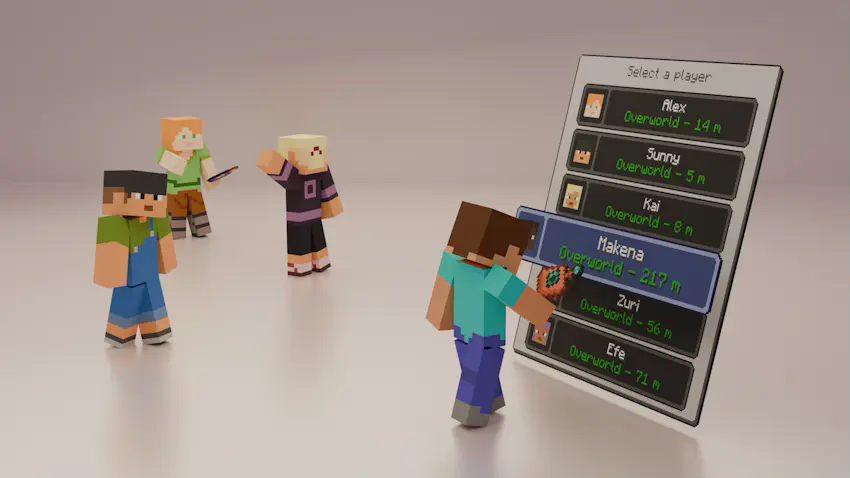
The UI displays, in real time, information about all players who have a Wormhole Artifact or Wormhole Remote in their inventory:
- Their name and head icon.
- Their current dimension (including the five modded dimensions shown in the images; otherwise, it will display "???").
- Their block distance from you (only if you are in the same dimension).
⚙️ Configurable Settings
You can customize various aspects of the mod in the wormhole-artifact-config.toml file, including:
- Durability of both the Wormhole Artifact and Wormhole Remote.
- Cooldown time for using either item.
- Ender Nacre drop rate from Ender Pearls.
📕 Recipes
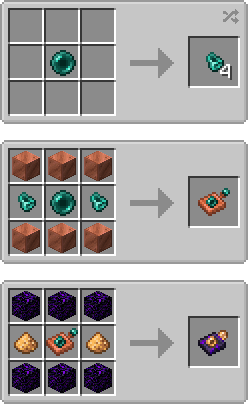
💬 Permissions
✔️ Allowed
- You may include this mod in CurseForge and Modrinth modpacks.
- You are free to use this mod in your videos (credits and a link to the mod page in the description would be appreciated).
❌ Not Allowed
- Reuploading this mod to any other websites, launchers, or apps.
- Using any content from this mod (textures, models, recipes, tags, etc.) in other projects.
- Selling this mod in any way or including it in paid modpacks.
🖼️ Explanation Renders (and a gif)
📌 You can teleport to your friends from your same dimension with the Womrhole Artifact!
📌 Also you can teleport to friends from other dimensions with the Wormhole Remote!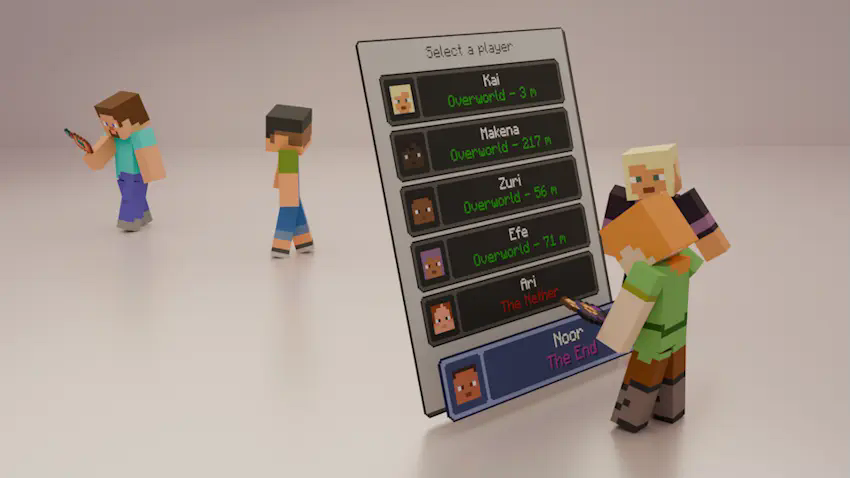
📌 The UI can display the names of modded dimensions!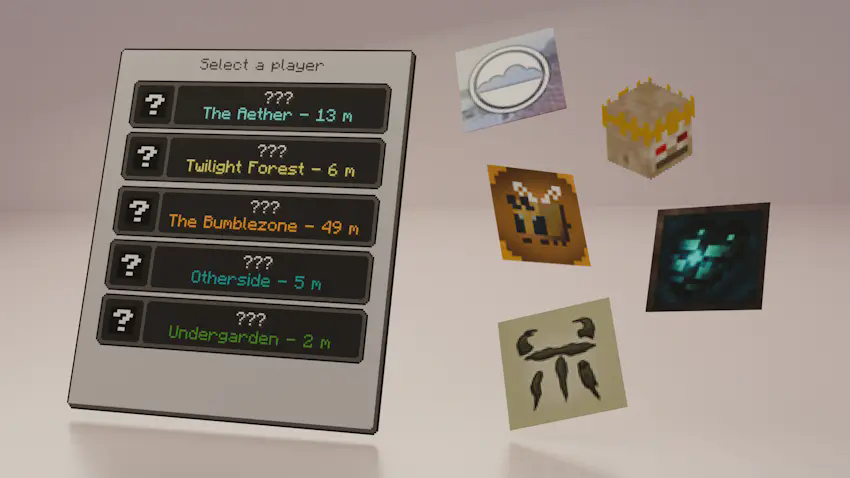
📌 Also you can get Ender Nacre from using Ender Pearls!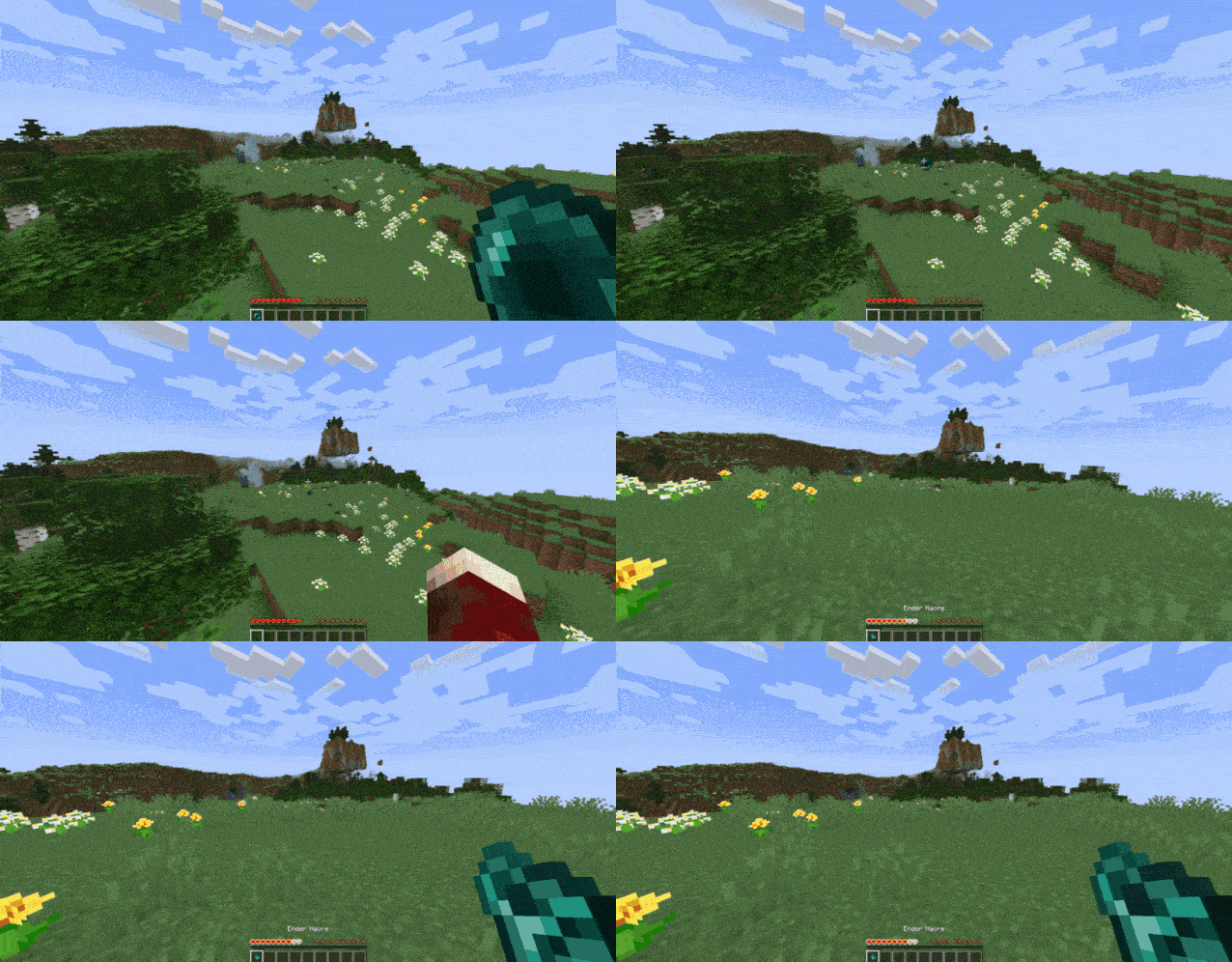
Available Versions
How to Install Wormhole Artifact on Your Server
Order Server
Order a Minecraft Java server with at least 3 GB RAM (4 GB recommended).
Set forge Loader
In the panel under "Egg", select the forge loader and matching Minecraft version (1.20.1).
Install Mod
Open the mod browser in the dashboard and search for "Wormhole Artifact". Click "Install" – done! Alternatively, upload the .jar via SFTP to the /mods folder.
Compatibility
Mod Loaders
Minecraft Versions
1.20.1
Server-side
✓ RequiredRecommended RAM
4 GB(min. 3 GB)Frequently Asked Questions
Wormhole Artifact server crashes on startup – what to do?
Most common cause: wrong forge version or insufficient RAM. Check the server log (latest.log) for "OutOfMemoryError" or "Mixin" errors. With Mado Hosting: ensure at least 3 GB RAM is allocated and the loader matches the mod version (1.20.1). You can switch loaders with one click in the panel.
Is Wormhole Artifact compatible with forge?
Wormhole Artifact officially supports forge for Minecraft 1.20.1. The Mado dashboard automatically detects incompatible loader combinations.
Server lagging with Wormhole Artifact – how to optimize performance?
Recommended RAM: 4 GB (per 8 players). Use /spark profiler to check if Wormhole Artifact consumes the most tick time. Common fixes: reduce server view-distance to 8-10, install "performant" or "starlight" as supplementary mods on Forge. With Mado Hosting, your server runs on NVMe SSDs with dedicated CPU cores for minimal latency.
Similar Mods




Rent Modded Server
Install Wormhole Artifact with just one click on your server.