
XP Storage
A mod that lets you store your experience in multiple ways!
Screenshots
About this Mod



NO PORT TO FORGE PLANNED! (but feel free to port it by yourself and link it)
The mod is fully configurable to enable only changes that you like
Description
In this mod, you can craft XP Books in order to store your experience and save it from a coming death. After storing it, you can retrieve your experience back in two different ways: same way that you stored it OR you can brew the experience of the XP Book with the brewing stand in order to create special Experience Bottles that can give you even more experience.
TO READ WHEN UPDATING TO V1.6
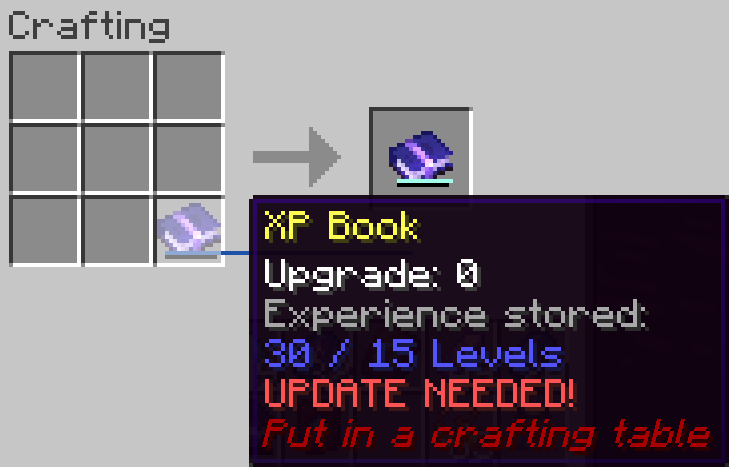
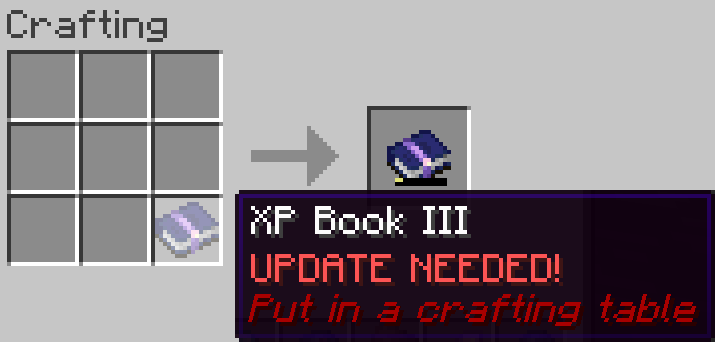
⚠️ v1.6 UPDATE: XP Book II and III were removed, and there were some changes with item data! You can update the mod in your world without losing anything, but be sure to put your books in a crafting table to update them. Old saves won't be supported forever, this warning will be update whenever a version without the transition support is uploaded.
This is a short description, full description below.
FAQ
Does it work on a server? Yes, it works on a server. File needed for both client and server
Can I include it in my modpack? Yes, you are free to include this mod into your modpack
For any other things: Feel free to share your experience, problems, enhancement ideas in the Discord server, or directly creating issues on the GitHub
Full description
Recipes
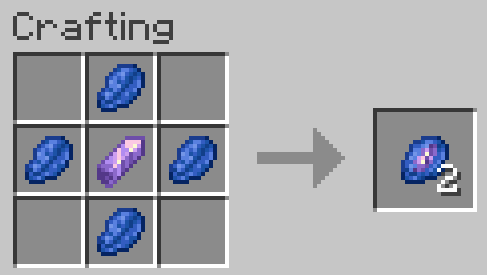
Crystallized Lapis
- 4 Lapis Lazuli (it stores experience so that makes senses)
- 1 Amethyst Shard (it's a precious gem)
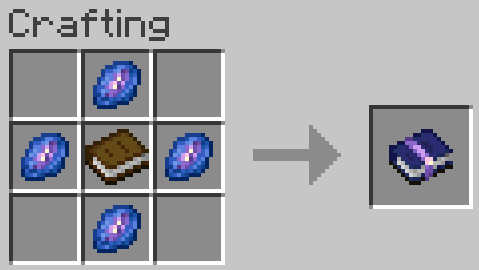
XP Book
- They can store up to 15 levels without upgrades (config).
This means experience to go from 0 level to X levels! Not the same amount than experience from Y to X+Y! - 1 Book (of course, it's a book)
- 4 Crystallized Lapis
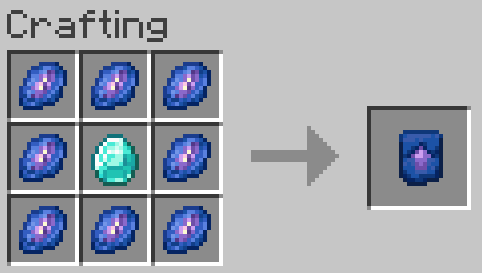
Smithing Template
- They can be used to upgrade XP Books of any level, only the ingredient with it changes
- 1 Diamond
- 8 Crystallized Lapis
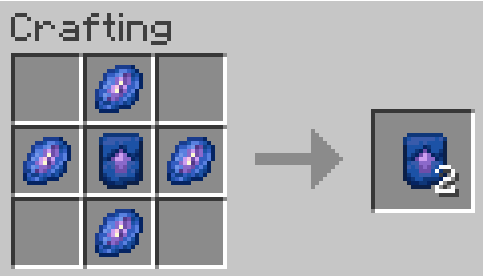
Smithing Template Duplication
- 1 Smithing Template
- 4 Crystallized Lapis
How to use?
XP Book
Store experience: Store the maximum amount of your experience in the book by right clicking. If you have more experience than the maximum amount, you will keep the remaining experience
Retrieve experience: Get 85, 90, 95 or 100% (depending on book's level) of the experience stored in the book by right clicking while sneaking
Brewing
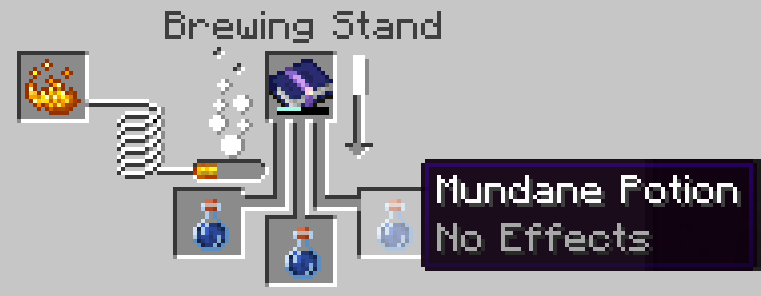
- Take 1, 3, 5 or 10 levels (depending on book's level) of the experience stored in the book for each mundane potions (or Experience Bottle) placed in the brewing stand and put it in the resulting Experience Bottle (or add it to the current ones)
- Each Experience Bottle can store a maximum of 30 levels (config)
XP Book Upgrades
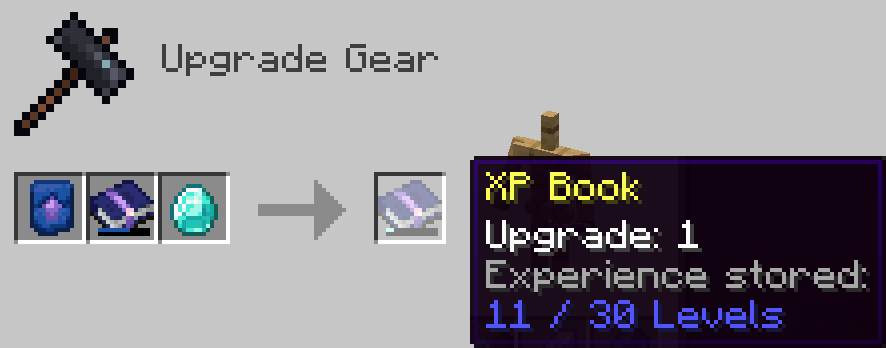
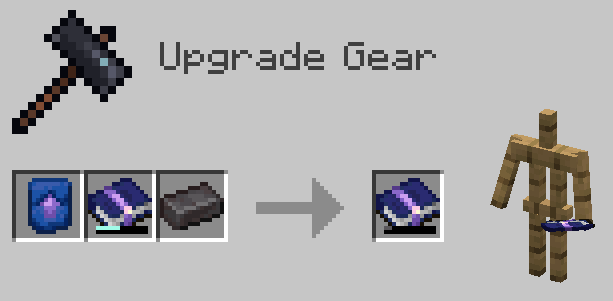
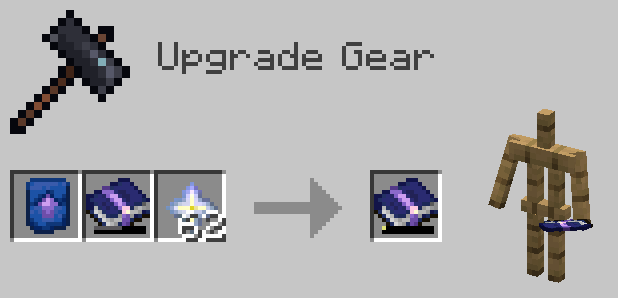
- You can upgrade the book, so that it can store more experience and retrieve it more efficiently
- You need to craft an XP Book Upgrade Smithing Template and use it with the right ingredient, depending on the XP Book level in input (Diamond, Netherite Ingot or Nether Star).
- You can update the new smithing recipes to customize the parameters of the XP Book in output, such as its new capacity or efficiency for example with your custom resource pack
- You can also add new smithing recipes in your custom resource pack to add more XP Book levels
Available Versions
How to Install XP Storage on Your Server
Order Server
Order a Minecraft Java server with at least 3 GB RAM (4 GB recommended).
Set fabric Loader
In the panel under "Egg", select the fabric loader and matching Minecraft version (1.21.3).
Install Mod
Open the mod browser in the dashboard and search for "XP Storage". Click "Install" – done! Alternatively, upload the .jar via SFTP to the /mods folder.
Compatibility
Mod Loaders
Minecraft Versions
1.21.3, 1.21.1, 1.21 (+6 more)
Server-side
✓ RequiredRecommended RAM
4 GB(min. 3 GB)Frequently Asked Questions
XP Storage server crashes on startup – what to do?
Most common cause: wrong fabric version or insufficient RAM. Check the server log (latest.log) for "OutOfMemoryError" or "Mixin" errors. With Mado Hosting: ensure at least 3 GB RAM is allocated and the loader matches the mod version (1.21.3). You can switch loaders with one click in the panel.
Is XP Storage compatible with fabric?
XP Storage officially supports fabric for Minecraft 1.21.3, 1.21.1, 1.21. The Mado dashboard automatically detects incompatible loader combinations.
Server lagging with XP Storage – how to optimize performance?
Recommended RAM: 4 GB (per 8 players). Use /spark profiler to check if XP Storage consumes the most tick time. Common fixes: reduce server view-distance to 8-10, install "performant" or "starlight" as supplementary mods on Forge. With Mado Hosting, your server runs on NVMe SSDs with dedicated CPU cores for minimal latency.
Similar Mods


Rent Modded Server
Install XP Storage with just one click on your server.