
YUNG's Cave Biomes
Adds new vanilla+ cave biomes and underground content!
Screenshots
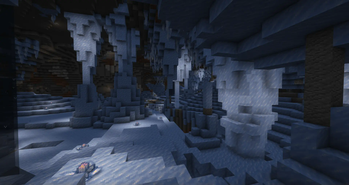
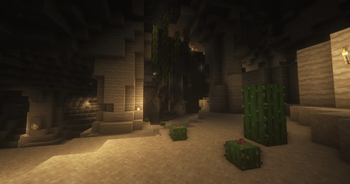
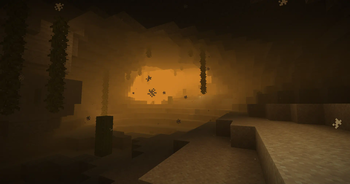
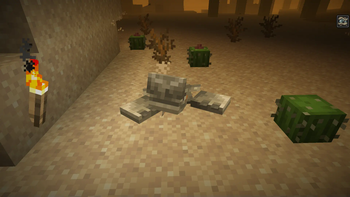
About this Mod


YUNG's Cave Biomes is a vanilla+ mod that adds two new cave biomes to the game, the Frosted Caves and the Lost Caves! Each biome features the addition of a new mob, new blocks, items, music, and more.

YUNG's Cave Biomes is intended to be fully compatible with every mod, including other worldgen mods. Any known incompatibility notes will be mentioned here. If you encounter any compatibility issues, please let us know in the Discord!
- Sodium
- I highly recommend disabling the "Use Fog Occlusion" option in the Performance tab. Keeping this option enabled results in chunks behind the thick yellow fog during sandstorms not rendering, resulting in being able to see the sky behind the fog. This doesn't affect actual gameplay, but the visuals are not nearly as impressive.
- Optifine / Iris
- The thick yellow fog won't render during sandstorms in the Lost Caves. Still looks good, just not as cool of a visual effect.
- Enchanted Ice is visible even when embedded in ice. Normally it's supposed to be hidden. Doesn't really affect gameplay.
- Distant Horizons (Fabric)
- You may find that you are unable to see anything at all during sandstorms. If this happens, do the following: go into the Distant Horizons settings in game > Advanced options > Graphics > Fog > set Enable Vanilla Fog to True.
- Distant Horizons (Forge)
- The thick yellow fog won't render during sandstorms in the Lost Caves. Still looks good, just not as cool of a visual effect.


Available Versions
How to Install YUNG's Cave Biomes on Your Server
Order Server
Order a Minecraft Java server with at least 4 GB RAM (6 GB recommended).
Set fabric Loader
In the panel under "Egg", select the fabric loader and matching Minecraft version (26.1.2).
Install Mod
Open the mod browser in the dashboard and search for "YUNG's Cave Biomes". Click "Install" – done! Alternatively, upload the .jar via SFTP to the /mods folder.
Compatibility
Mod Loaders
Minecraft Versions
26.1.2, 26.1.1, 1.21.1 (+3 more)
Server-side
✓ RequiredRecommended RAM
6 GB(min. 4 GB)Frequently Asked Questions
YUNG's Cave Biomes server crashes on startup – what to do?
Most common cause: wrong fabric version or insufficient RAM. Check the server log (latest.log) for "OutOfMemoryError" or "Mixin" errors. With Mado Hosting: ensure at least 4 GB RAM is allocated and the loader matches the mod version (26.1.2). You can switch loaders with one click in the panel.
Is YUNG's Cave Biomes compatible with fabric and forge and neoforge?
YUNG's Cave Biomes officially supports fabric, forge, neoforge for Minecraft 26.1.2, 26.1.1, 1.21.1. Note: Forge and Fabric mods are NOT cross-compatible – pick one loader and stick with it. The Mado dashboard automatically detects incompatible loader combinations.
Server lagging with YUNG's Cave Biomes – how to optimize performance?
Recommended RAM: 6 GB (per 5 players). Use /spark profiler to check if YUNG's Cave Biomes consumes the most tick time. Common fixes: reduce server view-distance to 8-10, install "performant" or "starlight" as supplementary mods on Forge. With Mado Hosting, your server runs on NVMe SSDs with dedicated CPU cores for minimal latency.
Similar Mods




Rent Modded Server
Install YUNG's Cave Biomes with just one click on your server.