
Modrinth · Fabric, Quilt
ZConfig on your Minecraft server
ZConfig runs on Minecraft servers with Fabric or Quilt. Order your server, set the loader in the panel and install the mod with one click in the mod browser.
A mixin config plugin for zfastnoise
- Downloads
- 1.4M
- Author
- ZenXArch
- Loader
- Fabric, Quilt
- Minecraft
- 1.21 – 26.3
- Updated
- –
Screenshots
What ZConfig looks like
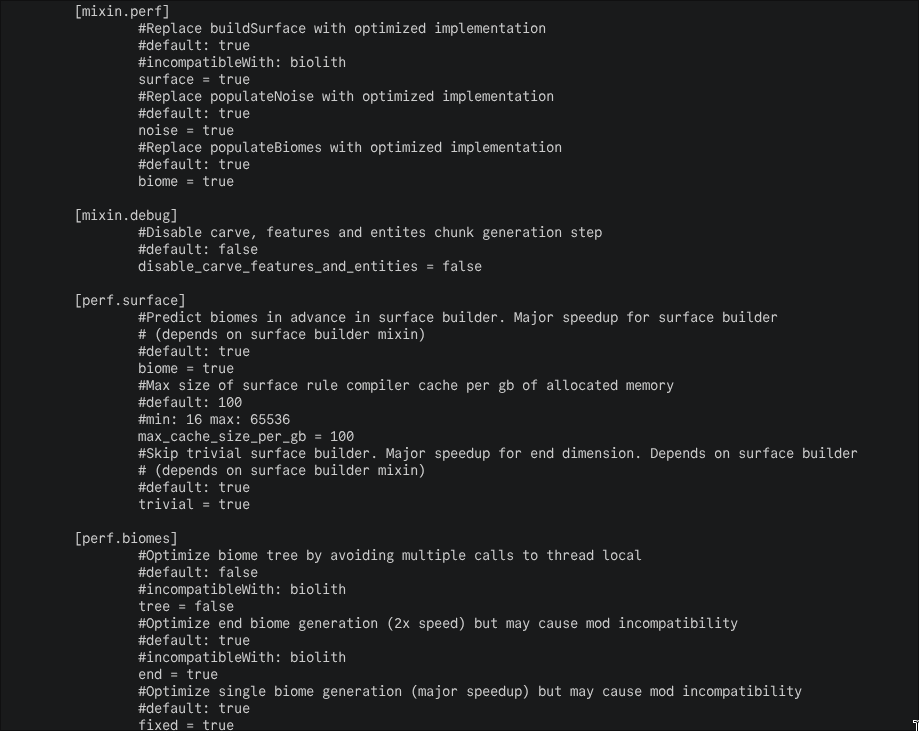
Images: ZConfig on Modrinth, published by the project team.
Setup
Install ZConfig on your server
The server and players need the same loader and Minecraft version. Back up the world before adding or updating mods.
- 01
Configure
4 GB of RAM is preselected. You choose the term and add-ons and pay by credit card or PayPal.
- 02
Set the loader
In the panel, set the server software to Fabric or Quilt and choose the matching Minecraft version, for example 26w14a.
- 03
Install the mod
Search the mod browser for “ZConfig” and install the release for your loader. Alternatively, upload the .jar to the mods folder via SFTP. Required dependencies are listed on the project page.
- 04
Connect
ZConfig is optional on the client. Players connect using the server address from the panel.
- On the server
- Optional
- On the client
- Optional
- Loader
- Fabric, Quilt
- Minecraft
- 26w14a, 26.4-snapshot-1, 26.3-snapshot-9 +152 more
- License
- Mozilla Public License 2.0
The panel
Install mods, find errors.
Real screenshots from the Mado panel. Both come with every Minecraft server.
Mod browser
Modrinth and CurseForge, right in the panel.
The browser filters by your Minecraft version. Install mods with one click, without uploading .jar files.

AI crash analysis
When a mod crashes, the analyzer reads the log.
Mods often fail on a wrong loader version, Java version or missing dependency. The analyzer names a likely cause and suggests a fix.

Releases
Published releases
Pick the file that matches your server’s loader and Minecraft version. The server and players need the same release.
ZConfig · Modrinth- ZConfig 1.0.0+1.21.xAugust 3, 2026Minecraft 1.21, 1.21.1, 1.21.1-rc1, 1.21.10, 1.21.10-rc1, 1.21.11, 1.21.11-pre1, 1.21.11-pre2, 1.21.11-pre3, 1.21.11-pre4, 1.21.11-pre5, 1.21.11-rc1, 1.21.11-rc2, 1.21.11-rc3, 1.21.2, 1.21.2-pre1, 1.21.2-pre2, 1.21.2-pre3, 1.21.2-pre4, 1.21.2-pre5, 1.21.2-rc1, 1.21.2-rc2, 1.21.3, 1.21.4, 1.21.4-pre1, 1.21.4-pre2, 1.21.4-pre3, 1.21.4-rc1, 1.21.4-rc2, 1.21.4-rc3, 1.21.5, 1.21.5-pre1, 1.21.5-pre2, 1.21.5-pre3, 1.21.5-rc1, 1.21.5-rc2, 1.21.6, 1.21.6-pre1, 1.21.6-pre2, 1.21.6-pre3, 1.21.6-pre4, 1.21.6-rc1, 1.21.7, 1.21.7-rc1, 1.21.7-rc2, 1.21.8, 1.21.8-rc1, 1.21.9, 1.21.9-pre1, 1.21.9-pre2, 1.21.9-pre3, 1.21.9-pre4, 1.21.9-rc1, 24w33a, 24w34a, 24w35a, 24w36a, 24w37a, 24w38a, 24w39a, 24w40a, 24w44a, 24w45a, 24w46a, 25w02a, 25w03a, 25w04a, 25w05a, 25w06a, 25w07a, 25w08a, 25w09a, 25w09b, 25w10a, 25w14craftmine, 25w15a, 25w16a, 25w17a, 25w18a, 25w19a, 25w20a, 25w21a, 25w31a, 25w32a, 25w33a, 25w34a, 25w34b, 25w35a, 25w36a, 25w36b, 25w37a, 25w41a, 25w42a, 25w43a, 25w44a, 25w45a, 25w46a · Fabric, Quilt
- ZConfig 1.0.0+26.xAugust 3, 2026Minecraft 26.1, 26.1-pre-1, 26.1-pre-2, 26.1-pre-3, 26.1-rc-1, 26.1-rc-2, 26.1-rc-3, 26.1-snapshot-1, 26.1-snapshot-10, 26.1-snapshot-11, 26.1-snapshot-2, 26.1-snapshot-3, 26.1-snapshot-4, 26.1-snapshot-5, 26.1-snapshot-6, 26.1-snapshot-7, 26.1-snapshot-8, 26.1-snapshot-9, 26.1.1, 26.1.1-rc-1, 26.1.2, 26.1.2-rc-1, 26.2, 26.2-pre-1, 26.2-pre-2, 26.2-pre-3, 26.2-pre-4, 26.2-pre-5, 26.2-pre-6, 26.2-rc-1, 26.2-rc-2, 26.2-snapshot-1, 26.2-snapshot-2, 26.2-snapshot-3, 26.2-snapshot-4, 26.2-snapshot-5, 26.2-snapshot-6, 26.2-snapshot-7, 26.2-snapshot-8, 26.3, 26.3-pre-1, 26.3-pre-2, 26.3-pre-3, 26.3-rc-1, 26.3-rc-2, 26.3-rc-3, 26.3-snapshot-1, 26.3-snapshot-10, 26.3-snapshot-2, 26.3-snapshot-3, 26.3-snapshot-4, 26.3-snapshot-5, 26.3-snapshot-6, 26.3-snapshot-7, 26.3-snapshot-8, 26.3-snapshot-9, 26.4-snapshot-1, 26w14a · Fabric, Quilt
Original description by the project author
Why does this project exist?
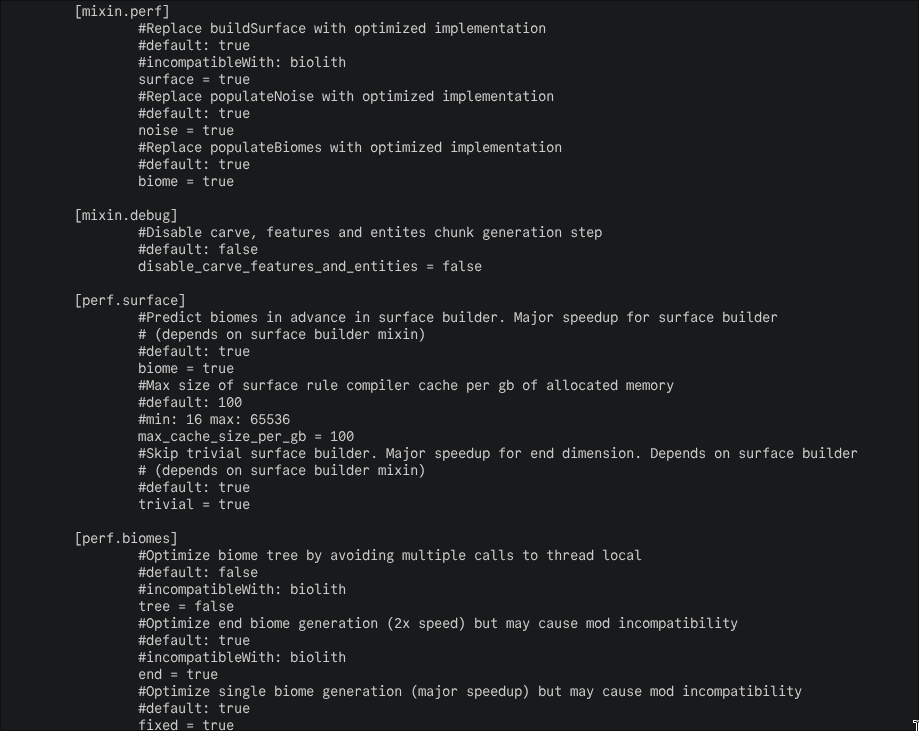
This is a general purpose config mod slightly based on c2me's internal config system.
This also lets me reduce zfastnoise's size to a few dozen kilobytes and users only have to download the config mod once.
Features
- Toml based config files
- boolean and int based config entries
- allow other mods to override config entries using mod metadata
- mark mods as incompatible with certain config entries
For example, fabric.mod.json
{
  ...
  "custom": {
    "zfastnoise:overrides" : "mixin.perf.surface"
  }
}
The above disables mixin.perf.surface config option
Future plans
- add support for modmenu/forge config api
- add neoforge builds
- add more sugar to easily generate config
Example config
package org.codeberg.zenxarch.zconfig.test;

import org.codeberg.zenxarch.zconfig.entry.BooleanConfigEntry;
import org.codeberg.zenxarch.zconfig.entry.ConfigEntries;
import org.codeberg.zenxarch.zconfig.entry.IntConfigEntry;
import org.codeberg.zenxarch.zconfig.loader.Config;
import org.codeberg.zenxarch.zconfig.loader.ConfigLoader;
import org.codeberg.zenxarch.zconfig.loader.OverrideCollector;
import org.junit.jupiter.api.Test;

public class ExampleConfig extends ConfigEntries {
  public static final ExampleConfig INSTANCE = new ExampleConfig();

  public static final BooleanConfigEntry MAIN =
      INSTANCE.createEntry(
          "main",
          builder -> builder.addComment("Main entry").defaultValue(false).addIncompat("sodium"));

  public static final IntConfigEntry OTHER =
      INSTANCE.createIntEntry(
          "other", builder -> builder.addComment("Other entry").defaultValue(0).constraints(-1, 1));

  public static final Config CONFIG =
      new Config(
          new ConfigLoader("example_mod_id", INSTANCE), new OverrideCollector("example_mod_id"));

  @Test
  public void loadConfig() {
    IO.println(CONFIG.get(MAIN));
    IO.println(CONFIG.get(OTHER));
    IO.println(CONFIG.loadMixinEntries());
  }
}
ZConfig server crashes on startup – what to do?
Common causes: the loader or Minecraft version does not match the mod file, a dependency is missing, or RAM is too low. Check the log (latest.log) for “OutOfMemoryError”, “Mixin” or missing mods. At Mado, the AI crash analysis reads the log and suggests a cause. You can change the loader and version in the panel.
Which loader does ZConfig run on?
According to Modrinth, ZConfig supports Fabric, Quilt for Minecraft 26w14a, 26.4-snapshot-1, 26.3-snapshot-9.
How much RAM does a server with ZConfig need?
As guidance, 3–4 GB for a server with this mod. This is an estimate, not a measured minimum. More mods, many players and long view distances need more. The spark profiler shows whether a mod is costing tick time.
Similar mods
Popular mods in the same category
 Server-ready

Fabric API
by modmuss50
Lightweight and modular API providing common hooks and intercompatibility measures utilized by mods using the Fabric toolchain.
 Server-ready

Cloth Config API
by shedaniel
Configuration Library for Minecraft Mods
 Server-ready

YetAnotherConfigLib (YACL)
by isxander
A builder-based configuration library for Minecraft!
 Server-ready

Fabric Language Kotlin
by modmuss50
This is a mod that enables usage of the Kotlin programming language for Fabric mods.
Ready for your server with ZConfig?
4 GB of RAM from €8.00 per month. 35% off your first month with MADO35.