
Zoom In
A Zoom In mod with customizations - Zoom in & out with a single keypress -Scroll zoom and more! 4x-Infinite Zoom with scroll
Screenshots
About this Mod
A Complete lightweight zoom mod that lets you zoom in with a single keypress.
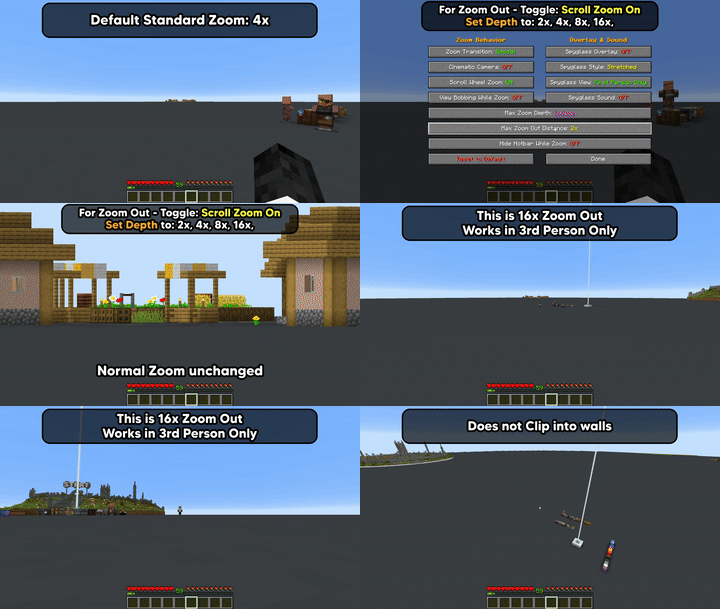
Now includes optional Zoom In & 3rd Person Zoom Out, both off by default.
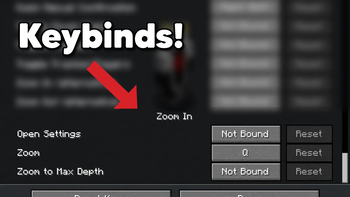
Now includes Zoom To Max Depth Keybind - Hold Zoom + Keybind to Zoom in/Out to set zoom level.
How to Use
Press Q to zoom in, default 4x (rebindable in Controls > Keybinds)
Zoom To Max Depth Keybind (off by default)
*New v26.2=0.4.5+
Enable Scroll Zoom > Hold Zoom + Max Depth Keybind to zoom in/out to max depth level.

or Open Settings
Enable Scroll Wheel Zoom (off by default) -
hold Q and scroll to zoom in further
Third Person Zoom Out is a separate opt-in (also off by default)
3rd Person: Hold Q and scroll to zoom in & out from player.

Settings Access
- Set a Settings keybind to access the
Settings Screen - Slash command:
/zoom menuto accessSettings Screen - Open Mod Menu to access the
Settings Screen(Optional)
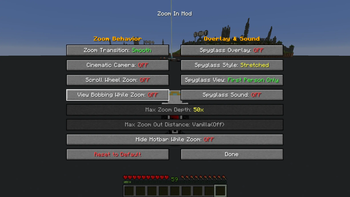
Options/Settings - Defaults

Zoom Transition - Smooth or Instant
Cinematic Camera - Floaty and smooth, or Instant
Scroll Wheel Zoom - Hold the zoom key and scroll to zoom in further. Off by default - the base 4x zoom-in works exactly the same whether this is on or off.
*Scroll Zoom has relative mouse sensitivity built in, (skipped while Cinematic Camera is on)
Max Zoom Depth - * New in v26.2-0.3.1+ - 10x, 25x, 50x, 100x, Infinite (1000x). Only applies while Scroll Wheel Zoom is on.
Max Zoom Out Distance - *New in v26.2-0.4.3+ - Default (off), 2x, 4x, 8x, 16x. Independent of Max Zoom Depth - set to Default to keep deeper zoom-in without any camera pull-back.
Zoom Out only works in 3rd person perspective.
Defaults to off (Vanilla), even when Scroll Wheel Zoom is enabled.
Hide Hotbar while Zoomed - Toggle to show or hide the Hotbar while zoomed
Disable View Bobbing While Zoom - Toggle view bobbing while zoomed
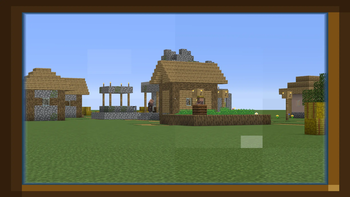
Spyglass Overlay - Classic scope overlay while zoomed
Spyglass Style - Stretched or Framed overlay
Spyglass View - First Person Only or All Perspectives
Spyglass Sound - Plays the spyglass use/stop sound on zoom
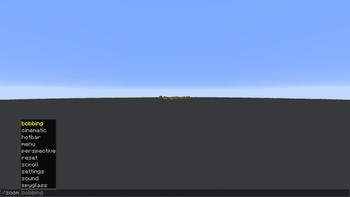
Commands
Every command below toggles when run with no argument, or takes an explicit value:
/zoom transition [smooth|instant]/zoom cinematic [on|off]/zoom scroll [on|off]- Scroll Wheel Zoom/zoom maxzoom [10|25|50|100|infinite]- Max Zoom Depth (zoom-in)/zoom zoomout [default|2|4|8|16]- Max Zoom Out Distance (third-person zoom-out)/zoom bobbing [on|off]- View Bobbing While Zoom/zoom hotbar [on|off]- Hide Hotbar While Zoom/zoom spyglass [on|off]- Spyglass Overlay/zoom style [stretched|framed]/zoom perspective [first|all]/zoom sound [on|off]/zoom menu- open the settings screen/zoom reset- reset all settings to default/zoom settings- print all current settings in chat
Credits
Built by ChapmanOfficial
Available Versions
How to Install Zoom In on Your Client
Install the Mod Loader Locally
Install fabric for your local Minecraft version.
Download the Matching File
Choose the Zoom In file for fabric and Minecraft 26.3.
Install Mod
Place the .jar file in your local .minecraft/mods folder and restart Minecraft. No server-side installation is required.
Compatibility
Mod Loaders
Minecraft Versions
26.3, 26.2, 26.1 (+1 more)
Server-side
✗ UnsupportedRecommended RAM
4 GB(min. 3 GB)Frequently Asked Questions
Does Zoom In need to be installed on the Minecraft server?
No. Modrinth marks Zoom In as unsupported on the server side. Install it only in your local Minecraft mods folder. Your server can remain unchanged unless the mod page lists an additional dependency.
Which version and loader does Zoom In require?
Use a file for fabric and your exact Minecraft version. Supported versions include 26.3, 26.2, 26.1. Files for different loaders are not interchangeable.
Zoom In is not working – what should I check?
First check the Minecraft version, loader version and required dependencies. Put the .jar file in your local .minecraft/mods folder and remove older duplicates. Because this mod is client-side, adding server RAM will not fix it.
Similar Mods






Minecraft Server for Your Group
Zoom In stays on your client. Host a compatible world for your group.