
Arctic Survival
The cold and harsh weather will prove survival difficult. Are you up for the task?
Screenshots
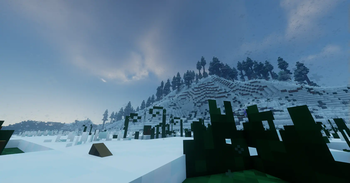

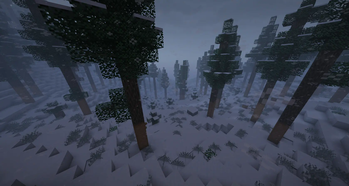
About this Modpack
Alaskan Wilderness by Forge Labs

Can you survive the harsh weather of winter? Can you defend yourself against the animals that are still awake?
Notice
For the best experience with Distant Horizons, we recommend preloading the chunks in your world with Chunky. If you have major lag, lower the quality of Distant Horizons or remove it entirely.
It is recommended that you allocate 8GB of RAM to Minecraft if you intend to use shaders with this modpack.
Socials




🧪 Content Mods
Alex's Mobs
BadMobs-1.20.1-19.0.4
Biome Replacer
Biome Spawn Point
Bliss Shaders
Butchery
Chunky
Crops Need Sky
Disable Structures
Disableportal
Distant Horizons
Embeddium
Farmer's Delight
Geckolib
GlitchCore
HardRock Tools & Materials
Hot Kettles
Just Enough Items
Just Zoom
Kiwi 🥝
Lychee
Naturalist
Oculus
Panda's Falling Tree's
PandaLib
Patchouli
Project: Vibrant Journeys
Regions Unexplored
Realistic Torches
Serene Seasons
Sinytra Connector
Simple Snowy Fix (Forge / Fabric)
Snow Under Trees
Snow! Real Magic! ⛄
Snowy Biomes: Enhanced
Spelunkery
Sparse Structures Reforged
Spartan Weaponry
Tectonic
TerraBlender
William Wythers' Overhauled Overworld
True Fishing
Hot Iron
Legendary Survival Overhaul
Snowhoes
🧬 Library Mods
Architectury API
Christel Lib
Collective
Complementary Shaders - Unbound
Curios API
Forgified Fabric API
Moonlight Lib
⚗️ Shader Packs
Available Versions
How to Set Up a Arctic Survival Server
Order Server
Choose at least 6 GB RAM (8 GB recommended for Arctic Survival). Based on player count: per 5 players.
Install Modpack in Dashboard
Open the modpack browser in the dashboard, search for "Arctic Survival" and click "Install". The forge loader and Minecraft 1.20.1 are configured automatically.
Start Server & Play
Start the server – all mods are loaded automatically. Share the server IP with friends and play together!
Frequently Asked Questions
Arctic Survival server crashes or won't start – what to do?
Most common causes: insufficient RAM or wrong forge loader. Check latest.log for "OutOfMemoryError" → increase RAM to at least 8 GB. For "Mixin" or "ClassNotFoundException" errors: modpack version and loader don't match. With Mado Hosting, loader and Minecraft version are auto-configured on modpack install – preventing most startup issues.
How much RAM does a Arctic Survival server really need?
Minimum 6 GB, recommended 8 GB for stable performance. per 5 players. Important: Minecraft modpacks need more RAM than vanilla – plan extra per additional player. With Mado Hosting, you can scale RAM up live at any time without data loss (from €7.800000000000001/month).
Can I add custom mods to Arctic Survival without conflicts?
Yes, but check compatibility: only use mods for the same loader (forge) and same Minecraft version (1.20.1). Common issues: ID conflicts with recipe mods and incompatible coremod versions. The Mado dashboard mod browser only shows compatible mods and warns about known conflicts.
Arctic Survival server lagging – performance tips
1) Increase RAM to 8 GB+. 2) Reduce server view-distance to 8 (server.properties). 3) Pre-generate chunks with the "Chunky" plugin. 4) Use /spark profiler to check which mods consume the most tick time. With Mado Hosting, all servers run on NVMe SSDs with dedicated CPU cores – eliminating hardware as a bottleneck.
Similar Modpacks
![Cobblemon Official Modpack [Fabric]](https://cdn.modrinth.com/data/5FFgwNNP/e7f9ee2e9d361623847853fe2ddce42f519ee64f.png)
![COBBLEVERSE - Pokemon Adventure [Cobblemon]](https://cdn.modrinth.com/data/Jkb29YJU/581ecf54530972afb18a04660afd820f2f24f6c7.png)
![Better MC [FABRIC] - BMC2](https://cdn.modrinth.com/data/shFhR8Vx/a19c2bcb51d38f32f138d3607e91cb2b7b8e387f_96.webp)


![Better MC [FORGE] - BMC4](https://cdn.modrinth.com/data/4BV47HRn/7f5ef7cc61b2593609aabef3ed07a866a4f11b73_96.webp)
Rent Arctic Survival Server
Start your own server with automatic modpack installation.
Supported Versions
Start your Arctic Survival Server now
From €7.80/month; 8 GB RAM is recommended for best performance.
Configure Server →