
Distantly Optimized
26.1.2 NeoForge + Fabric Distant Horizons, Optimized.
Screenshots
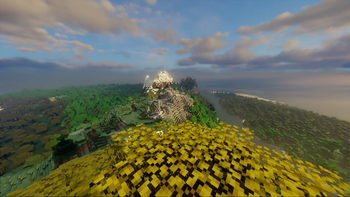
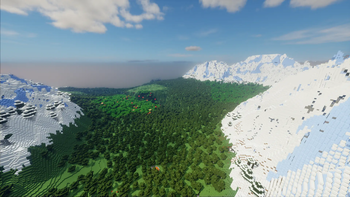
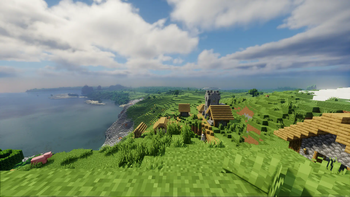
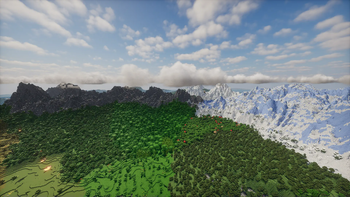
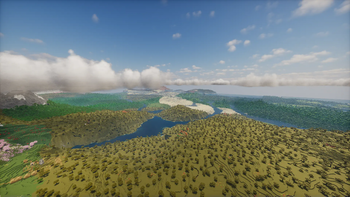
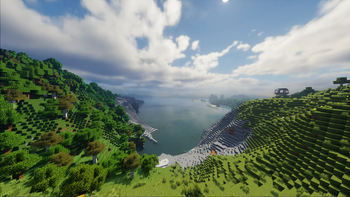
About this Modpack
Updated to 26.1.2!


Hey!
You may want to configure your Minecraft instance to use the ZGC garbage collector. The default Minecraft uses, G1GC, can cause lag spikes with Distant Horizons. To change it, find the launch arguments section for your launcher, and paste "-XX:+UseZGC". This should help eliminate some lag spikes when using DH.
Distantly Optimized is a modpack featuring Distant Horizions 3.0 and Iris, letting you see really, really far, as well as a few shaderpacks that support Distant Horizons, incredible worldgen powered by Tectonic, and some utility mods.
It is designed to be lightweight, work on any server, and update faster than anyone else.
Best part is, it works right out of the box! The only settings you need to worry about are in the main menu of Distant Horizon's settings, accessed by the button to the right of the FOV slider, in the options menu.
What about framerate?
With the settings and specs listed below, I had a stable 70 FPS.
You actually dont need a powerful PC to run this, plus you can turn down Distant Horizons quality and render distance settings, as well as shaders.
Settings and Specs
Distant Horizions Settings
Quality: High
CPU Load: Balanced + thread tweaks
LoD Render Distance: 300
Minecraft settings:
Resoulution: 1920x1080
Shadow Distance: 12
Render Distance: 12
Simulation Distance: 5
Shader: Bliss
Specs:
6800 MB RAM allocated
Intel i5-9400F at 2.90 GHz
Nvidia GTX 1660 Ti
Windows 11
Extra Features
Tectonic, the worldgen mod included in this modpack, adds amazing world generation to Minecraft, using only vanilla blocks. No extra setup required.
To get a better view of your surroundings, press Z(rebindable as "Toggle Perspective"). Hold K and scroll to zoom out or in, and press Z twice to go back to normal view.
Hold C and scroll to zoom in.
To play with friends, pause the game and open a LAN world. Then look in chat for a IP you can give to your friends to join your world!
Thanks to X0nk for adding Distant Horizions support to Bliss, one of my favorite shader packs! You can find the version included here, which supports Distant Horizons on his Github and CurseForge pages:
Available Versions
How to Set Up a Distantly Optimized Server
Order Server
Choose at least 4 GB RAM (6 GB recommended for Distantly Optimized). Based on player count: per 5 players.
Install Modpack in Dashboard
Open the modpack browser in the dashboard, search for "Distantly Optimized" and click "Install". The fabric loader and Minecraft 26.1.2 are configured automatically.
Start Server & Play
Start the server – all mods are loaded automatically. Share the server IP with friends and play together!
Frequently Asked Questions
Distantly Optimized server crashes or won't start – what to do?
Most common causes: insufficient RAM or wrong fabric loader. Check latest.log for "OutOfMemoryError" → increase RAM to at least 6 GB. For "Mixin" or "ClassNotFoundException" errors: modpack version and loader don't match. With Mado Hosting, loader and Minecraft version are auto-configured on modpack install – preventing most startup issues.
How much RAM does a Distantly Optimized server really need?
Minimum 4 GB, recommended 6 GB for stable performance. per 5 players. Important: Minecraft modpacks need more RAM than vanilla – plan extra per additional player. With Mado Hosting, you can scale RAM up live at any time without data loss (from €5.2/month).
Can I add custom mods to Distantly Optimized without conflicts?
Yes, but check compatibility: only use mods for the same loader (fabric) and same Minecraft version (26.1.2). Common issues: ID conflicts with recipe mods and incompatible coremod versions. The Mado dashboard mod browser only shows compatible mods and warns about known conflicts.
Distantly Optimized server lagging – performance tips
1) Increase RAM to 6 GB+. 2) Reduce server view-distance to 8 (server.properties). 3) Pre-generate chunks with the "Chunky" plugin. 4) Use /spark profiler to check which mods consume the most tick time. With Mado Hosting, all servers run on NVMe SSDs with dedicated CPU cores – eliminating hardware as a bottleneck.
Similar Modpacks

![Cobblemon Official Modpack [Fabric]](https://cdn.modrinth.com/data/5FFgwNNP/e7f9ee2e9d361623847853fe2ddce42f519ee64f.png)
![COBBLEVERSE - Pokemon Adventure [Cobblemon]](https://cdn.modrinth.com/data/Jkb29YJU/581ecf54530972afb18a04660afd820f2f24f6c7.png)
![Better MC [FABRIC] - BMC2](https://cdn.modrinth.com/data/shFhR8Vx/a19c2bcb51d38f32f138d3607e91cb2b7b8e387f_96.webp)


Rent Distantly Optimized Server
Start your own server with automatic modpack installation.
Supported Versions
Start your Distantly Optimized Server now
From €5.20/month; 6 GB RAM is recommended for best performance.
Configure Server →