
Modrinth · Fabric
Dont Look server hosting
Your own Dont Look server on AMD Ryzen 9 without a thread limit. The server is ready usually under 60 seconds; then install the pack with one click in the modpack browser.
Whatever you hear, whatever follows, don't look back.
- Downloads
- 14.1K
- Followers
- 0
- Loader
- Fabric
- Minecraft
- 1.20.1
- Updated
- –
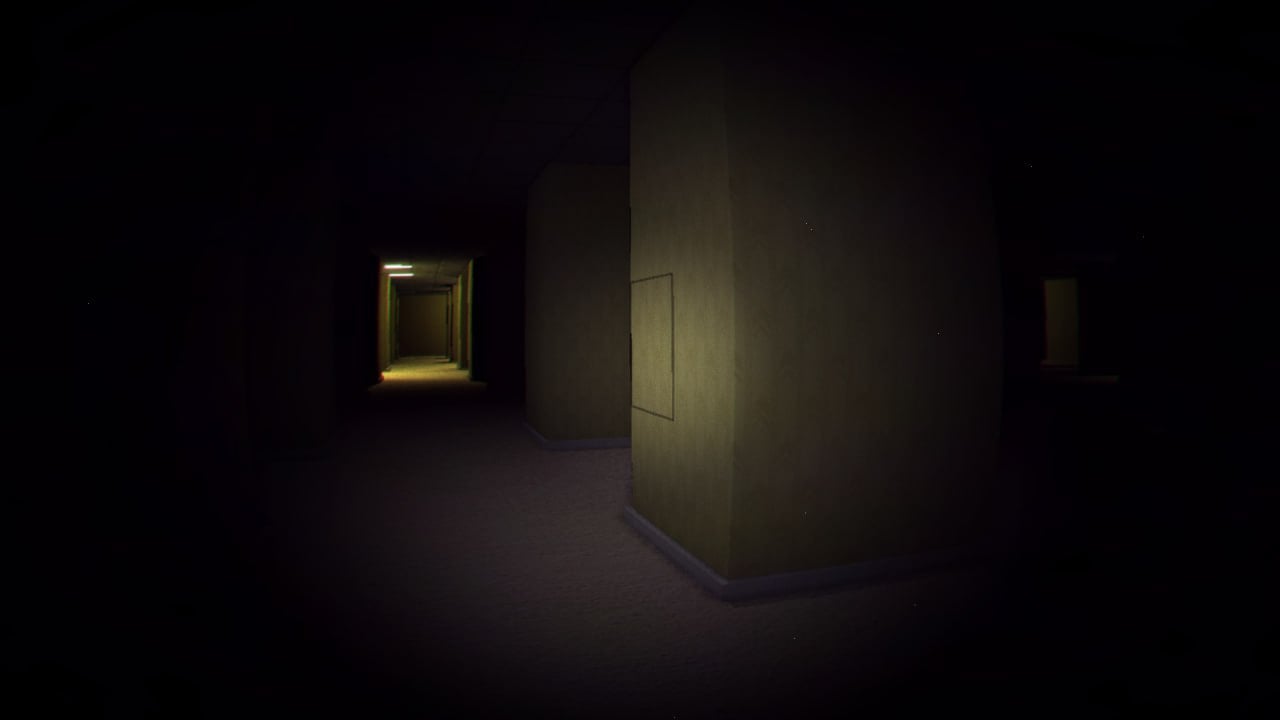
Screenshots
What Dont Look looks like


Images: Dont Look on Modrinth, published by the project team.
Setup
Your Dont Look server in four steps
For errors, check startup logs, Java version, loader and dependencies first. Increase RAM when there is evidence of memory pressure. Keep a copy of the working installation before updates.
- 01
Configure
6 GB of RAM is preselected and Dont Look is noted in the configurator. You choose the term and add-ons.
- 02
Pay
By credit card or PayPal. Your server is ready usually under 60 seconds.
- 03
Install the pack
Open the modpack browser in the panel, choose Modrinth, verify the project ID and install your chosen pack release. Back up an existing world first.
- 04
Connect
Every player installs the same pack release in a compatible launcher and connects using the server address from the panel.
Modrinth project ID: 6WRcAhDC
The panel
Install the pack, find errors.
Real screenshots from the Mado panel. Both come with every Minecraft server.
Modpack browser
Modrinth and CurseForge, right in the panel.
Search the pack, choose a release, install. You do not have to upload the loader or server files by hand.

AI crash analysis
When a mod crashes, the analyzer reads the log.
Large modpacks often fail on a single mod, Java version or missing dependency. The analyzer names a likely cause and suggests a fix.

Releases
Published pack releases
The server and players need the same pack release. Pick it in the modpack browser to match your group’s clients.
Dont Look · ModrinthOriginal description by the project author

This modpack is still in early development, meaning bugs and crashes may occur.
WELCOME TO DONT LOOK!
Most - if not all - horror modpacks arent even really scary. I believe this is genuinely more horrifying then most horror games and it's not because of gore or loud noises. It's because nothing ever resolves. It's always a bit too dark, the noises are always a bit too creepy.
And when you realize that it changes how you play. You start checking your F5 view. You start taking the long way around because the short way has a corner in it. You mine facing the wrong direction so nothing can be at your back, and then you realize the wall you're facing is also a direction something could come from. And sometimes, something does.
SETTINGS
- This modpack is meant to be played with the correct config, do NOT change ANYTHING.
- It is pretty much necessary to use anywhere between 8 to 12 chunk render distance.
- Multiplayer with proximity chat is much more fun because some entities will mimic your friends voices / also hear you if you talk. You can play easily with essentials mod :)
BUGS
PLEASE tell me any bugs you have and message me on discord @zimmerman392 ! this modpack is for my upcoming youtube series so if theres issues for you please tell me!
Similar packs
More server-ready modpacks
 Server-ready

Zombie Invade 100 Days
by FlameFire
僵尸入侵 100 天(高版本惊变重制)—— Same as Forge Labs 100 Days Zombie Apocalypse in new Minecraft
 Server-ready

COBBLEVERSE - Pokemon Adventure [Cobblemon]
by LUMYVERSE
Start a true Pokémon adventure in Minecraft: Cobblemon 1.8.4 | ALL 1025 Pokémon! | Mega Evolutions | Gyms & Badges | Starter Kit | Unique Structures | Custom Music | Shaders | Optimized | So much more! [1.21.1]
 Server-ready

Slimes Adventure
by NotWindx
Tensura: that time i got reincarnated as a slime modpack with many features
 Server-ready

Aged
by xR4YM0ND
realistic / medieval / progression based modpack for Fabric 1.21.1
Ready for your Dont Look server?
6 GB of RAM from €12.00 per month. 35% off your first month with MADO35.