
DrUltraLux's Steam Fantasy
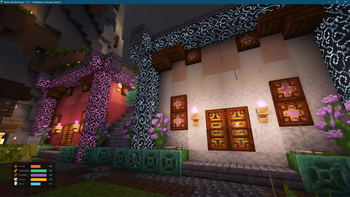
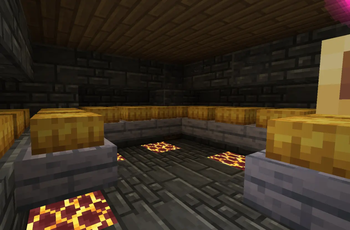
A Steampunk/Magitech inspired Modpack set in a dying fantasy world where players survive by building their own cities and airships.
Screenshots
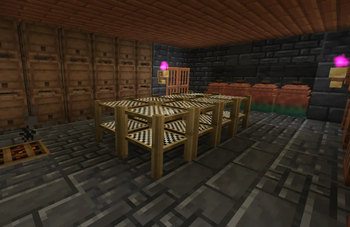
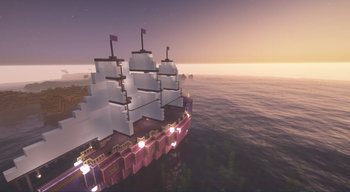
About this Modpack
A Steampunk/Magitech inspired Modpack set in a dying fantasy world where players survive by building their own cities and airships.
Made for my own community server, but free for anyone to use.
Currently missing dedicated server pack, but I am working on that for future releases
Pack now on Neoforge 1.21.1!
- Uses BiomeReplacer to convert most of the world to dry/hot environments.
- Continents, and many other modifications to world generation for a more unique minecraft world.
- Cold Sweat and Thirst Was Reclaimed makes survival difficult. Now also includes Nourished for more immersive diets, only eating bread now has consequences.
- Cold Sweat:Altittude makes mining and flying high altitudes difficult
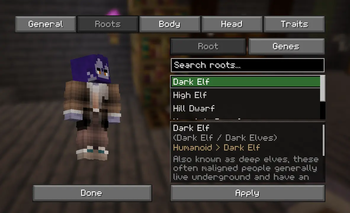
- Minecraft Comes Alive Reborn along with Townstead and Ribbits for players to build up a functioning society out of the ruins of a dying world.
- Rule your new kingdom using MCA Capitals! become a monarch and establish noble houses.
- Create: Aernoautics and many others to make ships and airships using steam, source/mana or just old fashioned hot air balloons or sails! Also includes Create:Deep Seas to allow submarines!
- Create and addons for automation and technical work.
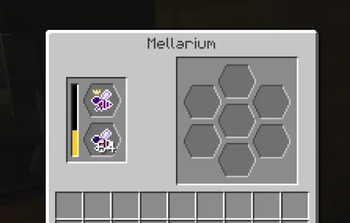
- Iron's Spells and Ars Nouveau for magical and fantasy content. Ars Creo and Ars Technica for Create integration.
- Better Combat and Knight Quest for combat.
- Overhauled Dynamic weather, seasonal and clouds systems using Simple Clouds, Project Atmosphere, Serene Seasons via Ecliptic Seasons Bridge API
- Dynamic Party systems for both pvp and pve combat organisation built around Party System
Included in pack are optional resource packs and shaders. 3D Muskets. Ars Brassified Create and Iron's Weapons reimagined and the adorable Looshy.
Available Versions
How to Set Up a DrUltraLux's Steam Fantasy Server
Order Server
Choose at least 6 GB RAM (8 GB recommended for DrUltraLux's Steam Fantasy). Based on player count: per 5 players.
Install Modpack in Dashboard
Open the modpack browser in the dashboard, search for "DrUltraLux's Steam Fantasy" and click "Install". The neoforge loader and Minecraft 1.21.1 are configured automatically.
Start Server & Play
Start the server – all mods are loaded automatically. Share the server IP with friends and play together!
Frequently Asked Questions
DrUltraLux's Steam Fantasy server crashes or won't start – what to do?
Most common causes: insufficient RAM or wrong neoforge loader. Check latest.log for "OutOfMemoryError" → increase RAM to at least 8 GB. For "Mixin" or "ClassNotFoundException" errors: modpack version and loader don't match. With Mado Hosting, loader and Minecraft version are auto-configured on modpack install – preventing most startup issues.
How much RAM does a DrUltraLux's Steam Fantasy server really need?
Minimum 6 GB, recommended 8 GB for stable performance. per 5 players. Important: Minecraft modpacks need more RAM than vanilla – plan extra per additional player. With Mado Hosting, you can scale RAM up live at any time without data loss (from €7.800000000000001/month).
Can I add custom mods to DrUltraLux's Steam Fantasy without conflicts?
Yes, but check compatibility: only use mods for the same loader (neoforge) and same Minecraft version (1.21.1). Common issues: ID conflicts with recipe mods and incompatible coremod versions. The Mado dashboard mod browser only shows compatible mods and warns about known conflicts.
DrUltraLux's Steam Fantasy server lagging – performance tips
1) Increase RAM to 8 GB+. 2) Reduce server view-distance to 8 (server.properties). 3) Pre-generate chunks with the "Chunky" plugin. 4) Use /spark profiler to check which mods consume the most tick time. With Mado Hosting, all servers run on NVMe SSDs with dedicated CPU cores – eliminating hardware as a bottleneck.
Similar Modpacks
![Cobblemon Official Modpack [Fabric]](https://cdn.modrinth.com/data/5FFgwNNP/e7f9ee2e9d361623847853fe2ddce42f519ee64f.png)
![COBBLEVERSE - Pokemon Adventure [Cobblemon]](https://cdn.modrinth.com/data/Jkb29YJU/581ecf54530972afb18a04660afd820f2f24f6c7.png)
![Better MC [FABRIC] - BMC2](https://cdn.modrinth.com/data/shFhR8Vx/a19c2bcb51d38f32f138d3607e91cb2b7b8e387f_96.webp)


![Better MC [FORGE] - BMC4](https://cdn.modrinth.com/data/4BV47HRn/7f5ef7cc61b2593609aabef3ed07a866a4f11b73_96.webp)
Rent DrUltraLux's Steam Fantasy Server
Start your own server with automatic modpack installation.
Supported Versions
Start your DrUltraLux's Steam Fantasy Server now
From €7.80/month; 8 GB RAM is recommended for best performance.
Configure Server →