
HorrorScape
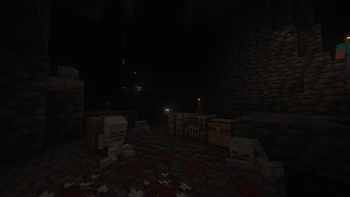
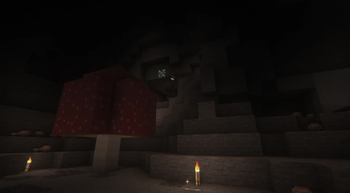
Enter a world full of terrifying monsters and try to survive!
Screenshots
About this Modpack
Adventure and horror themed hardcore modpack designed to create a challenge. Will you be the one slaughtered or the one who will slaughter?
HorrorScape is a hardcore horror-themed modpack featuring RPG elements such as skill system and leveling system. It's built around horror mods, such as Nyctophobia Dread, Cave Dweller, Gigeresque, From The Fog, Weeping Angels and many more. While there's a progression system for player, there's also a progression system for mobs that increases their difficulty depending on your distance from spawn.
Undead creatures became resistant to weapons, so now they need to be burned before proper extermination or attacked with holy materials, weapons or enchantments. Creepers are now a stalking menace, that won't leave you in peace after they saw you. And something sentient is also lurking in the dark... And it's not alone.
Exploration is rewarding, and further you go - the greater the risk, including reward.
Will you be able to kill every boss of this modpack? Or just ender dragon? Though, she also became stronger and more interesting to fight... It's all up to you now. But struggling alone isn't the best experience, so it's a good idea to bring some friends to suffer with you. At least someone will protect your back from the ever-present darkness.
Recommendations
- RAM: 4-6 GB
- Configure controls before creating world (default options are shipped via mod, so first install will set them to recommended, but you should still change something to your liking)
- Use BetterX world type or everything will be broken!
- Use Insanity Shaders or other horror-themed shaderpacks
Mods for better experience:
- Dusk
- Increased mob spawns during night, which increases difficulty, highly suggesting this one!
Planned
- Difficulty overhaul
- Terraria-like phases of the game (Hardmode) [Possibly]
Credits
Music by Myuu
Some of the authors of the assets used require an attribution back to their page. So here is a list of the mods/resource packs that have this requirement:
- https://modrinth.com/mod/levelz
- https://www.curseforge.com/minecraft/mc-mods/macaws-fences-and-walls
- https://www.curseforge.com/minecraft/mc-mods/macaws-paintings
- https://www.curseforge.com/minecraft/mc-mods/macaws-doors
- https://www.curseforge.com/minecraft/mc-mods/macaws-bridges
- https://www.curseforge.com/minecraft/mc-mods/macaws-trapdoors
- https://www.curseforge.com/minecraft/mc-mods/macaws-lights-and-lamps
- https://www.curseforge.com/minecraft/mc-mods/structory-towers
- https://modrinth.com/mod/mariums-soulslike-weaponry
- https://www.curseforge.com/minecraft/mc-mods/structory
- https://www.curseforge.com/minecraft/texture-packs/fresh-animations-extensions
CAUTION
It's my first time making a modpack, so there are some uneven corners in it, I'll try my best to make everything work and compatible.
Available Versions
How to Set Up a HorrorScape Server
Order Server
Choose at least 6 GB RAM (8 GB recommended for HorrorScape). Based on player count: per 5 players.
Install Modpack in Dashboard
Open the modpack browser in the dashboard, search for "HorrorScape" and click "Install". The fabric loader and Minecraft 1.20.1 are configured automatically.
Start Server & Play
Start the server – all mods are loaded automatically. Share the server IP with friends and play together!
Frequently Asked Questions
HorrorScape server crashes or won't start – what to do?
Most common causes: insufficient RAM or wrong fabric loader. Check latest.log for "OutOfMemoryError" → increase RAM to at least 8 GB. For "Mixin" or "ClassNotFoundException" errors: modpack version and loader don't match. With Mado Hosting, loader and Minecraft version are auto-configured on modpack install – preventing most startup issues.
How much RAM does a HorrorScape server really need?
Minimum 6 GB, recommended 8 GB for stable performance. per 5 players. Important: Minecraft modpacks need more RAM than vanilla – plan extra per additional player. With Mado Hosting, you can scale RAM up live at any time without data loss (from €7.800000000000001/month).
Can I add custom mods to HorrorScape without conflicts?
Yes, but check compatibility: only use mods for the same loader (fabric) and same Minecraft version (1.20.1). Common issues: ID conflicts with recipe mods and incompatible coremod versions. The Mado dashboard mod browser only shows compatible mods and warns about known conflicts.
HorrorScape server lagging – performance tips
1) Increase RAM to 8 GB+. 2) Reduce server view-distance to 8 (server.properties). 3) Pre-generate chunks with the "Chunky" plugin. 4) Use /spark profiler to check which mods consume the most tick time. With Mado Hosting, all servers run on NVMe SSDs with dedicated CPU cores – eliminating hardware as a bottleneck.
Similar Modpacks
![Cobblemon Official Modpack [Fabric]](https://cdn.modrinth.com/data/5FFgwNNP/e7f9ee2e9d361623847853fe2ddce42f519ee64f.png)
![COBBLEVERSE - Pokemon Adventure [Cobblemon]](https://cdn.modrinth.com/data/Jkb29YJU/581ecf54530972afb18a04660afd820f2f24f6c7.png)
![Better MC [FABRIC] - BMC2](https://cdn.modrinth.com/data/shFhR8Vx/a19c2bcb51d38f32f138d3607e91cb2b7b8e387f_96.webp)


![Better MC [FORGE] - BMC4](https://cdn.modrinth.com/data/4BV47HRn/7f5ef7cc61b2593609aabef3ed07a866a4f11b73_96.webp)
Rent HorrorScape Server
Start your own server with automatic modpack installation.
Supported Versions
Start your HorrorScape Server now
From €7.80/month; 8 GB RAM is recommended for best performance.
Configure Server →