
Kingdom of Daldar
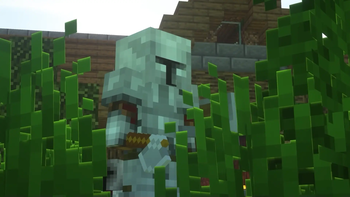
Welcome... to the kingdom of Daldar! How long can you survive these dangerous medieval lands, where threats lurk at ever corner?
Screenshots


About this Modpack
World of Daldar by ForgeLabs

Welcome... to the kingdom of Daldar! How long can you survive these dangerous medieval lands, where threats lurk at ever corner?
The Kingdom of Daldar is a survival based modpack where players are put into a medieval world full ripe for exploration and challenges.
Notice
Shaders are supported out of the box. Go to Options > Video Settings > Shaderpacks and choose a shader to use.
Socials




🧪 Content Mods
AI Improvements
Alex's Mobs
Aquaculture 2
Biomes O' Plenty
Bountiful
Darker Depths
Dungeon Crawl
Dungeons Content
Dungeons Gear
Dungeons Mobs
Dynamic Surroundings
Entity Culling
FerriteCore
Goblin Traders
Guard Villagers
Hostile Villages
Ice and Fire
In Control!
Jousting
Just Enough Items
LazyDFU Forge
Medieval Craft
Medieval Craft Weapons
Memory Leak Fix
Mouse Tweaks
Mowzie's Mobs
Nature's Compass
Nef's Medieval Decoration
Oculus
Pandoras Creatures
Quark
Repurposed Structures
Roadrunner
Rubidium
Saturn
Small Ships
Sound Filters
Spartan Sheilds
Spartan Weaponry
Starlight x Create
Straw Golem Rebaled
TerraForged
Upgrade Auquatic
Valhelsia Structures
Whisperwoods
🧬 Library Mods
Architectury API
AutoRegLib
Blueprint
CaveBiomeAPI
Citadel
Curios API
Dungeons Libraries
Geckolib
Kotlin for Forge
Valhelsia Core
⚗️ Shader Packs
Available Versions
How to Set Up a Kingdom of Daldar Server
Order Server
Choose at least 6 GB RAM (8 GB recommended for Kingdom of Daldar). Based on player count: per 5 players.
Install Modpack in Dashboard
Open the modpack browser in the dashboard, search for "Kingdom of Daldar" and click "Install". The forge loader and Minecraft 1.16.5 are configured automatically.
Start Server & Play
Start the server – all mods are loaded automatically. Share the server IP with friends and play together!
Frequently Asked Questions
Kingdom of Daldar server crashes or won't start – what to do?
Most common causes: insufficient RAM or wrong forge loader. Check latest.log for "OutOfMemoryError" → increase RAM to at least 8 GB. For "Mixin" or "ClassNotFoundException" errors: modpack version and loader don't match. With Mado Hosting, loader and Minecraft version are auto-configured on modpack install – preventing most startup issues.
How much RAM does a Kingdom of Daldar server really need?
Minimum 6 GB, recommended 8 GB for stable performance. per 5 players. Important: Minecraft modpacks need more RAM than vanilla – plan extra per additional player. With Mado Hosting, you can scale RAM up live at any time without data loss (from €7.800000000000001/month).
Can I add custom mods to Kingdom of Daldar without conflicts?
Yes, but check compatibility: only use mods for the same loader (forge) and same Minecraft version (1.16.5). Common issues: ID conflicts with recipe mods and incompatible coremod versions. The Mado dashboard mod browser only shows compatible mods and warns about known conflicts.
Kingdom of Daldar server lagging – performance tips
1) Increase RAM to 8 GB+. 2) Reduce server view-distance to 8 (server.properties). 3) Pre-generate chunks with the "Chunky" plugin. 4) Use /spark profiler to check which mods consume the most tick time. With Mado Hosting, all servers run on NVMe SSDs with dedicated CPU cores – eliminating hardware as a bottleneck.
Similar Modpacks
![Cobblemon Official Modpack [Fabric]](https://cdn.modrinth.com/data/5FFgwNNP/e7f9ee2e9d361623847853fe2ddce42f519ee64f.png)
![COBBLEVERSE - Pokemon Adventure [Cobblemon]](https://cdn.modrinth.com/data/Jkb29YJU/581ecf54530972afb18a04660afd820f2f24f6c7.png)
![Better MC [FABRIC] - BMC2](https://cdn.modrinth.com/data/shFhR8Vx/a19c2bcb51d38f32f138d3607e91cb2b7b8e387f_96.webp)


![Better MC [FORGE] - BMC4](https://cdn.modrinth.com/data/4BV47HRn/7f5ef7cc61b2593609aabef3ed07a866a4f11b73_96.webp)
Rent Kingdom of Daldar Server
Start your own server with automatic modpack installation.
Supported Versions
Start your Kingdom of Daldar Server now
From €7.80/month; 8 GB RAM is recommended for best performance.
Configure Server →