
MC Backrooms - Found Footage
a modpack for the Minecraft Backrooms Found Footage mod by SpacePotato - with optimizations!
Screenshots
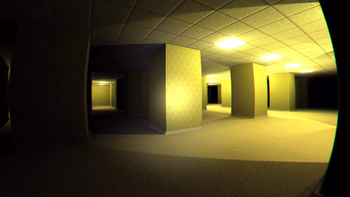
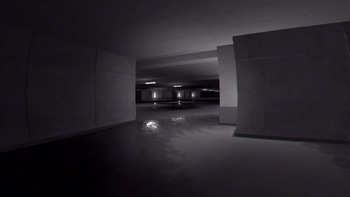
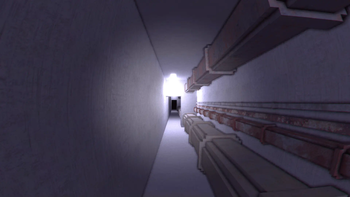
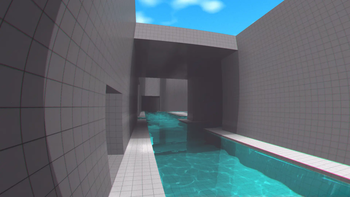

About this Modpack
a modpack for the Minecraft Backrooms Found Footage mod by SpacePotato!
updated for 1.1.7
🚪 to enter the backrooms
- create a new world
- be in survival mode
- suffocate yourself with sand or gravel
🎮 host a Singleplayer world for friends
note: best if the host has the most stable/fastest internet connection
✅ Essential Mod (recommended)
if you know how Essential Mod works, just host your world as you normally would!
👥 add your friends in Essential
- click Social 👥 button
- click the blue 👤+Add Friend icon
- enter their Minecraft username, click Add
🌐 invite friends (in world)
- open Esc menu
- click Invite ✉️ button
- choose friends to invite!
🌐 or from the main menu
- click Host World 🌎
- select the world you want
- choose friends to invite and host
⚠️ e4mc (with workaround)
e4mc requires a bit of a workaround for the Simple Voice Chat mod to work properly!
🌐 hosting your world
- open Esc menu
- click Open to LAN button
- click Start LAN World button
- share the link
- you will see a message in chat
- click the link to copy it
- send it to your friends! they can join via Multiplayer
- Direct Connection is recommended (domains change each session)
🗣️ Simple Voice Chat workaround
- watch this short video tutorial: https://youtu.be/TOE6dbtrZWg
- or check this guide here: https://sora.framer.wiki/
💡 things
- this modpack is incompatible with Mac OS
- integrated graphics are not currently supported
- do not use Fabulous! graphics, only Fast or Fancy
- do not remove veil/deferred resource pack
- you can configure the shaders and video/camera settings for the Found Footage mod from ModMenu (if you get motion sickness for example)
mods information
this modpack aims to provide a stable and optimized base for you to customize. feel free to add your own mods or see the addon mod recommendations below for inspiration
⚙️ stuff
- removed C2ME because it crashes the game when entering new levels
(crashed on entering Level 1 in 1.1.7) - mods like Sodium, Lithium, VulkanMod, Optifine, Iris Shaders, are incompatible
- for more information about the Found Footage mod, check their official wiki
📌 included mods (21+1)
- BadOptimizations: low-impact miscellaneous optimizations
- Cloth Config API: dependency for MoreCulling mod
- Cubes Without Borders: allows you to play in borderless fullscreen window
- Enhanced Block Entities: reimplements block (tile) entities for performance
- Entity Culling: uses path tracing to cull entities behind walls
- Fabric API: essential hooks and interoperability mechanisms for Fabric mods
- FerriteCore: memory usage optimizations
- GeckoLib: dependency for Minecraft Backrooms Found Footage mod
- GpuTape: fix video memory leaks, based on VideoTape
- ImmediatelyFast: immediate-mode rendering optimizations across many areas
- Krypton: attempts to optimize the Minecraft networking stack
- Memory Leak Fix: fixes multiple memory leaks in Minecraft
- Minecraft Backrooms Found Footage: the backrooms mod
- ModernFix: miscellaneous optimizations targeting load times and memory usage
- ModMenu: lets you easily view and configure the mods you have installed
- MoreCulling: various culling-related optimizations
- Noisium: low-impact worldgen optimizations
- ServerCore: aims to optimize the Minecraft server
- Simple Voice Chat: proximity voice chat for Minecraft with a variety of addons
- ThreadTweak: adjusts thread priorities for performance
- Very Many Players: like Lithium, but smaller and more experimental
+
- e4mc: reverse tunneling reverse proxy for Minecraft
- Essential Mod: world hosting, friend chat, avatar customizations, and much more
🔎 addon mod recommendations
- Better Third Person: improves third person camera view
- Controlling: adds a search bar to the key bindings menu
- Dynamic FPS: reduce resource use when backgrounded, idle, or battery-powered
- Eating Animation: adds sprite animations for edible and drinkable items
- FastBack: fast, incremental world backups powered by Git
- First-person Model: enables the third-person model in first-person
- InvMove: adds the ability to walk around while in inventories
- Model Gap Fix: fixes gaps in block models and item models
- No Hunger: removes hunger and replaces eating to heal you instead
(works well with the mod since it has its own stamina thingy) - Ping Wheel: allows players to temporarily mark locations and entities
- ResolutionControl+: allows you to set render resolutions and take large screenshots
(great for making the game look lower res like lethal company or repo) - Sound Physics Remastered: adds realistic sound attenuation, reverberation, and absorption through blocks
optional java arguments
🚀 recommended for:
OpenJDK builds shipped with Shenandoah, such as Adoptium Temurin (AdoptOpenJDK)
-Xms#G -Xmx#G -XX:+UnlockExperimentalVMOptions -XX:+UseShenandoahGC -XX:+AlwaysPreTouch -XX:+DisableExplicitGC
^ replace '#' with the amount of RAM you want to allocate, e.g.
-Xms4G -Xmx4Gfor 4GB
📌 sources
🎉 credits
- SpacePotato and Herr_Chaos for the amazing mod 💖
- HyperSoop for testing and configuring Simply Optimized (rip) 🗿
- modpack icon is made with images from the Minecraft Found Footage GitHub repo, and thumbnail of SpacePotato's video on YouTube
ℹ️ disclaimer
this modpack bundles third‑party mods hosted on Modrinth. all included mods remain the intellectual property of their respective authors and are used under their original licenses.
Available Versions
How to Set Up a MC Backrooms - Found Footage Server
Order Server
Choose at least 6 GB RAM (8 GB recommended for MC Backrooms - Found Footage). Based on player count: per 5 players.
Install Modpack in Dashboard
Open the modpack browser in the dashboard, search for "MC Backrooms - Found Footage" and click "Install". The fabric loader and Minecraft 1.20.1 are configured automatically.
Start Server & Play
Start the server – all mods are loaded automatically. Share the server IP with friends and play together!
Frequently Asked Questions
MC Backrooms - Found Footage server crashes or won't start – what to do?
Most common causes: insufficient RAM or wrong fabric loader. Check latest.log for "OutOfMemoryError" → increase RAM to at least 8 GB. For "Mixin" or "ClassNotFoundException" errors: modpack version and loader don't match. With Mado Hosting, loader and Minecraft version are auto-configured on modpack install – preventing most startup issues.
How much RAM does a MC Backrooms - Found Footage server really need?
Minimum 6 GB, recommended 8 GB for stable performance. per 5 players. Important: Minecraft modpacks need more RAM than vanilla – plan extra per additional player. With Mado Hosting, you can scale RAM up live at any time without data loss (from €7.800000000000001/month).
Can I add custom mods to MC Backrooms - Found Footage without conflicts?
Yes, but check compatibility: only use mods for the same loader (fabric) and same Minecraft version (1.20.1). Common issues: ID conflicts with recipe mods and incompatible coremod versions. The Mado dashboard mod browser only shows compatible mods and warns about known conflicts.
MC Backrooms - Found Footage server lagging – performance tips
1) Increase RAM to 8 GB+. 2) Reduce server view-distance to 8 (server.properties). 3) Pre-generate chunks with the "Chunky" plugin. 4) Use /spark profiler to check which mods consume the most tick time. With Mado Hosting, all servers run on NVMe SSDs with dedicated CPU cores – eliminating hardware as a bottleneck.
Similar Modpacks
![Cobblemon Official Modpack [Fabric]](https://cdn.modrinth.com/data/5FFgwNNP/e7f9ee2e9d361623847853fe2ddce42f519ee64f.png)
![COBBLEVERSE - Pokemon Adventure [Cobblemon]](https://cdn.modrinth.com/data/Jkb29YJU/581ecf54530972afb18a04660afd820f2f24f6c7.png)
![Better MC [FABRIC] - BMC2](https://cdn.modrinth.com/data/shFhR8Vx/a19c2bcb51d38f32f138d3607e91cb2b7b8e387f_96.webp)


![Better MC [FORGE] - BMC4](https://cdn.modrinth.com/data/4BV47HRn/7f5ef7cc61b2593609aabef3ed07a866a4f11b73_96.webp)
Rent MC Backrooms - Found Footage Server
Start your own server with automatic modpack installation.
Supported Versions
Start your MC Backrooms - Found Footage Server now
From €7.80/month; 8 GB RAM is recommended for best performance.
Configure Server →