
Minecraft: Story Mode
Nothing Built Can Last Forver!
Screenshots

About this Modpack
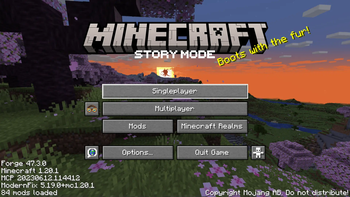
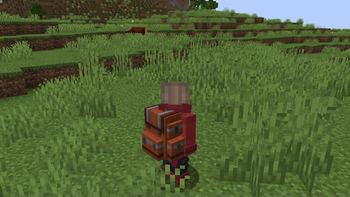
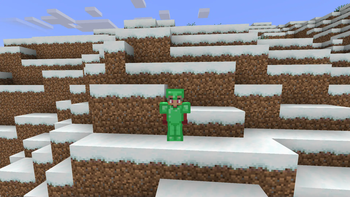
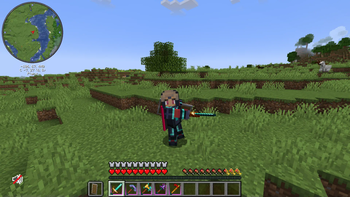
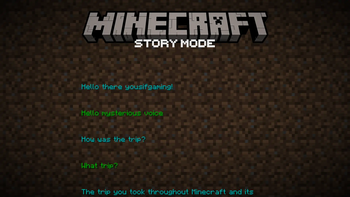
This modpack adds features from the game Minecraft: Story Mode by TellTale to make Minecraft Minecraft Story Mode.
This modpack is also centered around Cracker's Wither Storm Mod are you ready to take on the battle?
Here is a list of all mods inside the modpack:
- BetterF3 by TreyRuffy and cominixo
- Xg's Story Mode Items, Armor and More by Xg787
- GroovyModLoader (GML)
- AppleSkin by squeek
- FirstPerson by tr7zw
- Colorful Hearts by Terrails
- Chat Heads by dzwdz, Fourmisain
- Cyclic by Lothrazar
- Leaves Be Gone by Fuzs
- Create Stuff & Additions by Furti_Two
- Mouse Tweaks by Ivan Molodetskikh (YaLTeR)
- Simple Voice Chat by Max Henkel
- Xaero's World Map by xaero96
- Model Gap Fix by MehVahdJukaar
- Collective by Rick South
- Memory Leak Fix by FX - PR0CESS
- EntityCulling by tr7zw
- flib by Lothrazar
- Create: Steam 'n' Rails by The Railways Team
- ShulkerBoxTooltip by MisterPeModder
- Create by simibubi
- Cracker's Wither Storm Mod by nonamecrackers2, Nazaru
- Create: Connected by Lysine
- Villager Names by Rick South
- Do a Barrel Roll by enjarai
- Prism by Grend
- Fusion by SuperMartijn642
- Cloth Config v10 API by shedaniel
- Farmer's Delight by vectorwing
- OkZoomer by Matyrobbrt
- Rechiseled: Create by SuperMartijn642
- Cracker's Wither Storm Mod Soundtrack - V-Sides by _TheExiIedFeIIow, Vertigo
- Trimmable Tools by Apollo
- Create Slice & Dice by possible_triangle
- SuperMartijn642's Core Lib by SuperMartijn642
- Curios API by C4
- Entity Texture Features by Traben
- Sophisticated Core by P3pp3rF1y
- Player Animator by KosmX
- Jade Addons by Snownee
- Xaero's Minimap by xaero96
- CIT Resewn by SHsuperCM, Asek3,Tfarcenim
- Highlighter by Grend
- Boat Item View by 50ap5ud5
- Puzzles Lib by Fuzs
- Embeddium by embeddedt
- Just Enough Items by mezz
- Polymorph by Illusive Soulworks
- Create Enchantment Industry by MarbleGateKeeper & LimonBlaze
- 3d-Skin-Layers by tr7zw
- Entity Model Features by Traben
- Visual Workbench by Fuzs
- PoofSound by V0calgiant12, MCreator
- Create: Trimmed by TorNato
- Oculus by NanoLive, dima_dencep, coderbot, IMS212, Justsnoopy30, FoundationGames
- Item Borders by Grend
- YetAnotherConfigLib by isXander
- ModernFix by embeddedt
- Controlling by Jaredlll08
- Leave My Bars Alone by Fuzs
- Create: Copycats+ by Lysine, Bennyboy1695, Redcat_XVIII
- Ferrite Core by malte0811
- Iceberg by Grend
- Searchables by Jaredlll08
- Jade by Snownee
- Patchouli by Vazkii
- Rechiseled by SuperMartijn642
- SuperMartijn642's Config Library by SuperMartijn642
- Double Doors by Rick South
- Sophisticated Backpacks by P3pp3rF1y, Ridanisaurus
- NotEnoughAnimations by tr7zw
- Better Combat by Daedelus
- Simple Inventory Sorter by cpw
- Kotlin for Forge
- Eating Animation by Matyrobbrt
- Citadel by Alexthe666
- Alex's Mobs by Alexthe668, Carro1001, Paint_Ninja
- Alexs Mobs Interaction by The Crimson and the Reimainder
- Better Third Person by Socolio
- Ore Harvester by Rick South
- Tree Harvester by Rick South
Resource Packs in this modpack:
- Fresh Animations by FreshLX
- Redstone Tweaks by RexxStone
- Resource pack i made to change some text and edition (Please don't laugh at the edition :))
Shaders pre installed in this pack:
- Complementary Reimagined by EminGT
- BSL by CaptTatsu
- Solas by septonious
- Super Duper Vanilla by Eldeston
- Insanity by ElocinDev, LunaPixelStudios
here is how to install it (No launcher)
- install the modpack
- install forge
- press WIN + R
- type in the "Run" "appdata" or "%appdata%
- navigate to .minecraft
- place all the files in its appropriate place
- launch minecraft
here is how to install it (With launcher)
- open the launcher (Example prism)
- add instance (or add modpack depends)
- in prism you will navigate to "Modrinth" (might be different for each launcher)
- find this modpack then install it
- launch the instance
and done if there is any java compatibilty issue just click on "settings -> java -> auto detect -> select the java version"
Available Versions
How to Set Up a Minecraft: Story Mode Server
Order Server
Choose at least 6 GB RAM (8 GB recommended for Minecraft: Story Mode). Based on player count: per 5 players.
Install Modpack in Dashboard
Open the modpack browser in the dashboard, search for "Minecraft: Story Mode" and click "Install". The forge loader and Minecraft 1.20.1 are configured automatically.
Start Server & Play
Start the server – all mods are loaded automatically. Share the server IP with friends and play together!
Frequently Asked Questions
Minecraft: Story Mode server crashes or won't start – what to do?
Most common causes: insufficient RAM or wrong forge loader. Check latest.log for "OutOfMemoryError" → increase RAM to at least 8 GB. For "Mixin" or "ClassNotFoundException" errors: modpack version and loader don't match. With Mado Hosting, loader and Minecraft version are auto-configured on modpack install – preventing most startup issues.
How much RAM does a Minecraft: Story Mode server really need?
Minimum 6 GB, recommended 8 GB for stable performance. per 5 players. Important: Minecraft modpacks need more RAM than vanilla – plan extra per additional player. With Mado Hosting, you can scale RAM up live at any time without data loss (from €7.800000000000001/month).
Can I add custom mods to Minecraft: Story Mode without conflicts?
Yes, but check compatibility: only use mods for the same loader (forge) and same Minecraft version (1.20.1). Common issues: ID conflicts with recipe mods and incompatible coremod versions. The Mado dashboard mod browser only shows compatible mods and warns about known conflicts.
Minecraft: Story Mode server lagging – performance tips
1) Increase RAM to 8 GB+. 2) Reduce server view-distance to 8 (server.properties). 3) Pre-generate chunks with the "Chunky" plugin. 4) Use /spark profiler to check which mods consume the most tick time. With Mado Hosting, all servers run on NVMe SSDs with dedicated CPU cores – eliminating hardware as a bottleneck.
Similar Modpacks
![Cobblemon Official Modpack [Fabric]](https://cdn.modrinth.com/data/5FFgwNNP/e7f9ee2e9d361623847853fe2ddce42f519ee64f.png)
![COBBLEVERSE - Pokemon Adventure [Cobblemon]](https://cdn.modrinth.com/data/Jkb29YJU/581ecf54530972afb18a04660afd820f2f24f6c7.png)
![Better MC [FABRIC] - BMC2](https://cdn.modrinth.com/data/shFhR8Vx/a19c2bcb51d38f32f138d3607e91cb2b7b8e387f_96.webp)


![Better MC [FORGE] - BMC4](https://cdn.modrinth.com/data/4BV47HRn/7f5ef7cc61b2593609aabef3ed07a866a4f11b73_96.webp)
Rent Minecraft: Story Mode Server
Start your own server with automatic modpack installation.
Supported Versions
Start your Minecraft: Story Mode Server now
From €7.80/month; 8 GB RAM is recommended for best performance.
Configure Server →